Showing posts with label Development. Show all posts

Saturday, July 7, 2012

[MeeGo Harmattan] Jolla will deliver MeeGo devices!

As seen on opensmartpad Ltd. Jolla. a Finnish phone manufacturer who will continue the sensational work by Nokia and thus provides new MeeGo devices. The team was founded Jolla from employees of Nokia N9 Meego's team, and some brilliant minds out of the MeeGo community. Are not sensational news? This operating system has just deserves to be circulated. I'm looking forward to the future with the best operating system ever.

Twitter

Jolla continues Nokia's excellent work on # MeeGo based smartphones together with the # N9 -core professionals and # MeeGo alumni community. Tweets by @ jukkaeklund

Finland · http://www.linkedin.com/company/jolla
Sunday, December 4, 2011

[Did You Know?] how Calendar Feed for N9 is developed !?

Calendar Feed  (Similar to Organiser Feed) pushes your calendar entries directly onto the event feed of your home screen, it's entirely integrated into the OS and a great example of how an application should be !

But the most interesting thing to learn, is how the application (plugin) was written ;)

Enjoy the read !

(You can translate the page with the help of an online translator)

Sunday, November 6, 2011

[MeeGo Harmattan] [How to] Explore, Edit, Replace System Files And So On

Well, it's not much different from what you did with your N900, but here's how :


  1. You need an SSH client on your computer as on the earlier tutorial. A free SSH client WinSCP is one of the popular softwares for Windows. WinSCP provides both the Remote Terminal access to the N9 as well as the File Transfer GUI. You can download WinSCP from here.
  2. Turn on the “Developer Mode” in your Nokia N9 by going through - “Settings > Security > Developer mode” - and turn on the “Developer mode”. You don't have to install other items in Developer Mode and just leave the interface. After turning the Developer mode on you should see two new icons on your home screen “Terminal” and “SDK Connection”.
  3. Open “SDK Connection” on home screen and tap “WLAN” to see what’s the IP address, N9 has been assigned on the network. Note this IP address. You don’t need to note any thing else in SDK Connection other than the IP address.
  4. On your Computer, run WinSCP. Give the IP address of N9 in “Host name”. User name is “root” and Password is “rootme”
  5. That’s it. Click Login to initiate the SSH connection with Nokia N9. – Accept any private key notifications on first time connection.

If the step 4 didn't work, do the following :

- On N9 open terminal and run:

Code:
devel-su (password is rootme)
passwd user (and enter some password)
Then on WinSCP ssh in as 'user' (Instead of "root") using the password you just set (instead of "rootme").

Monday, October 3, 2011

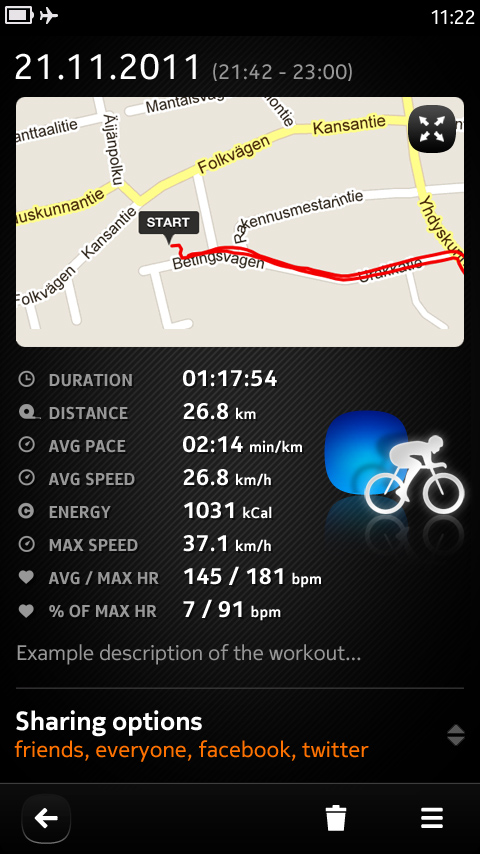
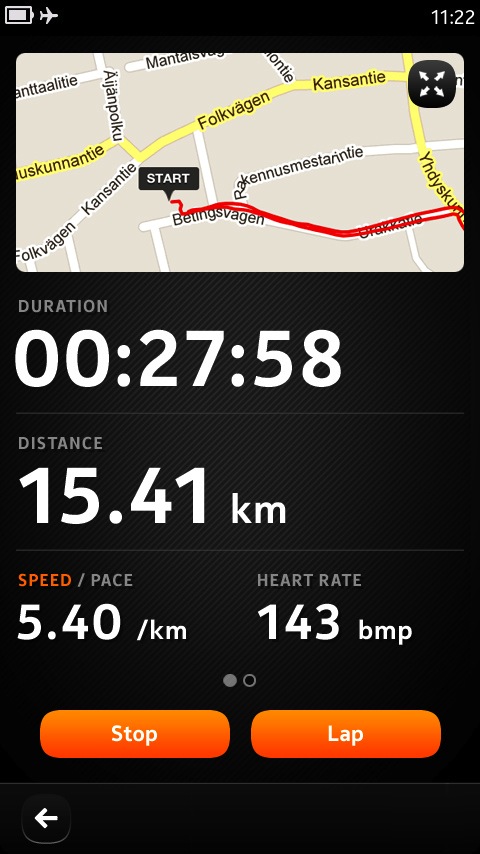
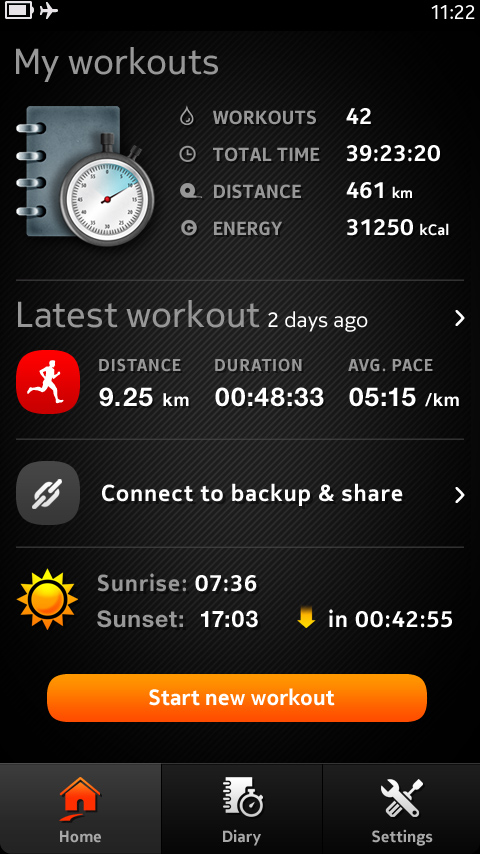
[MeeGo Harmattan] Sports Tracker heading for Meego and Nokia N9 !

happy to let you know that Sports Tracker is heading for Meego and therefore also the N9!


Development of the app is in full swing as we speak and here are the first screens to show you what the experience will be like.


The app will feature all the tracking capabilities you’ve come to expect from Sports Tracker and also support for the new Sports Tracker Heart Rate Monitor.


Via : sports-tracker 

Tuesday, June 21, 2011

The N950 is here too, but not for you !

Yes, as we know the Nokia N9 has been already announced this morning stirs envy. It is however not up to the expectations of some including me, who expected the first smartphone MeeGo it is a worthy heir to the N900, mainly due to the disappearance of the slider. They can rest assured that Nokia is also launching the "N950" variant "developer" of the N9 but not for public, not for sale !

by Brendan Arndt Product Manager for Three UK

The "Nokia N950" inherits the crucial points of the specifications of the N9, but ignores some of its refinements. It benefits in return for a slider, which is well worth the sacrifices to some mobile users.

"Exchange against keyboard screen, camera and connectivity"

The screen version of the developer just to start a LCD panel, not AMOLED. The tenth of an inch of additional diagonal (4.0 against 3.9 inches) is a small consolation, but of course they display the same definition FWVGA (848 x 480 pixels).

The dorsal sensor N950 is also "different" from that of the N9, without to much lower quality, but in any case deprived of light stamped Carl Zeiss lens of the latter.

Its connectivity is finally partially amputated, since swapped the one hand the latest Bluetooth 4.0 standard for tireless 2.1, and the other is deprived of NFC.


The same vital components

He inherited, however, the same TI OMAP 3630 SoC clocked at 1 GHz, carrying a PowerVR SGX GPU 530, all supported by 1 GB of RAM LPDDR. Storage is finally performed by the same amount of from 16 to 64 GB of flash memory.

Not content to communicate or not the price or the date of marketing, which is not good since it has not done either for the original, Nokia has not even published a photo of the N950. 

Saturday, June 5, 2010

Illumination Software Creator : create your software (even if you have no programming experience) !

Illumination Software Creator 1.0 (for Linux and Windows desktops) was released this week.

It is a 100% visual software development tool aimed at making the creation of software approachable to everyone (even those with no programming experience) through the use of visual "building blocks".

The resulting software that you create is Python/GTK, and there's even a "Maemo/Tablet" setting for making your UI custom tailored to the devices.

Take a look here: http://radicalbreeze.com/?page_id=102
And see a quick tutorial here: http://radicalbreeze.com/?page_id=168
The support forum (including the beta releases) are here: http://radicalbreeze.com/forum/

Via : talk.maemo.org

Tuesday, February 9, 2010

Nokia to ship Qt 4.6 with PR1.2, replace Qt 4.5

Some welcome news for all Qt on Maemo developers out there: Nokia intends to deploy the currently in Beta Qt 4.6 to all devices via software update — most probably already with the next major update PR1.2. Currently, Qt 4.6 (available from extras-devel) is completely optified and resides in /opt/qt4-maemo5. That will change with PR1.2, where it will move to the rootfs, replacing the community-supported Qt 4.5. What does this mean for Qt applications?

- Qt 4.6 applications : If all goes well, nothing needs to be done. Deployed applications should pick up the libraries in /usr. You might need to edit your build scripts so they won’t look in /opt/qt4-maemo5/bin if you’re using qmake.

- Qt 4.5 applications : This one is trickier. Qt 4.6 is neither API nor ABI compatible with Qt 4.5. This means that you’ll need at least a recompile, and probably also source code modifications if you’re doing anything Maemo5-specific. Qt 4.5 applications on device will stop working until there is a Qt 4.6-based update available.

So all you Qt 4.5 users out there, install libqt4-maemo5-dev in scratchbox and start porting.

Via : sjaensch.org