Showing posts with label Games. Show all posts

Wednesday, March 9, 2011

WebOS Games Manager : The Easy Way to Get WebOS Games On N900 !

WebOS Games Manager (‘wgames’ in repo) - automatic installer/uninstaller for WebOS games. It installs game from .ipk file, applies all needed hacks and creates desktop launcher. It also can back up/restore games’ saves.
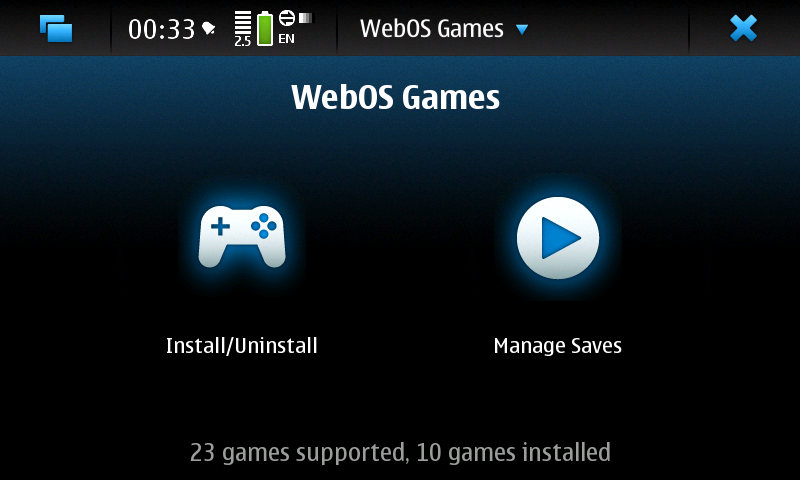


Features:
* Single click install/uninstall
* Applies all needed hacks
* No changes in system files/dirs (all hacks are implemented with LD_PRELOAD technique)
* No root usage - desktop/icons are stored under /home/user/.local path
* Installs game (by default) into 32GB partition
* Localization support
* Written in C++ using Qt4
* Allows to store/restore game saves
* Multitouch-dependant games adapted for keyboard controls (NOTE. Seems, now that mappings works only for ru_RU locale, Will be researched and fixed ASAP)
* Configurable settings for dirs (useful for people with unusual partitioning)
* Space and directories checks on all stages of install/uninstall
* Simple procedure for adding new games

 Usage:
* Copy your purchased ) .ipk files into MyDocs/Downloads dir. (for Windows users - dir Downloads on Nokia N900, when connected to computer). Create this folder if not exists.
* Run WebOS Games from Applications menu, select game and press 'Install'.
 

Wednesday, July 7, 2010

Demo Tower Bloxx Deluxe 3D !

With Tower Bloxx Deluxe 3D, Enjoy amazing 3D dune experience while you build skyscrapers in a dizzying collection of amazing game modes! Test your skills by building brand new homes for Tower Toons - the faster you drop the blocks that form the soil, the more they will be happy !


Enjoy 20Mb of 3D (limited) contents ;)

Update : the full version is now available

Friday, March 12, 2010

Zeemote Control Panel : Configuration of Bluetooth game controllers !

Zeemote Control Panel allows you to configure and test your zeemote bluetooth game controllers.

Available at Extras-devel repository

Tuesday, February 16, 2010

Preview for new cool apps coming for Maemo 5 !

Nokia Conversations has been shown on Youtube a preview of programs and games available soon. Besides the already known, but not for everyday use Firefox, was also presented a 3D roller coaster. Whether the name is retained, it is questionable, especially since the program in task manager under the name "njurassic" is running.

Here's the video.


Friday, February 5, 2010

Play emulated games on Nokia N900 using PS3 Sixaxis controller !

Here's a video demonstration of setup allowing to play emulated games on Nokia N900 using PS3 Sixaxis controller.


You can read instructions over here !

Wednesday, February 3, 2010

[How To] Add Custom Levels For Angrybirds !

A few weeks have pasted since our friends over at Rovio release the awesome Angrybirds game for the N900 over at the ovi store :

The game is already being downloaded 6 times more than the original sales of the same game on the iPhone.

Most of you may also know that there was an issue with the release of the level pack on Ovi store, which allowed users to directly download the Level pack from their N900’s without having to pay.

Rovio promtly removed the pack, and now most people are left waiting to part with their £3 pounds so that they may enjoy more awesome levels for this graphically beautiful game.

Fear not my little friends because a few of us over at Maemo.org have started a thread for a Level editor.

Another great thing is that @Miika over at Maemo.org is also an employee of Rovio and has been good enough to get us clearance to create our own levels and begin work on a level editor, head over and see how things are getting on.


Here are the instructions of how you can go ahead and install these levels:
First you need to download the attached file : HERE

You can either use WinRAR to extra the file on your PC or Type the following in your N900 terminal if you download it directly to your device:
root
tar xfz /home/user/MyDocs/cag_level_pack.tar.gz
This will extra a mypack folder. Copy this folder to the internal memory of the N900 if you unpacked in windows.

Then open X-Terminal (you will need rootsh) on the N900 an type in the following :
root
mkdir /home/opt/rovio/angrybirds/data/levels/pack2
cp /home/user/MyDocs/mypack/* -R /home/opt/rovio/angrybirds/data/levels/pack2

More to read !