Showing posts with label Web / Internet Related Applications. Show all posts

Saturday, December 10, 2011

[MeeGo Harmattan] MyTopSites : Top Site Editor for N9 Web Browser !

MyTopSites is a Top Sites editor for the built-in web browser of the Nokia N9.

Using it, you can freely modify the top sites list that's shown when you launch the browser.


You can change the title, URL, font and color background, counter, and also add new sites.

The access count is responsible for the position on the top site list in the browser. A higher value gives a more relevant position.

Note: It's recommended to close all browser windows when using this application (and vice versa) to prevent possible mess due to concurrent access of the same database by two apps.

Wednesday, December 7, 2011

[MeeGo Harmattan] IP Address Widget !

Based on experiments with the Calendar Icon Hack, IP Address Widget takes the concept one step further and provides a "Widget" for your Harmattan (N950/N9) application screen that shows your current IP address(es). If you click on it, it will automatically update itself (it takes about two seconds), but that's still easier than firing up the Terminal and typing /sbin/ifconfig or playing with SDK icon on developer mode...


Download it !

If you have problems installing the .deb, please install the packages python and python-imaging (both are in the Nokia Repos) using:

$ devel-su
(enter the root password, usually "rootme")
# apt-get update
# apt-get install python python-imaging

If you are installing from the command line (with dpkg -i), you can use apt-get -f install after it to fulfill missing dependencies.

More infos and support also over here !

Monday, November 28, 2011

[MeeGo Harmattan] Default Browser Setting : choose your default web browser !

Default Browser Setting is a Control panel applet which allows you to choose the default web browser.

Useful if you have other web browsers installed (e.g. Firefox, Opera etc.) and you want to use one of them by default, e.g. when clicking a link in an email message...


Saturday, November 26, 2011

[MeeGo Harmattan] QAD Cleaner : cache cleaner for N9 !

QAD Cleaner is an application cache cleaner for N9/N950.

Features

- Check how much space ~/.cache and ~/.grob/cache are consuming
- Clear cache folders


Bug Tracker

- coming soon, meanwhile you can send the maintainer an email using juhapekka@jpii.fi.

Friday, September 9, 2011

[MeeGo-Harmattan] seamlessly smooth browsing & latest technologies with Nokia Browser !

If you're more hunger to know about web browser here's some basic additional informations from browser.nokia.com !


Just a swipe away

You don't always have both hands free when you're using your phone. That's why Nokia Browser supports gestures that are easy to use with one hand, or even one finger. Swipe to reveal previously opened windows, tap to save favourites to the Applications menu, or long-tap to open a new window or share links and images with friends.


Pinch to zoom and tap to fit


Use these familiar gestures to adjust the size of content, making it easier to read. Push two fingers apart to enlarge content just as you like, or double-tap an area to automatically expand it to fit the width of the screen.

Comfortable, efficient typing


With Nokia Browser's virtual, split-screen QWERTY keyboard, you can type comfortably, without ever leaving the page, or loosing sight of the content. The keyboard is also customized to suit your chosen language, providing easy access to common accents and diacritical characters.

Stay safe


Nokia Browser includes all the security features you'd expect. Manage popups, delete cookies, clear your browser history, and set next generation permissions such as location sharing. Nokia Browser also flags secure sites with an easy to recognise icon so you're always in control.

Make your location count


Knowing your location can be useful when you're on the go. Nokia Browser includes new geolocation technologies, enabling sites to request your location so they can provide faster and more relevant content. Using this feature is optional and sites must always ask your permission before detecting this information. If you say yes, the site won't ask again, but you can always change your mind. Tap the URL bar's location icon at any time to delete the location sharing preferences for that site.

Type less. Surf more


Search for content or enter URLs in a snap using the always available, search integrated address field. As you type, our predictive technology will provide a list of popular sites, matching bookmarks, recently input keywords and visited URLs; enabling you to type less, and load your content even faster.

All the latest technologies


Nokia Browser for MeeGo is powered by the latest web standards and technologies including HTML5, CSS3 and the new, state of the art WebKit2 engine. These technologies enable developers to build web sites and applications that load fast, perform beautifully, and look their very best on a variety of mobile devices — including yours.

See what HTML5 can do. Try the demo application pictured here on your HTML5 compatible mobile or desktop browser.

Fast access to your top sites


The Top Sites page keeps track of your most frequently visited web sites and gathers them in one spot so they're easy to access. Sites are ordered by popularity, so your favourites are always on top.

Download with confidence


Download files such as PDFs and spreadsheets just like on the desktop. Downloading take place in the background, so you're not interrupted. Downloaded files can be saved to the Documents area, so they're easy to find, manage, and share.

Automatic updates


Nokia Browser is always growing and automatically lets you know when a new, improved version is available. Updates are downloaded straight to your phone so you so you can have instant access to all the new features.

Friday, January 28, 2011

Presence Notifier : Notification for status changes of your online contacts !

 Presence Notifier notifies you about presence status changes of your contacts !


The settings page in the control panel is intuitive allows you to :

- enable/disable the notification
- enable for all status changes or only for "... goes online" notifications
- enable for all status message changes.
- configure the notification window (autohide notification after X seconds).

Don't forget to drop a feedback to the author ;)

Tuesday, August 10, 2010

Shake-N-Surf : Scroll web pages by just tilting the phone from side to side !

Shake-N-Surf is a great accelerometer based application that enables to scroll a web page by just tilting the phone from side to side !

Wednesday, July 28, 2010

Tweak Flash plugin version : Change Flash version reported on sites

Tweakflashver alters the Flash plugin so that it reports a custom version to sites. This will NOT magically give you
functionality not already in the plugin, but will allow to use sites that 'require Flash 10' even though the actual
content works with Flash 9.

Tuesday, July 20, 2010

Autofreewifi : Connexion automatique à un réseau FreeWifi !

Bonne nouvelle pour les Freenautes, Autofreewifi s'agit d'une application (script) permettant l'authentification automatique sur un réseau FreeWifi (Un réseau que l'on trouve partout où il y a une freebox) quand la connexion s'établit. Le défaut de ce réseau, c'était qu'il faut passer par une page web d'authentification. Mais comme nous sommes sur Linux, c'est facile de ne plus avoir à passé par là !


Basé sur http://tomamplius.legay-homes.fr/index.php?post/2010/04/14/Nokia-N900-et-freewifi il rajoute une interface graphique pour la configuration et une installation automatique des fichiers et des dépendances.

Friday, July 16, 2010

WPA key editor : With 32-byte hex key support !

WPA Key Editor is a simple WPA-PSK key editor for 802.11 networks; supports both passphrases and 32-byte hexadecimal keys (support for the latter is notably missing in Maemo 5).

If you've tried to connect to a WPA-secured network using a 32-byte (64 char.) raw hexadecimal key on Maemo 5, you will have encountered bugs 1002, 6802, 6678.

This is a solution in the form of a control panel applet that allows you to edit an existing connection and enter a hex key (or a passphrase, as accepted by the standard UI tools).

Test and vote !

Sunday, June 27, 2010

[How To] Improve Your MicroB Browser !

You won't require some additional softwares because we'll using firefox configs.

First go to the address bar in the browser window and type

about:config
Click on "ill be careful"


Network pipelining

This is a feature thats speeds up my browser on desktop.

Click on the textbox next to filter and type NpipN and press enter.

You should see the filtered options

To change any value, click on the value and press enter. If its a boolean value(true or false), it will change states between true and false. If the value is a text field, a new popup shows up asking you for a new value.

Change the values according to my screenshot below. The ones in bold are the values edited. As for the max requests, experiment from 4 to 30 and see which works. after your done, restart MicroB.


Address bar Google search.


By default, when you type anything in the address bar and press enter, it searches in google mobile which can be annoying. If u want it to search in google desktop, go back to about:config,

in the filter type, "keyword".

click on "keyword.url" and press enter. change the tect to

http://www.google.com/search?btnG=Google+Search&q=
If u want it to use "im feeling lucky" ie, when you search for anything it will dip theirs website from search results automatically,

change the same keyword.url to

http://www.google.com/search?btnI=I%27m+Feeling+Lucky&q=
Tracemonkey

Tracemonkey is the fastest javascript engine from mozilla. Usually its found in the sesktop versions and speeds up browsing. Remember that tracemonkey is not the fastest javascript engine as google has a faster one in chrome. no idea if it will have any improvements in your browsing or not but its sure worth a try. To enable tracemonkey, in the filter type "jit".

Find "javascript.options.jit.chrome" and "javascript.options.jit.content". Click on it and press enter. It should change its value to true.

For other hints, take a look over here and here !

Wednesday, June 9, 2010

Wi-Fi Signal Applet : Shows the Wi-Fi signal in the status area

Wi-Fi Signal Applet shows the Wi-Fi signal from 1 - 10 in the status area
, it checks the strength every two seconds. (FWIW, the standard wifi applet checks every 1 second when the status menu is open) It does not check when either the applet is not in view (fullscreen apps, display off, etc.) or if you aren't connected to a network.


Available at Extras-devel repository.

Friday, May 28, 2010

WeatherBug for Nokia N900 released !

WeatherBug for Nokia N900 provides instant access to local current conditions, extended forecast, radar and satellite images, severe weather alerts and more for your U.S. city and thousands of locations around the world. To download, simply access the Ovi Store on your Nokia N900 smartphone device and search by entering the keyword "WeatherBug"


Standard Features:

- Access to the WeatherBug Network — the source for truly live, local weather with the largest network of professional weather stations in the U.S. and thousands of locations around the world
- Extended 7-Day, Detailed and Hourly* forecasts
- Ten (10) detailed interactive weather maps: Temperature, Radar*, Satellite, Humidity, Pressure, Wind Speed, Today's High, Today's Low, Tomorrow's High and Tomorrow's Low Temperature Forecast
- Interactive weather maps include zoom and road, aerial or hybrid view options
- Radar animation*
- Easily switch between unlimited saved locations
- Severe weather alerts (NWS alerts) for any saved location*
[Note: Alerts update in background at interval options of 15 minutes to 8 hours.]
- National Weather Outlook broadcast provided by WeatherBug meteorologists* (updated 2x daily)
- Weather camera images and time-lapse animation*
- Unique weather data presentation for your location – view maps, radar animation, camera images and videos in full-screen mode or side-by-side current conditions
- View weather in Metric or English Imperial (U.S.) units

* U.S. locations only

Wednesday, May 12, 2010

Opera Mobile 10 on Maemo

We’re proud to present the first preview build of Opera Mobile 10 for Nokia N900 and N800/N810.


Back in 2005, Nokia released the Nokia N770. The included web browser was developed by Opera Software. In 2008, Nokia chose to stop including Opera with Maemo, switching instead to a browser developed internally. Today’s preview build marks our unofficial return to the Maemo platform, after a little over 3 years of absence.

This Maemo version of Opera Mobile 10 was created as a hobby project by a small team of developers in their spare time. In total, about 6 man-weeks were spent on creating the release. It’s worth pointing out that this is not an officially-supported release. As such, it has not undergone our usual quality assurance processes, and at times may not feel as polished or complete as an official release. This also means that there may never be a “final” release of Opera Mobile 10 for Maemo devices, since it’s just that much more fun to add shiny new features rather than fixing boring old bugs.

Opera Mobile running on N900 and N800

The preview build contains the same features available in Opera Mobile 10 for Symbian and Windows Mobile smartphones. These include fast and economical browsing with Opera Turbo, bookmark and Speed Dial sync with other Opera products, and of course multiple tabs. For more information, see our rundown of Opera Mobile 10 features.

We have two additional treats for Maemo users: this is the first public release of Opera Mobile to include Carakan — our new Javascript engine.

Unfortunately, JIT support for ARM was not yet stable enough to include, but the speed advantage we gain from Carakan compared to Opera Mobile running on other platforms is already quite substantial.

The second treat is the Mobile debut of our Vega rendering library which — among other things — is responsible for rendering all the exciting new eye-candy like CSS3 rounded corners and shadow effects.
There are a number of known issues with this build, listed below:
  • Adobe Flash and other plugins are not supported.
  • Screen tearing may be visible when panning, especially in portrait mode. We expect to fix this in a future update.
  • The built-in on-screen keyboard is not supported. Use the physical keyboard or the on screen keyboard included with Opera Mobile.
  • There is no power management support. In practice this means that if you open a page with animations and leave Opera running, you will soon be using a payphone. Power is drained even when Opera is running in the background and/or the screen is turned off.
  • If you set Opera as the default browser, for example by installing the Browser Switchboard, an extra empty tab will get opened every time you open a link from an external application.
Opera Mobile 10 on Maemo supports portrait screen mode, and will choose screen rotation automatically by default, based on the device orientation. It is also possible to select a specific screen mode manually from the settings menu. This works out-of-the-box on the N900. For the setting to work on the N800/N810 you need to install an additional kernel driver for rotation support.

The fullscreen button on N800/N810 only affects the native titlebar and menu. The “fullscreen” setting in the settings menu only affects Opera Mobile’s UI elements.

Download and install Opera Mobile 10 on your Nokia N800/N810/N900 using the phone’s default browser.
In case you encounter problems, please report bugs and issues using our bug wizard. We also welcome feedback on our forums.

Friday, April 30, 2010

Firefox 1.1 beta for Nokia N900 goes live !

As already highlighted, Firefox 1.1 beta is built on the same browser engine as Firefox 3.6 for desktop computers with extensive under the hood work to optimize for mobile. For the 1.1 release, they have tried to improve the browsing experience. As a result, polishing the user interface and improving UI responsiveness and performance is at the heart of this beta release. Secure, powerful and customizable, Firefox 1.1 beta for the Nokia N900 is packed with your favorite features and great improvements. Highlights include:

- Use volume rocker to zoom in and out on the Nokia N900
- Download, First Run and Start page redesign to help you find and use your favorite Firefox features
- Add-ons now auto update and view full add-on gallery from the Add-ons Manager
- Portrait mode support on the Nokia N900
- Form assistant improvements, including autocomplete
- Context Menu with Open in New Tab and Save Image
- Manage site preferences (clearing passwords and others)
- Site Menu improvements and additions including Save to PDF, Forget Password and Add Search Engine
- Web content theme update

Download Firefox 1.1 beta for the Nokia N900 by visiting Firefox.com/m/beta.

Known Issues
Important: for Ovi Store customers

If you installed Firefox 1.0 from the Ovi Store, you will not be able to upgrade to Firefox 1.1 Beta 1 (either from the N900 Application Manager or by downloading the software from Mozilla). We are working to solve this for future releases so that anyone can participate in our Beta programs. Don't worry, though, if you got Firefox 1.0 from either the Ovi store or directly from Mozilla, you will be updated to Firefox 1.1 (final) when it is released.

Stretched images can show black lines and dots near to bottom and side of content bug 468496
Youtube Enabler is not compatible with Firefox 1.1 beta 1 bug 559908
Vertical white line on tab thumbnails when on About:home bug 556046
Text is hard to read due to light gray background color on buttons with new web content theme bug 556650
Scrolling to bottom of a long Web page cannot be reached using the keyboard bug 547307
Switching from portrait to landscape mode while page is zoomed always displays tab sidebar bug 559868

Via : www.mozilla.com

Thursday, April 29, 2010

[How To] Tweak the default web browser's address bar search !

it is possible to make the default web browser's address bar search use more than just google, a la Opera or (I'm told) Firefox.

What to do:

Download this file to your N900, prefereably to the Documents folder.

In XTerminal enter the command

Code:
mv MyDocs/.documents/search.txt search.htm
(NB If you saved to a folder other than Documents from the webbrowser MyDocs/.documents will need to be changed to the requisite path)

In the web browser go to the page about:config

Read the "Here be dragons" warning and promise to be careful.

Find the setting keyword.URL by typing key into the filter box at the top of the page. Select the line keyboard.URL by tapping it and press enter.

Put
Code:
file:///home/user/search.htm?
in the dialogue box that appears and tap Done.

Now when you type a search into the address bar you can choose the following search engines by prefixing them with the letters lited below:

go - regular Google search (not mobile!)

wiki - wikipedia

map - Google Maps UK

ebay - eBay UK

php - PHP manual

mysql - MySQL manual

acronym - acronymfinder.com

urban - urbandictionary.com

(eg ebay n900 in the address bar will seach ebay.co.uk for an N900, wheras wiki n900 will search wikpedia)

You can add to or edit the choice of engines by editing search.htm - I would advise using pygtkeditor, which I think any serious modder should have installed unless they like vim or emacs. I, for instance, have edited the line
Code:
urls['go']='http://www.google.com/search?q=%s';
to read
Code:
urls['g']='http://www.google.co.uk/search?q=%s';
which means that instead of typing
Code:
go foo
into the address bar to get a search for foo from the full-fat google.com I type
Code:
g foo
to search google.co.uk.

A further change I have made is to add the lines
Code:
urls['tt']='http://traintimes.org.uk/%s';
into the search engine list block of code and
Code:

redirUrl = redirUrl.replace(/%2F/g,"\/");
before the line
Code:
document.location.replace(redirUrl);
This allows you to replicate the bookmarkable search function for UK train journeys on the excellent traintimes.org.uk by typing, for instance

Code:
tt hitchin/york/1000/tomorrow
to search for tomorrow's departures from Hitchin to York at around 1000.

The second line of code needs to be added as else between the script and the browser / is replaced with %2F which confuses the website. For more on how to use this look at the traintimes.org.uk frontpage; you can click the iCal links from its search results to get the times entered into your n900 calendar.

Hat-tips to evad for coming up with the idea and Viqsi for the device-side rather than online evolution of the idea in this thread.

Via : talk.maemo.org

Monday, April 26, 2010

Zhaan works on the N900! A UPnP Control Point based on GUPnP

Zhaan is a UPnP Control Point based on GUPnP bindings and GObject Introspection and PyGI

Features: +Browse MediaServers for Content +Play Content on a MediaRenderer with a Playlist +Change Volume on a Renderer +Pause/Play/Stop on a Renderer +Next/Previous on a Renderer +Show Renderer Status (Playing, paused etc.) +Show currently rendered media item information (artis, album, title etc.) +Seeking within media


Via : zachgoldberg

Friday, April 9, 2010

[How to] install Google Chromium on the N900 !

Google Chromium Browser (Chrome) has been unofficially Ported to the N900, it is a port of Chromium from the 32-bit Debian package

1- Download libxss-1.1.3.deb and chromium-5.0.369.2.deb

2- Install .deb files with X Terminal, for memo :

sudo gainroot


cd “wherever you downloaded the packages into”


dpkg -i libxss-1.1.3.deb


dpkg -i chromium-5.0.369.2.deb

3- Enjoy !


Via : meegoportal

Thursday, April 8, 2010

Mobilehotspot : Joikuspot alternative !

Mobilehotspot enables to share your mobile internet connection via WiFi like joikuspot but FREE !

WARNING: This software requires custom kernel with NAT support (See http://talk.maemo.org/showthread.php?t=48075)

One can (and possibly will) be installed automatically but be aware that the custom kernel has much greater chance of messing up your device than the run-of-the-mill not-officially-supported software.

Provided as-is, no warranty etc. Use at your own risk.

Wednesday, April 7, 2010

Firefox Mobile 1.1 – What’s Coming

Mark Finkle from Mozilla Corporation on the Mozilla Mobile team developing Fennec stated the following :

The Mobile Team has been hard at work on the 1.1 release of Firefox Mobile. This release will mainly be a Nokia Maemo release, but the current Android builds are based on the same front-end.

For the 1.1 release, we are focusing on some UI features we didn’t have time to put in the initial release. We are also using your feedback to help improve the browsing experience. You can see the list of planned features on the planning page. As you can see, we have completed much of the work and the beta release is quickly approaching.

Some of the bigger features that have already landed include :

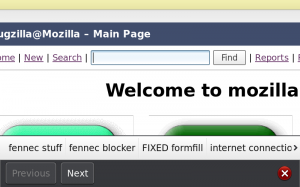
- Form assistant improvements, including autocomplete
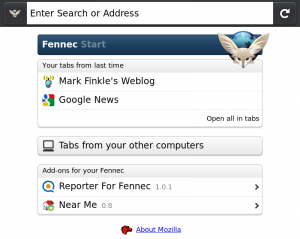
- Start page redesign
- Auto update add-ons
- Portrait support on N900
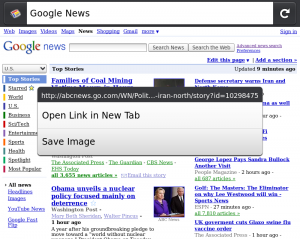
- Context Menu with Open in New Tab and Save Image
- Web content theme update
- Manage site preferences (clearing passwords and others)
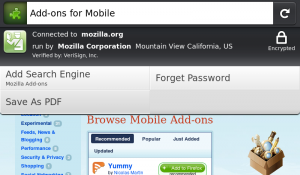
- Clean up site menu
- Use volume keys to zoom on N900
- Save page to PDF

Screen shots of the some new features:

Form Assistant with Autocomplete:


Start Page:


Context Menu:


Page Menu: