Friday, May 28, 2010

PR1.2 Features you might have missed !

PR 1.2 as now available (for everyone) everyone is searching for change and bugfixes for this "long" awaited update...

Things you should know and should not miss from this update is :

1. Video calling

Not direct. Cannot call phone to phone. Only use through skype and Gtalk.

2. New emoticons support for Skype.

3. Native web browsing in Portrait (with access to bookmarks and "back" button).

(To activate go to "Options/Settings" to enable rotation.)

4. Integrated FaceBook chat. (You need your facebook user name to log in.)

5. New Share option via File Manager (no need for petrovich)

6. Better interface for Ovi maps (and now open maps by clicking on a contacts address)

7. Keyboard mapping changed. Pressing and holding a key allows the "blue" symbols to be used (no more holding the blue arrow key).

8. Calendar no longer opens up at 4am every morning. Bug fixed. (Birthdays disappearing in calendar widget)

Also swiping the screen top to bottom (and the other way around) has a cool smooth transition between months. Previously you had a sharp transition when swiped left to right.

9. USSD codes now work. (try any USSD provided by your operator)

10. Email. Move Messages from folder to folder or to your N900's local storage. (Hit "Inbox" at the top bar and "Move messages")

- Search Email - Type anywhere in the email window and watch results show up.

- Highlight Text in Email. Hold shift and use your finger/stylus to highlight text. No longer have to hit reply to have the option to copy text. Fantastic.

- Delete email from the "new email" balloon pop up directly

11. Search apps catalogue dynamically (results show as you type a letter).

Also works with:

- Uninstall apps menu

- Music Files

- File Dialog

12. Mark and Delete/Share Multiple Conversations/Emails/Images.

Now you can attach multiple images to emails without doing one at a time. Hit the top bar and select "Share" or "Delete". Now you can click and higlight multiple items.

13. Re-arrange the menu as you like.

Press and hold any icon in the Menu to initiate this.

13. Get rid of "SMS" option to landline numbers.

Go to Contacts, and hit the top bar and settings.

14. Join Chat room?

If you go to Conversations there's an option via the top bar to join chat room. It only accepts "addresses".

15. Data Counter

Settings/Phone now allows you to view home network data counter as well as roaming data counter.

16. Video night mode introduced

17. Browser

- Shift + up key (takes u to top of the page)

- Shift + down key (takes u to the far bottom of page).

- Rearrangement of controls

- Back button now instantly takes you back without showing a "desktop" view of previously visited pages.
(holding it down however does show you the previous desktop view)

18. Volume. You can finally adjust the volume when the phone is locked. Great for listening to music.

Also volume control is smoother. no more choppiness when increasing/decreasing volume.

19. Red Eye Removal added to "edit image" in the gallery.

20. Main camera now has two additional resolutions available (1.5MB and 3MB medium). Allowing for small images to be take for email etc.

21. Notifications (miss calls/text mssgs etc) show on lock screen without unlocking phone.

24. EAP-TTLS+PAP authentication for WiFi is supported.

25. On screen keyboard has had a makeover.

Any thing else? You can follow this topic and see the full changelog ;)
N900 Enterprise Deployment Guide !

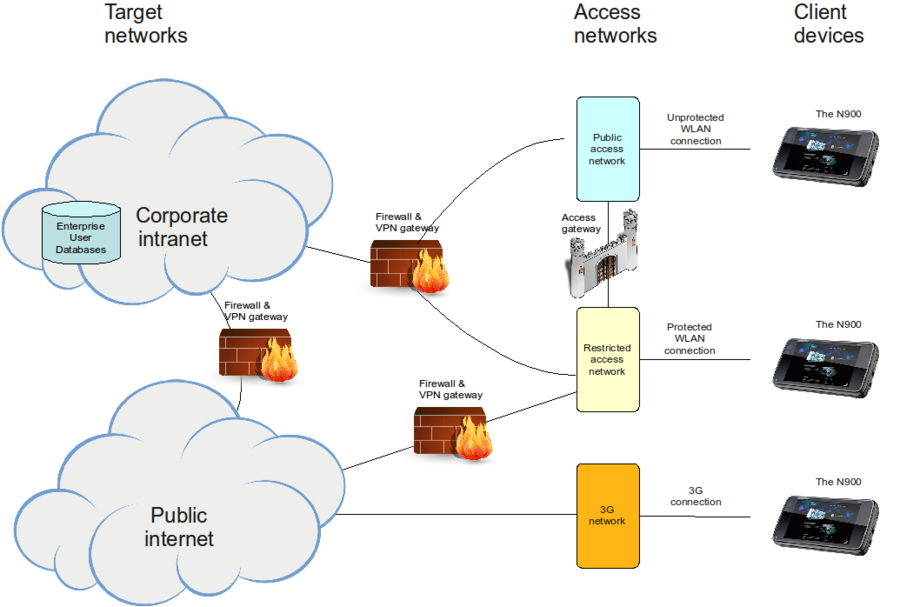
Nokia N900 is a powerful mobile computer with a phone feature. One area where the capabilities of N900 can be harnessed is the Enterprise environment. The device can be configured easily for providing access to corporate services and resources like:

- email
- intranet web pages
- instant messenger
- VoIP services

The open architecture of the Maemo platform enables the integration of such enterprise services with minimal effort.


More to read over here !

WeatherBug for Nokia N900 released !

WeatherBug for Nokia N900 provides instant access to local current conditions, extended forecast, radar and satellite images, severe weather alerts and more for your U.S. city and thousands of locations around the world. To download, simply access the Ovi Store on your Nokia N900 smartphone device and search by entering the keyword "WeatherBug"


Standard Features:

- Access to the WeatherBug Network — the source for truly live, local weather with the largest network of professional weather stations in the U.S. and thousands of locations around the world
- Extended 7-Day, Detailed and Hourly* forecasts
- Ten (10) detailed interactive weather maps: Temperature, Radar*, Satellite, Humidity, Pressure, Wind Speed, Today's High, Today's Low, Tomorrow's High and Tomorrow's Low Temperature Forecast
- Interactive weather maps include zoom and road, aerial or hybrid view options
- Radar animation*
- Easily switch between unlimited saved locations
- Severe weather alerts (NWS alerts) for any saved location*
[Note: Alerts update in background at interval options of 15 minutes to 8 hours.]
- National Weather Outlook broadcast provided by WeatherBug meteorologists* (updated 2x daily)
- Weather camera images and time-lapse animation*
- Unique weather data presentation for your location – view maps, radar animation, camera images and videos in full-screen mode or side-by-side current conditions
- View weather in Metric or English Imperial (U.S.) units

* U.S. locations only

Twitter Widget for Nokia N900 by Nokia

Yes you read it right !


The twitter widget is a little widget which display your time-line in the homescreen of the Nokia N900. You can also update the time-line by tapping the little bird saying “Tap me to tweet“

Download it here

Tuesday, May 25, 2010

PR1.2 firmware UK release today, and global release tomorrow Wednesday, May 26 !

There’s a number of changes that you can expect:

Loads of new games and apps in the Ovi Store

Gaming fans can now get their hands on all sorts of new titles including Jurassic 3D Rollercoaster, Zen-bound, Angry Birds (level pack), Sygic, Kroll, Weatherbug and GoGadget. Bear in mind that these games won’t show up in the Ovi Store until you have upgraded to PR 1.2.

It’s one for the socialites among you

Facebook IM Chat is now bundled in, and the updated email service allows you to accept or decline event invitations right from your inbox. And what do you think of video calling, allowing users face-to-face chatting anywhere.

A freshened Ovi Maps interface

This updated UI should make it easier for you to find your way around, and there’s also a change to the menu system UI, with the first level now customisable…
On top of all that, your N900 can now browse the web in portrait mode and make video calls.

Via : http://blogs.nokia.com/nseries/

Tuesday, May 18, 2010

Charging LED Clock : Modifies the charging LED pattern to indicate time !

Charging LED Clock modifies the charging LED pattern to indicate time : The charging and battery full LED batterns blink to indicate the current hour and minute with 5 minute precision.

concept:
time display with LED. When the phone is on charge.

Why do you want?
when I go to sleep.I usually put my phone (N900) away from me.
because I can turn the alarm off in my sleep.
is convenient when you can see the time at a distance.

implementation
use Morse code (only idea morse code)
12 hour 57 minute
looks like this: -** -----****(*)** //- long signal LED * short signal LED (*)signal brighter //

does not look very comfortable.
offer a minute rounded up a dozen
that is
12 hour 57 minute = 1 hour (code: *)
4 hour 16 minute = 4 hour 20 minute (code: **** **)
9 hour 33 minute = 9 hour 30 minute (code: ****(*)**** ***)
12 hour 22 minute = 12 hour 20 minute (code: -* **)
3 hour 42 minute = 3 hour 40 minute (code: *** ****)

More info at talk.maemo.org

Monday, May 17, 2010

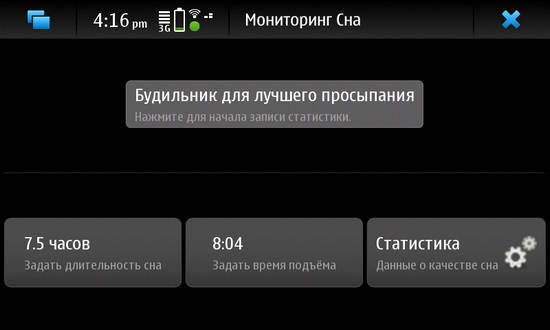
Sleeppy : using accelerometer data for the optimal triggering the alarm.

sleeppy  is a bio-alarm clock that analyzes your sleep patterns and wakes you when you are in the lightest sleep phase.


Waking up in the lightest sleep phase feels like waking without an alarm clock - it is a natural way to wake up where you feel rested and relaxed.


Since you move differently in bed during the different phases, Sleep Cycle uses the accelerometer in your phone to monitor your movement to determine which sleep phase you are in.

Sunday, May 16, 2010

Zeecontrol : control your N900 with a Zeemote bluetooth remote control !

Zeecontrol lets you control your N900 with a Zeemote bluetooth remote control based on Wiicontrol.

More info over here !

Saturday, May 15, 2010

Maenotify : last missed calls and sms on the screen when it's locked !

Like in the upcoming PR1.2, maenotify shows the last three missed calls/sms (with names of contact) when the device is locked, without requiring to unlock it.


Nice huh? ;)

Pykake : remote application for DSLR cameras !

Pykake is a remote application for DSLR cameras. It uses Lircd to send IR commands to camera.


Currently support cameras from Olympus, Canon, Nikon and Pentax.

More info over here ;)

Thursday, May 13, 2010

Dreamremote : A WiFi Remote Control for all DreamBox Receivers !

Dreamremote is a WiFi Remote Control for all DreamBox Receiver (the Linux-based set-top boxes) from Dream multimedia with installed and running Enigma 2 Webinterface plugin !


Usage:
Simple start DreamRemote and enjoy.
  • For the first time:
Go to [Settings] in the Menu. Enter the IP Adress of your Dreambox and tap [OK].
  • Daily usage:
Press one of the Buttons in the main screen of DreamRemote and if your N900 is connected to your local W-Lan your Box will do what ever you want!

If the command was successfully send the small dot icon in the top right will become green. If it fails you will see a red icon.

More info over here ;)

Wednesday, May 12, 2010

Opera Mobile 10 on Maemo

We’re proud to present the first preview build of Opera Mobile 10 for Nokia N900 and N800/N810.


Back in 2005, Nokia released the Nokia N770. The included web browser was developed by Opera Software. In 2008, Nokia chose to stop including Opera with Maemo, switching instead to a browser developed internally. Today’s preview build marks our unofficial return to the Maemo platform, after a little over 3 years of absence.

This Maemo version of Opera Mobile 10 was created as a hobby project by a small team of developers in their spare time. In total, about 6 man-weeks were spent on creating the release. It’s worth pointing out that this is not an officially-supported release. As such, it has not undergone our usual quality assurance processes, and at times may not feel as polished or complete as an official release. This also means that there may never be a “final” release of Opera Mobile 10 for Maemo devices, since it’s just that much more fun to add shiny new features rather than fixing boring old bugs.

Opera Mobile running on N900 and N800

The preview build contains the same features available in Opera Mobile 10 for Symbian and Windows Mobile smartphones. These include fast and economical browsing with Opera Turbo, bookmark and Speed Dial sync with other Opera products, and of course multiple tabs. For more information, see our rundown of Opera Mobile 10 features.

We have two additional treats for Maemo users: this is the first public release of Opera Mobile to include Carakan — our new Javascript engine.

Unfortunately, JIT support for ARM was not yet stable enough to include, but the speed advantage we gain from Carakan compared to Opera Mobile running on other platforms is already quite substantial.

The second treat is the Mobile debut of our Vega rendering library which — among other things — is responsible for rendering all the exciting new eye-candy like CSS3 rounded corners and shadow effects.
There are a number of known issues with this build, listed below:
  • Adobe Flash and other plugins are not supported.
  • Screen tearing may be visible when panning, especially in portrait mode. We expect to fix this in a future update.
  • The built-in on-screen keyboard is not supported. Use the physical keyboard or the on screen keyboard included with Opera Mobile.
  • There is no power management support. In practice this means that if you open a page with animations and leave Opera running, you will soon be using a payphone. Power is drained even when Opera is running in the background and/or the screen is turned off.
  • If you set Opera as the default browser, for example by installing the Browser Switchboard, an extra empty tab will get opened every time you open a link from an external application.
Opera Mobile 10 on Maemo supports portrait screen mode, and will choose screen rotation automatically by default, based on the device orientation. It is also possible to select a specific screen mode manually from the settings menu. This works out-of-the-box on the N900. For the setting to work on the N800/N810 you need to install an additional kernel driver for rotation support.

The fullscreen button on N800/N810 only affects the native titlebar and menu. The “fullscreen” setting in the settings menu only affects Opera Mobile’s UI elements.

Download and install Opera Mobile 10 on your Nokia N800/N810/N900 using the phone’s default browser.
In case you encounter problems, please report bugs and issues using our bug wizard. We also welcome feedback on our forums.

Thursday, May 6, 2010

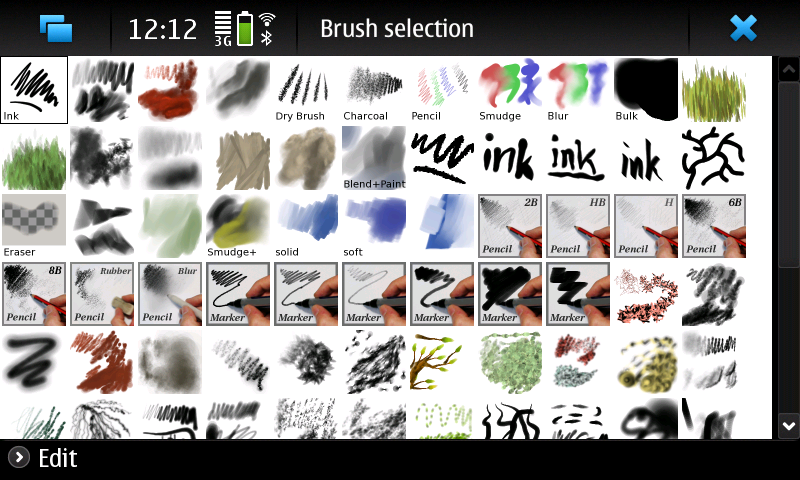
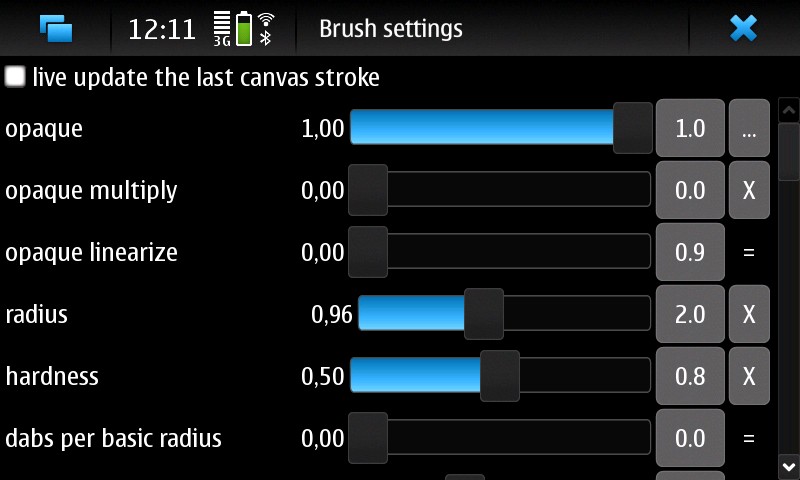
MyPaint : Paint program to be used with Wacom tablets

MyPaint is a pressure sensitive Wacom tablet paint program. It comes with a large brush collection including charcoal and ink to emulate real media, but the highly configurable brush engine allows you to experiment with your own brushes and with not-quite-natural painting.


Melissa & Doug Deluxe Poster Paint Set (10 Bottles)

Available on Extras-devel repository ;)

VertSMS : send SMS messages in portrait mode !

Vertsms is an application to send SMS messages in portrait mode !


Available at Extras-devel repository ;)

Nokia N900 Armor Case - The Metal Case (Black)

Sunday, May 2, 2010

PR 1.2 for Nokia N900 leaked ! (Links and changelog Inside)

Great news this morning !

Download links :

http://thepiratebay.org/torrent/5526521/Maemo_5_PR1.2_Joshv06

http://rapidshare.com/files/382571020/RX-51_2009SE_10.2010.12-9_PR_COMBINED_MR0_ARM.rar

http://www.megaupload.com/?d=JTHRXCJS

http://www.mediafire.com/?gznnfzeylqk

I highly recommand that you wait till it's official before you brick your N900 ;)

Key changes/improvements that come with this release include:
  • A revamped virtual keyboard. Screenshot via OptX.
  • Longpress to enter numbers/symbols on the keyboard.
  • The ability to rearrange icons,  no ‘more’ button in the menu.
  • Changes to the camera UI, and a night mode for both photos and video.
  • Qt 4.6.2 is now pre-installed.
  • The web browser now features a button to activate the portrait mode and a few more option while in the portrait mode.
  • The browser benchmark also seems to have shot up from 8687 to 10141 with this leaked release.
  • USSD codes now work.
  • Type to search for apps in the Application Manager.
  • Another addition is an email widget as well for the desktop. Screenshot via qwerty12.
  • Updates to the Ovi Maps application, but no voice navigation yet.
There is even a video showing off some of the changes outlined above :