Wednesday, June 29, 2011

[Did You Know?] N9 FAQ N°1 ! Flash is supported in fennec...

Konttori (the Coach for Harmattan Applications Framework) has responded to some queries, enjoy !

"N9 has exchange support. We use it internally a lot, so it's in stellar shape. "

"Qt is easy to develop on. You use QML to do the UIs, which is like turbocharged HTML. Then the additional logic you either code in c++ or python. Really easy. SDK has a one click packaging tool. Development easyness is definitely in the same ballpark as android. "

"Qt will live on at nokia also in other areas than just Symbian. I think officially the next billion strategy is the one we refer to. More details come later. And I won't go into those. "

"DLNA stack is there on the device by default, but not in use. We didn't have the time to make sure it works just perfectly, so we'll either roll the UIs out later or 3rd parties can enable it very easily. N9 doesn't have HDMI. "

"Package management is still debian based in N9."

"Flash is supported in fennec, but not in the default browser. We wanted to keep a clear differentiation between "desktop" -alike browsing and mobile browsing. Default browser focuses entirely in one handed use and relaxed browsing, where as fennec just does it all and acts like a desktop browser (tabs and all)"

"Landscape home is not available as default. You will need to install a theme that pretty much just inherits the default theme and overrides one property. I'm sure that will be available on sales start."

In-depth look at Nokia new N9′s and N950 MeeGo OS

mobilesguruji.co.cc spoiled us with in In-depth look at Nokia new N9′s MeeGo OS


Jump over the original post to read about it ;)

Update : the part two is live ! 

Nokia N950 Developer Preview

nuuneoi.com has spoiled us with a long preview of the N950 edition (mainly the OS) enjoy !

Sunday, June 26, 2011

Enhanced lockscreen !

Enhanced lockscreen !


Have i to say more? If you have suggestions, post them in the original thread !

Friday, June 24, 2011

AppLock : Locks the device when a blacklisted application is launched !

AppLock Locks the device when an application is launched, so it will automatically put the phone into a locked state whenever it detects that an application which is on the blacklist is launched.

This allows you to secure applications like Contacts, Messaging or your web browser to prevent unauthorized access.

Thursday, June 23, 2011

Secret video of the first Nokia Windows Phone !

Based on the same design as the N9 here's a video of a presentation by Stephen Elop


You can take a look at the uncut version :


Wednesday, June 22, 2011

Some N9 videos hands on !


Tuesday, June 21, 2011

The N950 is here too, but not for you !

Yes, as we know the Nokia N9 has been already announced this morning stirs envy. It is however not up to the expectations of some including me, who expected the first smartphone MeeGo it is a worthy heir to the N900, mainly due to the disappearance of the slider. They can rest assured that Nokia is also launching the "N950" variant "developer" of the N9 but not for public, not for sale !

by Brendan Arndt Product Manager for Three UK

The "Nokia N950" inherits the crucial points of the specifications of the N9, but ignores some of its refinements. It benefits in return for a slider, which is well worth the sacrifices to some mobile users.

"Exchange against keyboard screen, camera and connectivity"

The screen version of the developer just to start a LCD panel, not AMOLED. The tenth of an inch of additional diagonal (4.0 against 3.9 inches) is a small consolation, but of course they display the same definition FWVGA (848 x 480 pixels).

The dorsal sensor N950 is also "different" from that of the N9, without to much lower quality, but in any case deprived of light stamped Carl Zeiss lens of the latter.

Its connectivity is finally partially amputated, since swapped the one hand the latest Bluetooth 4.0 standard for tireless 2.1, and the other is deprived of NFC.


The same vital components

He inherited, however, the same TI OMAP 3630 SoC clocked at 1 GHz, carrying a PowerVR SGX GPU 530, all supported by 1 GB of RAM LPDDR. Storage is finally performed by the same amount of from 16 to 64 GB of flash memory.

Not content to communicate or not the price or the date of marketing, which is not good since it has not done either for the original, Nokia has not even published a photo of the N950. 

The N9 has arrived, finally !

As you probably saw this early morning i posted some first links regarding the N9 (here, here and here), and Engadget was up also with some great photo gallery here and here and with some live demos and initial thoughts !
The N9 UI, as you'll have learned from the product announcement, is Nokia's Harmattan skin atop MeeGo 1.2, which is built around three core home views. The central one is your app organizer / launcher, to one side of which you have a notifications and activities section -- which will be populated by phone calls, calendar alerts, and social network updates -- and to the other you get a live app switcher. That trio is navigable in a carousel fashion, meaning that you can keep cycling through all three by flicking your finger in one direction. Double-tapping the screen wakes the phone up and then you can unlock it with a swipe in any direction. Similar swipes, starting from one edge of the screen and going to the other, allow you to exit apps into the home screen. What we can say about all these aspects of the interface is that they're done exceedingly well and make the somewhat aged OMAP3630 processor look terrific. Fluid animations are evident throughout, navigation is natural, and this marks a major advance over anything else Nokia has given us on the software front in terms of touch-based UI.

Physically, the N9 feels about as good as a device built out of plastic can do. Nokia's devoutly calling it polycarbonate in order to highlight that this isn't just any old plastic, it's a high-grade variety that inspires confidence in its durability while also having the sharp looks to keep aesthetes happy as well. The whole phone is essentially built into the external shell, which does mean the battery isn't user-replaceable and there's no microSD expandability, but at least you can hot-swap the MicroSIM (yes, Micro) card without needing to reboot the handset.

The Clear Black AMOLED display is truly a sight to behold, with stunning viewing angles, a curved Gorilla Glass front, and some pretty excellent (for AMOLED) performance out in the sunlight. We compared it side by side with a Super LCD-equipped Incredible S and the N9 more than held its own. The screen is easily one of this new phone's great strengths, though we'd argue the intuitive UI, responsiveness, and eye-catching industrial design are pretty high up on that list too. All in all, we're highly impressed by what Nokia has put together here, though the N9 does beg the question as to why the company has opted against making MeeGo its long-term smartphone OS of choice. What we've seen today is a damn fine smartphone with some very neat ideas, one which certainly merits the title of being Nokia's flagship. Or it will do, when it launches later in the year.


For your information :

Nokia N9 Quick Specification
Size: 116.45 x 61.2 x 7.6-12.1 mm
Weight (with battery): 135 g
Volume: 76 cc
Internal memory: 16 GB or 64 GB
Use as USB mass memory device for storing photos, documents and more
Talk-time (maximum):
GSM 11 hours
WCDMA (3G) 7 hours
Standby time (maximum):
GSM 380 hours
WCDMA (3G) 450 hours
Video playback time (720P) 4.5 hours
Music playback time 50 hours

Display and User Interface
Screen size: 3.9″
Resolution: 16:9 FWVGA (854 x 480 pixels)
AMOLED display
16.7 million colours
Capacitive touch screen
2.5D curved glass
Anti-glare polariser
Scratch-resistant Corning® Gorilla® glass
Orientation sensor (Accelerometer)
Compass (Magnetometer)
Proximity sensor
Ambient light detector
Personalisation
Customisable wallpapers and lock screen
Customisable profiles
Ringtones: mp3, AAC, eAAC, eAAC+, WMA, AMR-NB, AMR-WB

Keys and Inputs Methods
Pure touch screen UI, all-screen front
On-screen alphanumeric keypad and keyboard
Dedicated power, camera and volume keys

Power Management
Talk-time (maximum):
GSM 11 hours
WCDMA (3G) 7 hours
Standby time (maximum):
GSM 380 hours
WCDMA (3G) 450 hours
Video playback time (720P) 4.5 hours
Music playback time 50 hours

Memory
Internal memory: 16 GB or 64 GB
RAM: 1 GB
Operating Frequency
Quad-band GSM/EDGE 850/900/1800/1900
Penta-band WCDMA 850/900/1700/1900/2100
Automatic switching between WCDMA and GSM bands
Flight mode

Data Network
GPRS/EDGE class B, multislot class 33
HSDPA cat 10 maximum speed up to 14.4 Mbit/s, HSUPA cat 6 up to 5.7 Mbit/s
WLAN IEEE802.11 a/b/g/n

Connectivity
NFC (Near Field Communication) for easy pairing and sharing
Bluetooth 2.1 +EDR (Enhanced Data Rate)
FTP (File Transfer Profile): server (v1.1)
OPP (Object Push Profile): client, server (v1.1)
HSP (Headset Profile): audio gateway (v1.2)
HFP (Hands Free Profile): audio gateway (v1.5)
A2DP (Advanced Audio Distribution Profile): audio source (v1.2)
AVRCP (Audio/Video Remote Control Profile): v1.0
High-Speed USB 2.0 with micro USB connector for transferring data and charging
3.5 mm AV connector
Capability to serve as data modem
Micro SIM card

Software
Software platform and user interface
MeeGo for Nokia N9 (MeeGo 1.2 Harmattan)
User interface simplified to three home views: events, applications and open apps
Swipe gesture instantly takes you back to the home view you started from
Multitasking and app switching through open apps view: a live snapshot of all running apps
Apps compliant with Qt 4.7
HTML5
Software updates over the internet
Personal Information Management (PIM)
Detailed contact information
Calendar
To-do list
Notes
Support for MS Outlook synchronisation of contacts, calendar and to-do with Mail for Exchange
Support for viewing documents in Word, Excel, Powerpoint, PDF and Open Document Formats
Online calendar synchronisation with CalDAV

Applications
Key applications: Facebook, Twitter, Skype, Joikuspot Wi-Fi tethering, Accuweather, AP News, Swype, Track and Protect, Galaxy on Fire 2, Real Golf, Angry Birds Magic, Mail, video player, Drive, Feeds, search, calculator, Calendar, Contacts, music player, web browser, messaging, photos, photo editor, Ovi Store, Maps
More apps available at Ovi Store
Nokia Link: PC and Mac application for easily syncing photos, music and videos

Monday, June 20, 2011

Nokia N9: First Press Shots !?

According to pocketnow.com This is the Nokia N9, set to be announced tomorrow at CommunicAsia 2011 in Singapore, and as is quite obvious, it is not the QWERTY slider that we were expecting. Rather, this is a slim MeeGo-powered candybar set to ship in pink, blue, and black, although the exact specifications remain elusive. Obviously the identity of the slider in that leaked teaser video is now up in the air, although we suspect it will end up as the N950. Developing...

Update :

More from Engadget :


Saturday, June 18, 2011

Kall : Kill a Call after some time !

Kall is a GUI to make a Call and terminate it after some seconds


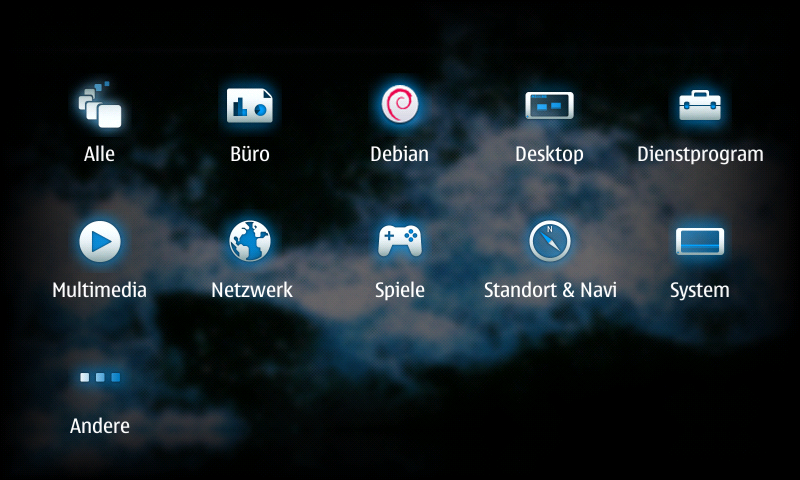
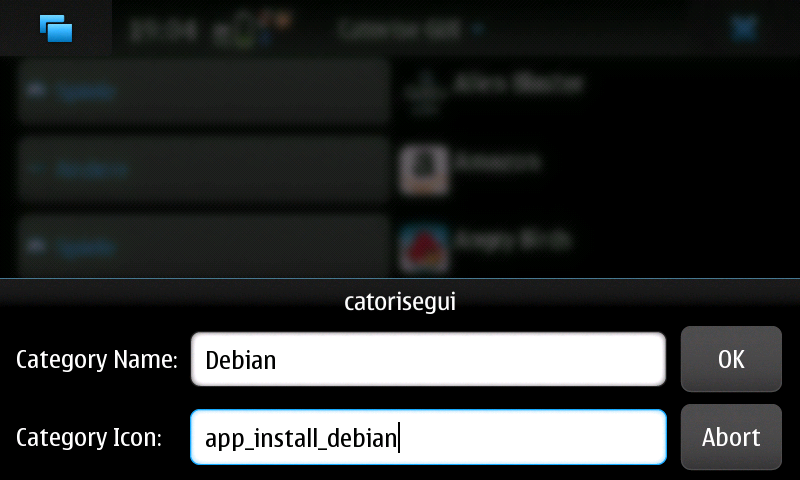
Catorise PLUS : create your menu the way you want !

Catorise PLUS combines "catorise" and (a better version from) "Catorise GUI".

You don't need anymore two package, that's enough alone. With this Application you can create your menu like you want. You can add, delete and edit categories and icons.


As packages are installed and removed, the menu is kept up-to-date, When you create or delete categories, it takes a little bit. no panic! It depends not and the system does not crash.


To revert to the Nokia-supplied default, simply uninstall.

Wlan Driver Selector Applet : Switch easily between stock and bleeding edge drivers !

Wlan Driver Selector Applet is a little status area applet which lets you switch between stock and bleeding edge drivers It also has a possibility to shut down WLAN complitely.


How?
  • Install kernel-power (>=v46-wl1)
  • Download the bleeding edge drivers with the applets wizard, if you don't have them allready
  • First time when you bleeding edge drivers, it will ask for the folder where you saved the drivers, if you didn't use the applet's wizard

Applet is not showing up? You could try to run this as root:

Code:
apt-get install python python-hildondesktop
reboot
apt-get install --reinstall status-area-wlan-driver-selector-applet
My drivers are not located in MyDocs or memory card. How to select?

Code:
gconftool-2 --type string --set /apps/wlan_driver_selector/driver_folder /path/to/drivers/