Saturday, December 31, 2011

[MeeGo Harmattan] Proximus : Advanced events manager !

Proximus is supposed to perform actions (currently only switching your phone profile between silent/beep/ring) when a predefined rule is true.


Rules are based on your location, the current time, and calendar keywords.

Download it !

[MeeGo Harmattan] MeePlus : Google+ client !

MeePlus is a Google+ client for Harmattan.

It's currently in early stages so it only supports people profiles with posts and people search.


NOTE: Due to current Google API restrictions only public information is available.

Download here:

apps.formeego.org (soon!)
Nokia Store (pending)
Webpage

Homepage: http://meeplus.tano.si (soon!)
Source and bug tracker: https://github.com/ntadej/MeePlus

Friday, December 30, 2011

[MeeGo Harmattan] Incoming Call UI MOD !

Incoming Call UI MOD (mainly) make the Incoming Call Avatar much larger !


Installation:

1. Download and using PC, extract zip into root directory of device via USB Mass Storage

2. Open Terminal app and type:

Code:

devel-su
rootme  [root password, default is shown]
sh /home/user/MyDocs/phoneuiMOD-install.sh
3. Device will automatically reboot.


Removal:

1. Open Terminal app and type:


Code:
devel-su
rootme  [root password, default is shown]
sh /home/user/MyDocs/phoneuiMOD-remove.sh
2. Device will automatically reboot.


Changelog:

Version 1.1 (30/12/11)

- Enlarged Answer & Reject buttons

- Adjusted position of avatar, buttons and labels


Version 1.0 (30/12/11)

- Avatar is now 470 x 470 pixels, up from default size of 64 x 64 pixels

- Rearranged buttons to accommodate larger avatar


Download Current Version

V 1.1 (30/12/11)


Please, Support Development

[MeeGo Harmattan] [How to] Transfer SMS and IM conversations from the N900 to the N9 !

Having a headache in migrating the SMS and IM conversations?

Do you remember The basic tool that import sms conversation from the N900 to the N9? Ok, now, there is an enhanced script to import all Conversations to N9.

All you have to do is to :

1- Download the *.deb file and install it (by clicking on it)
2- Copy the database (located at /home/user/.rtcom-eventlogger/el-v1.db) from the N900 to the N9
3- Open the terminal and run the following command:

n900-comhist-import /path/to/el-v1.db

And wait for the magic to happen !

If you want only import SMS messages, use this version instead ;)

Read this before !

[MeeGo Harmattan] QuasarMX music player !

QuasarMX is a nice music player that includes search everywhere on the main menu, lyrics pulled from lyrics wiki and even possibility for Last.fm Audio Scrobbler, also the UI looks very versatile


Download

Wednesday, December 28, 2011

[MeeGo Harmattan] Nokia Photo Map Plugin : bringing a map view to your gallery !

Nokia Photo Map Plugin is an experimental plugin spices up your Nokia N9 Gallery experience by bringing a map view to it.


When viewing photos in Gallery, you can:

- Open a map view directly from a Gallery photo (perform a long press or select menu icon -> Select the plugin from menu)
- Browse the map in the map view
- View your other photos when staying in the map view
- Edit the location and orientation of your photos, if needed
- Place and orient on the map those photos not having enough metadata
- Go back from the map view directly to Gallery

Uses for the plugin:

- Where was this photo taken at, again?
- While viewing and sharing travel photos, quickly check a photo's location from a map.
- See where a photo shared by a friend has been taken at. If metadata exists in EXIF.
- Edit the location & orientation metadata in EXIF of your photos, easily.

Tuesday, December 27, 2011

[MeeGo Harmattan] Zones : bubbles lockscreen for your N9 !

Zones let you use your N9 in a new and playful user interface.


It lets you keep the most essential parts handy to use based on your context. Whether you are at home, office, with friends you can group your applications, your needs and desires into Zones and interact with your device based on the Zone you are in. All it takes is a swipe to move from one Zone to another.


You can configure new Zones directly in your device or download new Zones for specific purpose.


[MeeGo Harmattan] [How to] Sync your N9 with ovi suite !

Simple ! Ovi Suite 3.0.0.290 will recognise and sync with the N9. It works.

You can then upgrade to the current Ovi Suite and it will continue to work – but only if you have created the sync under the 3.0.0.290 version.

Steps:

- When you are installing 3.0.0.290, turn off internet connections otherwise Ovi Suite will automatically upgrade before installing

- Once installed, turn off auto-update software (for now) and plug your handset in. It will be recognised, install drivers, and say it is ready

- Confirm your sync settings, and press sync.

- You can then go back online and agree to update your Ovi Suite to the current release.

If you have questions, drop them in the comments section below ! Enjoy !

Original topic ;)

Monday, December 26, 2011

[MeeGo Harmattan] Advanced Call Recorder : record your telephone call in the background !

Advanced Call Recorder helps you record your telephone call in the background like Call Recorder.


Auto recorder agent automatically starts when the device starts.

Auto recorder detects outgoing and incoming calls and records them with caller ID tags.


Sort your recordings by month ,date & caller ID.


It also can be used as a general voice recorder.

You need to restart your device once after installing this application.

Sunday, December 25, 2011

[MeeGo Harmattan] Accmanok : extra accounts manager !

Accmanok is an application for modifying the accounts connection settings.

Supported services: Jabber, ICQ, Yahoo, MSN, AOL, Skype.

You can change display name, username, password, connection host, connection port and encryption.
If parameter field is empty, then this parameter is not specified, and uses the default value.
All changes take effect immediately after pressing the save button.


Accmanok also provides the ability to download and install (to install you need to click on the downloaded file in the transmissions window) packages to support additional IM services: ICQ, MSN, AOL, Jabber, Vkontakte, Odnoklassniki, QIP. To remove the installed packages use the built-in application manager. You can launch it fast by clicking on the application manager icon on the packages page.


After installing services packages needed to reboot phone. This operation will be queried automatically when you return from the packages window. The best solution is a single reboot after installing all necessary packages.


For adding and deleting user accounts use the built-in Accounts application. You can launch it fast by clicking on the blue icon with a key on the main window.

For updates and support, look over here !

Saturday, December 24, 2011

[MeeGo Harmattan] [How to] Bring back your dead N9 to life !

If you bricked your N9 as i did the past week, and want it back to life from the dead Nokia Logo then you can use the following method for restoring system after some dangerous experiments with applications.

My guide is based on ubuntu live cd (the best and safest method yet) as i have Win 7 64bits and i just can't run properly the tools needed to flash the N9 (if you want steps to do it on windows OS, be sure to look into maemotalk forums)...so :

In few steps :

1- Get (not really necessary) the latest ubuntu build (i did it with ubuntu 9 and it worked just fine), Once you've finished downloading your file, you'll need to create a CD or USB drive (the advantage of running a live cd is that you won't need to install anything on your PC) and then run it (see step 3 from this page).

2- Get the maemo flasher released for Harmattan (in my case i did choose the flasher_3.12.1_i386.deb version of it as i'll use ubuntu live cd) and install it !

3- Get the firmware image for your device, I used NaviFirm from http://www.symbian-toys.com/navifirm.aspx to get the appropriate firmware for my N9 (you can search your Firmware with the help of the product code of your N9 which you can find on the back of the micro SIM holder) you're not forced to download all files but ones checked by default, the most important file is the Mcu LEGACY one (something like : DFL61_HARMATTAN_2X.2011.44-2_PR_LEGACY_XXX.bin)

Ps : It'll be convenient to rename it to something easy like your name for example : saad.bin

You want to do a warm-flash ( I have not tried a cold-flash, so do that at your own risk ) of your device.

There are detailed instructions at the maemo wiki, http://wiki.maemo.org/Flasher but you won't probably need them as only what's left to you to do is to place files you've just downloaded to Desktop.

5- Place downloaded files to desktop.

6- Run Xterm, then type :

cd Desktop

Then sudo flasher -F FIRMWAREIMAGE.bin -f -R

Where  FIRMWAREIMAGE.bin is the name you gave to your firmware image... in my case the command will be :

sudo flasher -F saad.bin -f -R

Plug your N9 (it must be switched off already) and wait the magic till your device reboot ;)

It worked fine, but still, do at your own risk !

Additional type : Do a hard reset after that as you could have some old nasty files staying on the system ;)

If you have questions drop them in comments section :)

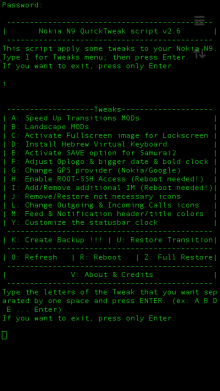
[MeeGo Harmattan] N9 QuickTweak : Different set of tweaks for your N9 !

Like N9Tweak, this small application that work via terminal also and will give you some different tweaks to your N9 file system.


I tried this app a few times and it’s work perfectly and quickly, but still I'm not responsible for the damage if will cause to your phone :-)

Tweaks Menu:

A. Speed Up Transitions MODs (Refresh needed) – You have a three different options (this have automatic refresh):

1. Full Speed Up Transition MOD - include landscape mod for Home & Lockscreen.
2. Speed Up Transitions with ONLY landscape Homescreen.
3. Only Speed Up Transitions - without landscape mod for Home & Lockscreen.


B. Landscape MODs (Refresh needed) - You have a four different options (this have automatic refresh):

1. Full Landscape MOD (Home & Lockscreen)
2. Full Landscape MOD (Home & Lockscreen) from your orig. files.
3. Only Homescreen Landscape MOD.
4. Only Homescreen Landscape MOD from your orig. files.


C. Activate Fullscreen image for Lockscreen – it’s activate a big-fullscreen image for LockScreen Landscape MOD, but before you apply this, you need to do something.. (thanks to jflatt)

Explanation:
1. Create picture named “mywall”with an 854x854 px dimension and with .png extension (mywall.png).
2. Put this image from your PC to: /home/user/MyDocs/.wallpapers/
3. Go to Setting ->Wallpaper-> choice your wallpaper and press Done.
4. Open N9 QTweak app (password of devel-su, default: rootme), choice i [hit Enter] then choice c [hit Enter]. No need to reboot !!!

D. Install Hebrew Virtual Keyboard – Add Hebrew virtual keyboard (Thanks to mohammad7410).

G. Change GPS provider (Nokia/Google) - This will give you ability to change the GPS provider (Thanks to Almehdin’s script).

H. Enable ROOT-SSH Access (Reboot needed!) – activate SSH access for ROOT user. This have automatic reboot. (Thanks to F2thaK & Almehdin).

I. Add/Remove additional IM (Reboot needed!) - This will install 3 additional packages: im-providers-additional telepathy-haze libpurple0. And you can use additional IM's - ICQ/MSN/Yahoo/AOL/Jabber/VK… This have automatic reboot for both options: Add/Remove (Thanks to Niwakame and his packages).

J. Remove/Restore not necessary icons - You can Remove or Restore the not necessary icons from your homescreen. It's not uninstall, it's only remove icons like facebook, twiter, User guide... You can choose a few numbers separated by one space and press ENTER. (ex: 2 4 6 ... Enter)

L. Change Outgoing & Incoming Calls icons – This will change you Outgoing & Incoming Calls history icons. Reboot needed! (Thanks to superjunior)

M. Feed & Notification header/title colors - This will change your Feed & Notification header and title colors to Orange and Blue (Thanks to oSCho)

Y. Customize the statusbar clock – Change your statusbar clock (ex. 08:08 | Sun 13 Okt or 08:08 AM | Sun 13 Okt), it have automatic refresh.

K. Create Backup !!! – Creating Backup from your system files. This will create folder named “.N9QTweakBackup” in your: /home/user/MyDocs

U. Restore Transition – Restore all changed files of Speed Up Transition with your BackUp files. (Refresh needed).

R. Reboot – Reboot your phone.

Z. Full Restore – This will restore ALL your tweaks, can uninstall new IM’s and restart or refresh your phone. Uninstall have two options Yes & No and also you will notice twice about uninstall new IM’s, you can choose Yes or No inside the restore process.

O. Refresh – Refresh your Homescreen and Lockscreen without reboot. All your applications will be closed anyway, but it's still faster way than a full reboot. See here.

V. About & Credits - it is clear

Before installation, make sure you have "allow other sources" set in settings and developer-mode activated.

Installation:
* Download and transfer the .deb file (thanks to Ammyt & hxka) to your phone.
* Install the .deb file by the usual way (double tap on file).
* Go to application Homescreen. You will see a new icon (Thanks to 3llipsis) at the end of the list and you can see the PDF instruction inside the: /home/user/MyDocs/Documents
* Tap on it and it will ask you for password of devel-su (default: rootme)
* Choose letter you want and press enter (you can write big or small character).

NOTE:
* Run “Create Backup !!!” on your first use of this script, mainly because of Speed Up Transition and Landscape MOD.
* You can choose more of one tweaks separated by one space and press ENTER. (ex: A B D E ... Enter)
* If you choose O or R, choose it at the end
* A and B have automatic refresh and H and I have automatic reboot and if you want to use more tweaks in the same session, just put this letters at the end. Don't use A , B , H and I together.. For example, you want to install A , C , F and D - just put the A at the end: C F D A [hit Enter]

Uninstall:
* To uninstall my application, do this by usual way, go to: Settings -> Applications -> Manage applications. Choose N9-QTweak and uninstall it. Another way – long press on N9 QTweak icon on the app homescreen.

  • If you uninstall this app it will leave the Backup files in MyDocs (/home/user/MyDocs/.N9QTweakBackup) and if for some reason you forgotten to restore your tweaks before uninstalling, you can do this manually or only one time by running the one simple command as ROOT: sh /home/user/MyDocs/.N9QTweakBackup/RESTORE . This command:

    1. restore your tweaks to default (except the new IM’s)
    2. Delete this folder (.N9QTweakBackup) from your phone
    3. Refresh your home and lockscreens
  • To update to new version, just install new .deb file.
Enjoy :D

Discussion and bug reports:

Maemo.org

[MeeGo Harmattan] TalkBox Voice Messenger : Voice Messages Redifined !

TalkBox Voice Messenger is an application dedicated to saving you the trouble of typing and to getting your messages across FAST!


Cross-platform TalkBox among iOS, Android and MeeGo
★ Push-to-talk instant voice messaging with your friends
★ Share photo and location
★ Group Chat
★ Post voice to Facebook, Twitter and make broadcast to all your friends

[MeeGo Harmattan] [How to] Get rid of the "click" sound of the N9 camera !?

Hey folks,

If you, like me need to take some silent shots, removal of the snd_camera_shutter.wav file from /usr/share/sounds/ui-tones works perfectly.

NB : Don't forget to restart your N9.

Friday, December 23, 2011

[MeeGo Harmattan] Speed Display : Flexible speedometer !

If you are you in need of a speedometer then Speed Display is just the app for you.

It displays the speed in km/h, mph, m/s, ft/s or in knots. The display can be inverted so that it can be used as a HUD display in a car with several color alternatives.


Features:
- Low energy consumption (most of the screen is black)
- Screen stays lit as long as application stays on
- Automatically adjusts the screen brightness to max when HUD mode is set
- Portrait and Landscape mode


Press anywhere to bring up settings button.

Thursday, December 22, 2011

[MeeGo Harmattan] BackLighter : disables the screensaver from dimming !

Don't want the device screensaver to go on when using applications like speedometers, timers, etc.? BackLighter does just that.


BackLighter disables the screensaver from dimming the device while the application is left running and set to ON. The screensaver can be once again enabled by setting the switch to OFF position or by closing the application.

BackLighter also makes it possible to adjust brightness with several convenien settings.

[MeeGo Harmattan] Nokia Pulse : the new way to check-in !

Nokia Pulse brings your everyday conversations to life by automatically tagging photos and updates with your location.


Every conversation, from pickups and drop-offs to meet-ups, is as instant, private, and simple as sending a text, but far more useful and engaging. Nokia Pulse is integrated with Maps, so finding people nearby, discovering new places, and getting directions is a snap.
Group Conversations:
Keep it Private. Keep it Personal. Keep it Real.
  • Private check in – All your conversations stay private and safe
  • Photo check in – Automatically tag your location to all your photo updates
  • Private by Default – No complicated privacy settings needed
Live Places:
One tap and they know where you are. Two taps to get you there.
  • Bring your favorite places to life – Post a favorite place to a conversation
  • Discover what’s nearby – Make and view recommendations of nearby places of interest
  • Getting there is a snap – Get directions directly from the recommended place
Your People:
Your Family. Your People. You Decide.
  • Instant: Receive instant on-device notifications of all new updates
  • Open:  Everyone with an email address can participate
  • Easy:  Sending and receiving messages with Nokia Pulse is as easy as SMS
  • Powered by the cloud: Your conversations are saved in the cloud for as long as you need them
  • Accessible from anywhere: Nokia Pulse is available on multiple touch-points - desktop web, mobile web, Windows Phone and Symbian devices


    Known issues on N9 * Nokia Account login can be flaky on PR 1.0 and PR 1.1, especially during the initial authentication. Possible resolutions to the issue: Ensure you have network access Restart the client Restart the device Remove your Nokia Account via the Account manager, restart the device, and add it back Try again later Updating to PR 1.2 when available will fix the problem entirely * Network latency can cause duplicate posts/comments sometimes * Device notifications of Pulse activity can only be sent to one device per Pulse/Nokia user. If you have multiple devices using Pulse with the same Nokia account credentials, then only the most recently registered/started client will receive notifications. * When sharing an image from the gallery only portrait orientation is available for browsing * Two sessions can be launched at the same time when one is launched via a notification and the other is launched via the menu

[MeeGo Harmattan] Dynamic calendar icon : Daily updated Calendar app icon !

Dynamic calendar icon is just another daily updated Calendar app icon, similar to Calenderr !

Wednesday, December 21, 2011

[MeeGo Harmattan] MeeScan : scanning 1-d and 2-d barcodes !

MeeScan is the N9 application for scanning 1-d and 2-d barcodes, such as UPC, QR, and Data Matrix codes.

The application also identifies many types of actionable text encoded in 2-d barcodes as contact, web URL, iCal event or text, and allows relevant action. MeeScan uses ldmtx and zbar libraries.


[MeeGo Harmattan] WidgetCanvas : Widgets for Harmattan !

Since UX cannot be touched, Giovanni Grammatico has created an application which offers a sort of platform to run widgets : WidgetCanvas !


Widgets can be added and dragged, theirs position is saved and restored at next application startup.

More to read from the original topic ;)

Monday, December 19, 2011

[MeeGo Harmattan] Home screen settings : Configure the orientation locking of the home screen !

Home screen settings is a settings plugin for configuring the home screen. It allows the orientation locking of the home screen to be configured. Harmattan PR1.1 or later is required.


Note that this unlocks Harmattan functionality not supported in any way by Nokia. Do not file bugs to Nokia or to the author if you change the default home screen behavior.

[MeeGo Harmattan] Clock Widget : Live clock icon !

After Calendar and Ip Address widgets, it's time for the clock widget ! Yeah !

Look at the hour on the top right side and compare it with the clock on the icon, it's dynamic !

Warning : it may drain the battery as it updates every minute ;)

Seen over here ;)

Sunday, December 18, 2011

[MeeGo Harmattan] FlowPlayer : Music Player with albums coverflow !

FlowPlayer is a music Player with albums coverflow


Just scroll the album list, select one and start playing it. It has a lyrics fetching function.

It's very simple, but it's nice.

[MeeGo Harmattan] MeeFolders : Another Folder Application for the N9

Like Folders here's MeeFolders, an application that allows you to sort your applications into folders.


Features:

* Automatic creation of desktop files when applications are added to a folder.

* Automatic removal of desktop files when the folder becomes empty.

* Clicking on the folder desktop file launches the folder. The folder automatically closes when an application is launched. This may be user-configurable in later releases, i.e. option to minimise.

* Applications can be added to multiple folders.

Icons for the folders are stored at

/opt/meefolders/desktop/icons/

You can change these to anything you like (just keep the same names).


Download it !

Follow this topic !

Saturday, December 17, 2011

[MeeGo Harmattan] Christmas eCards !

Christmas eCards allows you to create beautiful e-cards containing professional backgrounds and cliparts all with Christmas theme. You can also add any text or photos with colorful frame decoration.


The eCards is very easy to use as it uses multi-touch for moving, rotating and scaling items on the phone screen.

[MeeGo Harmattan] [How to] Enable zoom in video recording On your N9 !

In 4 steps you'll be able to zoom during video recording with your lovely N9, I also tested it, it works fine :


 Enable developer mode (Settings> Security> Developer Mode) if not already done.  

1- Download the file camera.conf

2- Open Terminal and enable root acces :

devel-su

password : rootme

3- Copy the downloaded file in the etc directory:

 cp /home/user/MyDocs/camera.conf /etc/camera.conf

4- Restart the device.

It 'can zoom both with the top bar like the pictures, both with the volume buttons.

To remove this tweak just delete the file by repeating the procedure from step 2 to step 5 and just type this command:

 rm /etc/camera.conf


Via : nokia.hdblog

Friday, December 16, 2011

[MeeGo Harmattan] Music Shelf : simple, easy, and good-looking music player !

Music Shelf is a MeeGo music player that aims to be simple, easy, and good-looking. It is the proud winner of the 1st WeTab Qt App Challenge in category Entertainment with 67% of votes.


PS : There are bad news for N900 users, though. Maemo5 PR1.3 is not capable of running the app smoothly, don't expect it then, The N900 MeeGo Community Edition, however, runs the app just fine.

By the way, Music Shelf is powered by the Qt incarnation of MediaBox technology. You can expect first releases for N900CE and Harmattan soon. And on the WeTab you can already download Music Shelf version 1.0 in the WeTab Market for free.

[MeeGo Harmattan] Boxee Remote for N9 !

Boxee is a home-theater PC software that you can connect to your TV and stream videos/music from other computers and play them from a single entry. Furthermore it is a social network powered home theater application, you can post what you are watching on Twitter or Facebook and watch videos your friends posted on Twitter or Facebook.

You have two options to use Boxee, you can either buy a Boxee Box or make your own Boxee as presented in Boxee’s website (http://boxee.tv) and by downloading Boxee application. For the first choice you need this application because of its powerful NFC and proximity features, otherwise Boxee Box comes with its own remote, for the second choice, you need to have this application if you posses one of the coolest phones ever, the Nokia N9.


Boxee Remote is a remote controller interface for Boxee, you can use this remote to navigate, search, play/pause/stop videos or music and adjust the volume of Boxee.


You can download Boxee for N9 on Ovi now, try it, it’s free!

[MeeGo Harmattan] eBuddy XMS : Whatsapp alternative goes live !

Current beta release of the eBuddy XMS is a basic messaging application that will allow you to:


- find your address book and Facebook friends who also have eBuddy XMS installed;
- exchange messages with XMS contacts;
- receive notifications about incoming messages.

In short :  free real-time messaging for smartphones, with text, pictures, video and more like whatsapp ;)

Thursday, December 15, 2011

[MeeGo Harmattan] cuteWiki : read articles hosted on Wikipedia !

cuteWiki lets you read articles hosted on Wikipedia website


Key Features are:

- Live Search (Search while typing)
- Support for 15 most popular languages
- Share articles via email

Wednesday, December 14, 2011

[MeeGo Harmattan] Nokia Live View : Augmenting Reality Everywhere !

A new way to easily find information and services on the go

Have you ever wished you could spot the closest restaurant or ATM?

Nokia Live View is a fun and easy way to discover what is around you. Simply launch the app on your phone and Live View will display the points of interests in the Camera viewfinder view/ List view.

Nokia Live View connects you to what you’re looking for – and more – exactly when and where you want it.

With Live View you can :

Select your interests in many different categories – Live View will filter the points of interests and present your choices

Know your options – get details, read reviews of restaurants and hotels

Enjoy the place – with one tap you can make a reservation, or navigate to the location via turn by turn walking map

Download Instructions :

If you are first time installing the application from non-Store sources, you must go to Settings → Applications → Installations and enable the option "Allow installations from non-Store sources”.

When installing, if you are asked to verify whether you wish to install software from an uncertified source. Select "I agree".

Make sure on your N9 device that you have selected "Allow background connections" (Settings → Internet connection and enable the option "Allow background connections").

(.deb, 1.5 MB)

Option 1: The easiest way to install this app is to browse this page on your Nokia N9 web browser. Then download the Live View app file (*.deb) and after the file transfer is complete successfully, click the file to install the app on your device. Once the app is successfully installed, you can open it from Applications Screen.

Option 2: Setup the Bluetooth connection with your PC (Nokia N9 Product Support available here: http://europe.nokia.com/support/product-support/n9). Download Live View client (*.deb) to PC and transfer the file to N9 device over Bluetooth connection (works only in “without authentication” mode). After the file transfer is complete successfully, click the file to install the app on your device. Once the app is successfully installed, you can open it from Applications Screen.

Tuesday, December 13, 2011

[MeeGo Harmattan] N9Tweak : user friendly app for some hacks available on N9 !

N9Tweak is a litte user friendly app for some hacks available on N9 !

Example of date and time format tweaking ;)


Install it through the browser and make sure you have "allow other sources" set in settings and developer-mode activated.

Current features:

* Add adhoc at start up
* Boost the playback volume
* Change the statusbar clock
* Tweaks the clock, date and bounce of the lock-screen
* Activate/Deactivate landscape support
* Tweak screen rotation sensitivity
* Change GPS provider
* Change behaviour of PowerKey
* Enable/Disable auto-brightness setting
* Add local key to N950 fn+arrow hw-keys
* Edit the options in display settings
* Swap screen sleep mode on or off
* Add/Remove extra repositories
* Enable ssh to root user
* Enlarge virtual keyboard
* Enable/Disable Skype on N950

Changelog:


0.2-3 

* Improved landscape a bit
* Q for quit app
* Added XL vkb
* Colored GUI
* Screen rotation sensitivity
* A couple of bug fixes

0.2-2

* Added rezisable virtual keyboard
* Added root ssh enabler
* Added zsh installer (hidden)
* Fixed 12h/24h issue for status clock
* A bunch of small fixes

0.2-1

* Change GPS provider
* Change PowerKey behaviour
* Added PreDriv to startup
* Added Screenlapse (hidden)

0.2-0

* A bunch of bug fixes

0.1-8

* A bunch of bug fixes

0.1-7

* Added bounce to lock-screen
* Added volume boost
* Added startup adhoc
* Added german hw-keys
* possibilty to revert hw-keys
* added /usr/bin/n9tweak
* A bunch of bug fixes

0.1-6

* Made a deb for easy install
* Made a desktop launch icon
* Added ability to reset all options

0.0-7

* initial release

You can follow updates here or here ;)

[MeeGo Harmattan] MeeCall : fake caller app !

MeeCall is a fake caller app that allows you to trigger a call from your contacts or a private call. The caller's interface mimics the incoming call's interface in N9.


If you need any assistance or support, it's over here !

Sunday, December 11, 2011

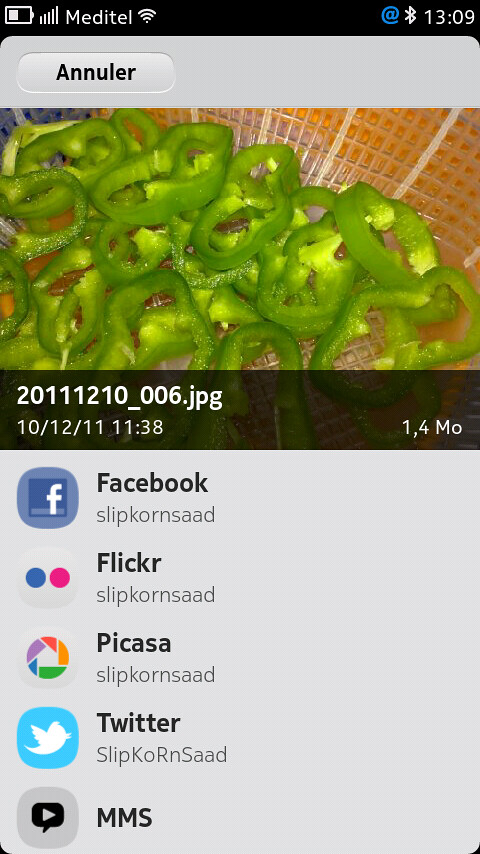
[MeeGo Harmattan] [How to] Share Pictures & Videos to Twitter From N9 Default Gallery Panel !

A simple hack (Found by ukhamitov it seems) which enables twitpic from N9 (N950) gallery !

So you can share your pictures directly from default Harmattan gallery panel manager (just like facebook, picassa etc) :

Make sure you have nano installed (Goto Settings->Security-Developer Mode-> Click Install button near utilities)


1- Open Terminal and enable root acces :
devel-su
password : rootme
2- Then type nano /usr/share/accounts/services/twitter-share.service


- The content of the twitter-share.service file will be displayed :

3- Scroll (with the help of the arrows keys) till you find something like below :

<!– <mime>image/*</mime> –>


<!– <mime>video/*</mime> –>


4- Remove comments from this code (with the help of the arrows keys) and press ctrl on the on-screen keyboard and press X and then press Y and click enter to save the modified file !

Tadaaaaa !

Ps : you can also configure max number of files to share etc.


[MeeGo Harmattan] [How to] Get MSN, ICQ, Jabber, AOL and Yahoo! In 1 or 4 steps in your N9 !

Hey hey ! What about getting all IM's : MSN, ICQ, Yahoo, AIM, IRC, Gadu-Gadu, QQ, Jabber, AOL, QIP, Vkontakte, etc on our lovely N9 (like on the N900)?

Well it's here finally !


1) Download these three files straight on the device :

LibPurple

Telepathy-Haze

IM-Providers-Additional

2 Open terminal, and gain root access using devel-su with rootme as password (unless changed).


3 Enter cd /home/user/MyDocs/Downloads


4 Then (in respective order) dpkg -i libpurple0_*.deb


(5) Then dpkg -i telepathy-haze_*.deb


(6) Then dpkg -i im-providers-additional-0.4.deb

Update :

2) You can use the Transfers view that pop-ups and single click (in respective order, otherwise installation will fail) to install (Yes, it works now) but if you're in ease with previous steps with xterm, just use it ;)

What then? Simply Restart the device you should have the various IM providers in the Accounts app.

Upgrading from a previous version :

- Download file number #3
- Use filemanager or transfer-view on your phone to find the .deb file
- click on the file, it will be upgraded automatically

If you wish to deinstall these later, simply go to  :

Programs -> Manage Programs -> im-providers-additional and select Deinstall.

You can follow this topic, this one and mainly this one for more informations and detailed guide ;)

Saturday, December 10, 2011

[MeeGo Harmattan] Photo Deformer For you N9

Photo Deformer - A cool application to make hilarious things with any photo.


You can easily make the cheerful animation turn your friend to funny character. All movies are stored on the device and you'll be in the center of attention, showing caricatures to your friends anytime.

[MeeGo Harmattan] MyTopSites : Top Site Editor for N9 Web Browser !

MyTopSites is a Top Sites editor for the built-in web browser of the Nokia N9.

Using it, you can freely modify the top sites list that's shown when you launch the browser.


You can change the title, URL, font and color background, counter, and also add new sites.

The access count is responsible for the position on the top site list in the browser. A higher value gives a more relevant position.

Note: It's recommended to close all browser windows when using this application (and vice versa) to prevent possible mess due to concurrent access of the same database by two apps.