Showing posts with label Calendar Manager Tools. Show all posts

Saturday, January 7, 2012

[MeeGo Harmattan] VSchedule : schedule an events in a simplest way !

VSchedule allows you to schedule an events in a simplest way


Tuesday, December 6, 2011

[MeeGo Harmattan] Calenderr : Daily updated Calendar app icon !

Calenderr is a simple hack to make the Calendar app icon always show today's date (day-of-month). The existence of calendar icons for each day (1-31) in the theme on the device lets suspect that this feature was either planned and then abandoned or that it will come built-in in some future firmware.


put calendarhack.conf in /etc/init/apps directory (see the comment inside)

put calenderr.sh in /home/user folder  (see the comment inside)

Or simply try this (verified) *deb  file !

More to read (support) over here !

Sunday, December 4, 2011

[Did You Know?] how Calendar Feed for N9 is developed !?

Calendar Feed  (Similar to Organiser Feed) pushes your calendar entries directly onto the event feed of your home screen, it's entirely integrated into the OS and a great example of how an application should be !

But the most interesting thing to learn, is how the application (plugin) was written ;)

Enjoy the read !

(You can translate the page with the help of an online translator)

Saturday, November 26, 2011

[MeeGo Harmattan] Organiser Feed : Show upcoming calendar events in your event feed

 Actually similar to DateEvent Organiser Feed (AKA Calendar Feed) pushes your calendar entries directly onto the event feed of your home screen.


Current Features


Per calendar settings for:
 - Inclusion in event feed
 - Maximum look ahead range (events starting beyond that range will not be shown)
 - Maximum number of entries (e.g. only show 1-2 entries at a time)
 - Recurring event support
 - Auto-update when entries in the calendar change
 - Directly jump to the event when clicked on the homescreen
 - Sort order of events (I am abusing a shortcoming in the current homescreen version for this - this may stop working at any time)
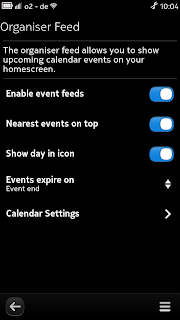


Control panel integration:

- Configure Organiser Feed via Settings -> Notifications -> Event Feeds
- Either a plain icon or the calendar icon with the correct day of the event
 - Customisable expiry time: events can be removed from feed either at the beginning of the event or at the end


Download

You can download the current version of Organiser Feed at https://www.bithub.de/philip/calendar-feed/organiserfeed_1.0.0_armel.deb

If you are updating from an earlier version (calendarfeed <= 0.9.3):


Due to the rename the package name has changed from calendarfeed to organiserfeed. So remove the old version from your phone before upgrading (either via the application manager or from the console via apt-get purge calendarfeed). Your settings will not be lost.

It will be published to the Nokia Store as soon as testing has finished.

FAQ

- How do I configure Organiser Feed?
 --> Organiser Feed can be configured via the Settings menu: Notifications -> Feed on home screen -> Organiser Feed

- The "Organiser Feed" entry is not shown in the control panel
 --> Make sure that you have restarted the Settings application (e.g. that it is not visible in the multitasking view before starting it).

Development

Organiser Feed is licensed under the GPL 3 and development happens in public in the Git repository hosted at https://gitorious.org/harmattan-organiser-feed

 If you are missing a feature or want to support development let the maintainer know.

Friday, November 18, 2011

[MeeGo Harmattan] MeeBirthdays : Create events in Calendar for contact's birtdays !

MeeBirthdays enables an automatic creation of Events in Calendar for Birthdays of Your Contacts


  1. List sort by Birth date
  2. Batch calendar events creation
  3. Batch events removal from calendar
  4. English, Russian language
For now the program uses Default calendar. You can create a new one and make it default for a while to test the program. In a future version there will be a calendar selection.

Thursday, November 17, 2011

[MeeGo Harmattan] DateEvent : Display your Calendar entries on EventScreen !

DateEvent enables you to show calendar events on the Event Screen of the N9/N950 !


known Bugs for now:

  • reccurring events are not displayed yet (reason: for the first version, we used a simple sql-query to fetch the events from the db, next version working with qtmobilty-organizer instead, looks promissing)
  • if your systemlanguage is not EN, you will get the german UI

Via : forum.meego.com

Tuesday, July 13, 2010

Scout : Search tool for contacts, conversations and calendars !

Another very cool and usefull tools from the developper of Calendar Home Widget !

Scout enables you to search for :

- Text in Contacts for names, nicknames, usernames, addresses or phone numbers.
- Calender entries with summary or description text.
- Text in your conversations.


The search result category is indicated by the different icons on the left side (contacts, calender, sms). I use two different kind of icons for sms and chat conversations and for each two different icons (with and without the blue arrow) to distinguish received and outgoing messages.

Selecting a search result has different actions:

-opens a contact details dialog for contacts
-opens the calendar app for calendar entries (agenda view)
-opens a new window with the full message text for conversations.

You can follow the official thread here ;)

Saturday, June 5, 2010

Calendar Home Widget : replacement for the built-in calendar home widget !

Calendar Home Widget opens the calendar application with different views (agenda, week, month). Can change dynamically the widget size. Selectable fixed sizes. And you can select which calendar entries (color) should be visible and a time period.


It looks like the built-in widget but with some small ui changes and some setting options.

Features:

- Set visible rows:
Small - 2 Rows
Medium - 5 Rows
Larte - 9 Rows
- Auto - Adjusts the size automatically for upto 9 rows.
- Set the date range to use to show events on the widget (1 week, 2 weeks, 1 month, ..., 1 year)
- Select visible calendars .
- Select which calendar view to open, when tapping on the event list (agenda, week, month)
- You can always tap on the day icon to open the agenda view, the week day name always opens the week view and tapping on the month label, well opens the month view.

More to read.

Wednesday, March 10, 2010

Birthday : Displays birthdays of your contacts

Birthday is a simple application for displaying birthdays of your contacts.

Available at Extras-devel repository !

Tuesday, March 9, 2010

Erminig : Google Calendar synchronization tool !

Erminig is a Google Calendar synchronization Python application to synchronize events between Google Calendar and the built-in Calendar of Fremantle !

Available at Extras-devel repository !

Monday, March 8, 2010

Alarmed : Scheduling App (supports automatic GPRS data counter resetting)

Alarmed is a small (???) App that acts as a GUI front-end to maemos alarmd scheduler back-end. It's written in python and uses the PySide bindings to Qt. (PySide is under heavy development at the moment and is both unstable and unreliable. A major new release is expected within weeks or months which will fix some of the knows issues with Alarmed.)

Alarmed enables you to do things like:

- Set a command to be executed at specific intervals (every minute, hourly, on specific weekdays, on last day of month etc...)
- Set recurring alarms
- Reset the GPRS data counter at a specific day every month or at the end of the month
- More stuff like this


WARNING: This is very much alpha: It crashes, has bugs, and it might do weird things (including - however unlikely - completely bricking your device). Do NOT use it if you expect it to work properly. Also read everything in this post before installing it! All of the known issues I can't do anything about except possibly workaround, as they're caused by bugs in PySide and pymaemo.

Planned future features:

- Support for intervals in seconds/minutes/hours etc.
- Better list of current items (waiting for new PySide release because of missing functions)
- Built-in functions for switching to the "General" or "Silent" profiles respectively
- Check if command is valid, possibly support for command line arguments
- Built-in function for sending SMS/Email

Known issues/bugs:

- Long startup time: Due to the current PySide implementation (boost). Will get much better once the new release is out (called Shiboken).
- Segfault (crash) after opening "New Event" or "Edit" three times or more: Bug in PySide, sorry
- Slightly weird banners: Bug in PR1.1 Qt, will be fixed in PR1.2 Qt.
- Adding a D-Bus call does not work: Bug in pymaemo, can't do anything about that.
- Command exec does not support command line arguments. Restriction in alarmd. You'll need to write a script and put it somewhere to execute a command with arguments.

More details over here !

Tuesday, February 23, 2010

datetoday-home-widget : shows the current day of month !

datetoday-home-widget is a a desktop widget that shows the current day of month.

Mimic the calendar shortcut and shows the current day of month as date sheet. Tap to open the calendar application. The default calendarview (month, week, agenda) and the widget icon size is configurable.


Available in Extras-devel repository !

Thursday, February 18, 2010

Badge : Qt Badge application !

Badge is a software to record the times of exit, entry and rests on the working day :

Click on day of interest to insert times


Select search from menu to calculate total hours spent at work in the interest period


You can download it from Extras-devel repository !

Monday, February 8, 2010

showtime : A global TV channel list viewer with calendar reminder integration !

showtime downloads xmltv data depending on the region selected and displays the tv channel listings , in most cases for an entire week.

The user can then view details of the programme and select them to be added to his calender.

The app can also send the messages to perform remote recording of selected programmes, but currently this is limited to the UK region. Can be added to any region if information about such a service is available.

Download it from Extras-devel or Extras-testing reository !

Friday, February 5, 2010

OSX N900 iSync plugin 1.1 released

OSX N900 iSync plugin enables the synchronisation of contact, calendar and task information between the N900 and any computer running OS X 10.5 or greater.

The current outstanding issue is that events created on the N900 with an alarm will not appear on the Mac, this is due to an issue with the N900, not the plugin. The plugin currently only works over a bluetooth connection, and you will need to install the "Bluetooth Dial-Up Networking" package on your N900 so iSync can find it.

This new release adds the ability to sync over a USB connection, and fixes a bug with the handling of custom labels. Please see the release notes/changelog for full details.

Download it from here !

Tuesday, February 2, 2010

MaePad : Notetaking application

MaePad is your application for creating texts, drawing sketches and managing lists of things. You can manage the information you are working with by using a node tree that can grow as big as you want.


MaePad is available for Maemo 5 and integrates into the system with a seamless, user-friendly UI that lets you get things done quickly. 

If you are feeling adventurous, please try out MaePad 1.0, which is available from Maemo Extras-Devel now.

Sunday, January 31, 2010

SimpleNoteWidget : a simple note desktop widget !

SimpleNoteWidget is a desktop widget for taking simple notes (press the lower side of the widget for edit the note)


Available at Extras-devel repository
