Showing posts with label GPS. Show all posts

Sunday, February 5, 2012

[MeeGo Harmattan] Track@Way : Track Your Way !

Track@Way is the successor to FreeTrack. Whatever reference you have for FreeTrack, you arrived in the right place now!


Track@Way is an Open-Source (released under GPLv3 license) application for mobile phones which lets you track your way using the embedded GPS in your mobile phone (or, where supported by the phone, an external GPS antenna).

Many use Track@Way (spelled "track-a-way") during their sport activities, some uses it during their travel to geoference their photos, some use Track@Way just for fun! Myself, i use Track@Way for my sport activities and leisure vacation.

Suppose, for example, that you go out for trekking in the mountains: Track@Way in its most basic usage can record where you have been so that you can review later your path, project it on a map (check gpsvisualizer.com for a free converter tool for Google Maps and Google Earth) or even reuse it as a guide for your next trekking in the same area!

If you have some more time to set up Track@Way, you can add a map to it (check the map section of the forums for some maps aready available, or just use the maps that you already own) and check your position on the map in real time...

Track@Way uses your phone internal GPS receiver or an external Bluetooth GPS antenna, if you have one, to find your position. It can use A-GPS or simple GPS devices, it can also use network-based localization if it is available on your mobile.

Friday, December 23, 2011

[MeeGo Harmattan] Speed Display : Flexible speedometer !

If you are you in need of a speedometer then Speed Display is just the app for you.

It displays the speed in km/h, mph, m/s, ft/s or in knots. The display can be inverted so that it can be used as a HUD display in a car with several color alternatives.


Features:
- Low energy consumption (most of the screen is black)
- Screen stays lit as long as application stays on
- Automatically adjusts the screen brightness to max when HUD mode is set
- Portrait and Landscape mode


Press anywhere to bring up settings button.

Thursday, December 22, 2011

[MeeGo Harmattan] Nokia Pulse : the new way to check-in !

Nokia Pulse brings your everyday conversations to life by automatically tagging photos and updates with your location.


Every conversation, from pickups and drop-offs to meet-ups, is as instant, private, and simple as sending a text, but far more useful and engaging. Nokia Pulse is integrated with Maps, so finding people nearby, discovering new places, and getting directions is a snap.
Group Conversations:
Keep it Private. Keep it Personal. Keep it Real.
  • Private check in – All your conversations stay private and safe
  • Photo check in – Automatically tag your location to all your photo updates
  • Private by Default – No complicated privacy settings needed
Live Places:
One tap and they know where you are. Two taps to get you there.
  • Bring your favorite places to life – Post a favorite place to a conversation
  • Discover what’s nearby – Make and view recommendations of nearby places of interest
  • Getting there is a snap – Get directions directly from the recommended place
Your People:
Your Family. Your People. You Decide.
  • Instant: Receive instant on-device notifications of all new updates
  • Open:  Everyone with an email address can participate
  • Easy:  Sending and receiving messages with Nokia Pulse is as easy as SMS
  • Powered by the cloud: Your conversations are saved in the cloud for as long as you need them
  • Accessible from anywhere: Nokia Pulse is available on multiple touch-points - desktop web, mobile web, Windows Phone and Symbian devices


    Known issues on N9 * Nokia Account login can be flaky on PR 1.0 and PR 1.1, especially during the initial authentication. Possible resolutions to the issue: Ensure you have network access Restart the client Restart the device Remove your Nokia Account via the Account manager, restart the device, and add it back Try again later Updating to PR 1.2 when available will fix the problem entirely * Network latency can cause duplicate posts/comments sometimes * Device notifications of Pulse activity can only be sent to one device per Pulse/Nokia user. If you have multiple devices using Pulse with the same Nokia account credentials, then only the most recently registered/started client will receive notifications. * When sharing an image from the gallery only portrait orientation is available for browsing * Two sessions can be launched at the same time when one is launched via a notification and the other is launched via the menu

Wednesday, December 14, 2011

[MeeGo Harmattan] Nokia Live View : Augmenting Reality Everywhere !

A new way to easily find information and services on the go

Have you ever wished you could spot the closest restaurant or ATM?

Nokia Live View is a fun and easy way to discover what is around you. Simply launch the app on your phone and Live View will display the points of interests in the Camera viewfinder view/ List view.

Nokia Live View connects you to what you’re looking for – and more – exactly when and where you want it.

With Live View you can :

Select your interests in many different categories – Live View will filter the points of interests and present your choices

Know your options – get details, read reviews of restaurants and hotels

Enjoy the place – with one tap you can make a reservation, or navigate to the location via turn by turn walking map

Download Instructions :

If you are first time installing the application from non-Store sources, you must go to Settings → Applications → Installations and enable the option "Allow installations from non-Store sources”.

When installing, if you are asked to verify whether you wish to install software from an uncertified source. Select "I agree".

Make sure on your N9 device that you have selected "Allow background connections" (Settings → Internet connection and enable the option "Allow background connections").

(.deb, 1.5 MB)

Option 1: The easiest way to install this app is to browse this page on your Nokia N9 web browser. Then download the Live View app file (*.deb) and after the file transfer is complete successfully, click the file to install the app on your device. Once the app is successfully installed, you can open it from Applications Screen.

Option 2: Setup the Bluetooth connection with your PC (Nokia N9 Product Support available here: http://europe.nokia.com/support/product-support/n9). Download Live View client (*.deb) to PC and transfer the file to N9 device over Bluetooth connection (works only in “without authentication” mode). After the file transfer is complete successfully, click the file to install the app on your device. Once the app is successfully installed, you can open it from Applications Screen.

Friday, December 2, 2011

[MeeGo Harmattan] Drive Logger : track your mileage !

Drive Logger is a driving log for enthusiastic/professional drivers. Use your mobile's GPS to track your mileage. Automatic address search and easy to use interface.

The distance measured by GPS can vary greatly depending on weather conditions, satellite positions and numerous other random things that can't be 100% taken into account. Always use the odometer of your vehicle to verify distance readings.


The application starts up in the 'New log' view and starts to locate your position right away. 'Location' shows your current location in text form. If you have started logging, the next three fields show information about the current trip. A new log can be started by pushing the button in the lower part of the screen. The text in the button changes from 'Wait for position' to 'Start logging' after position is deemed to be accurate enough. When the logging is not running, you can turn off the GPS with 'GPS off'.

Diary View:


Diary view shows the logs stored in the database. Click a log to display detailed information. To delete a log, press and hold on one log and from the opening menu, choose 'Remove'.

Details View:


Detail view shows detailed information about the log. You can edit start location, end location and odometer distance to your liking. Also log specific notes can be added in the field 'Notes'. Save your changes by clicking 'Save'

Utilities View :

Utilities view contains basic settings. You can set whether the GPS distances are shown in kilometers or in miles by flicking the switch 'Use imperial units'. If you want the application to show address of your location instead of coordinates, switch 'Automatic address search' on. This feature requires active internet connection to operate.

UPCOMING UPDATES

- Statistics view
- UI improvements

 Please send feedback, bug reports, feature requests, etc to : twoeufeedback@pp.inet.fi

Tuesday, October 25, 2011

[MeeGo Harmattan] Nokia City Scene : Explore cities

Explore cities in 3D with Nokia City Scene from Nokia Research Center. Click on buildings to browse their stores and services, or use search to jump to what you are looking for. Connect to your social networks to find friends' check-ins or share locations. Now featuring about a dozen US cities with coverage expanding both in the US and to Europe.

The application combines NAVTEQ street imagery, building models and terrain data to create interactive panoramic street scenes. It uses building models to make buildings clickable, and to present information right on the building facade, so you can discover information just by browsing along a street.

You can use City Scene's location aware search to jump directly to a panoramic view of the place you're looking for, so you'll recognize it when you go there. The application lists your friends' Foursquare and Facebook check-ins so you can jump to where they've been. You can also share "postcards" of locations complete with street address (maybe suggesting a place to meet for coffee later). The Featured Cities list will grow automatically as NAVTEQ completes more drives.


Head over here ! 

Monday, August 22, 2011

[MeeGo Harmattan] CloudGPS : hw accelerated silky smooth maps !

CloudGPS (known for our lovely N900) is a mapping application using OpenGL ES to display hw accelerated silky smooth maps :


GPS, accelerometer and digital compass are not supported yet !

Install instructions:

1. Install SDL 1.2 from this link. More info about SDL in this thread.

2. Install cloudgps package.

Installing a package may fail when done directly from web browser. In that case please try installing it using:

Code:
dpkg -i <package_file.deb>
as root from terminal.

Start app using icon on home screen. Sources are available here.

Thursday, March 17, 2011

omvoiceserver : A voice server for Ovi Maps to allow spoken directions

omvoiceserver is a voice server for Ovi Maps to allow spoken directions as well as enable future features and functionality

Wednesday, February 23, 2011

Latitude Assist : Keeps you alerted about children, family & friends !

LatitudeAssist is a mobile application Keeps you alerted about children/family/friends outside previously setting of secured area (geo-fence) more than enough to know that your child/family/friends are where they should be! Still.

Includes SOS tool that allow you to set up to 3 SOS Mobile numbers are used to request help or emergncy.

More to read

Saturday, January 15, 2011

Ovi Maps Extra Features : Voice guidance, Real turn-by-turn, 3D buildings And more !

Thanks to the community to bring us all the features we've always missed in the Ovi Maps for the N900 ! Yeah you hear it right !

The community goes ahead to provide us a true turn-by-turn navigation and voice guidance! The tweaks are currently a work-in-progress but already usable !

You can see how it goes over this thread, i'll try it ASAP !

Sunday, October 3, 2010

Here and Now: what's on near you now !

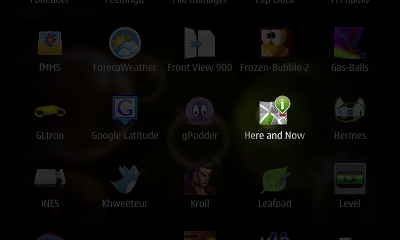
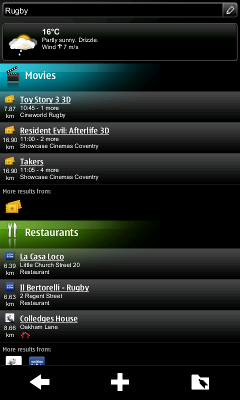
Nokia's N8, a Symbian^3 device, comes with a service called Here and Now. This reads the cell tower information you're currently connected to and opens a web page detailing the current events (cinema listings and weather, for example) near you. Jaffa has done a quick port to Maemo 5 and the N900.

Once installed, you can launch it like any other application:


Without using a GPS, it sends your approximate position to Nokia's servers and shows you what's currently going on:


Friday, July 16, 2010

FlexiSPY : Very First Spy Application For Maemo 5 !

So far there hasn’t been any spy phone vendors willing to allocate the resources needed to create Maemo spy phone software due to the small number of handsets in the marketplace.

FlexiSPY is able to secretly capture SMS, Call Records, Instant Messages, GPS Locations, listen to surroundings and intercept live phone calls.

-  GPS Tracking: This will enable you to secretly track the N900.
- Text Message Logging: Using Maemo spy software, you will be able to view incoming and outgoing text messages sent/received from the N900.
- View Call History: Find out who the person you are spying on is calling. Call duration and number information provided.
- Remote Monitoring: This Maemo spy feature will enable you to secretly listen in on the immediate surroundings of the Nokia N900.
- Live Call Interception : This Nokia N900 spy phone feature is most requested, but also the only one that is less likely to be available when Maemo spy software is released. Using ‘live call interception’ you will be able to secretly listen in on live phone calls placed using the N900.
- Remote Picture Video Grab: This Maemo spy feature enables you to remotely grab pictures and videos stored on the N900, so you can see what “secret” photos are on the phone.

if you two want a copy read this !

Thursday, March 18, 2010

Sygic Mobile Maps for Maemo !

Sygic Mobile Maps turns your phone into a turn-by-turn voice guided navigation system.

Crystal-clear animated 3D maps, intuitive address search, fast route calculation, lane assistant, signpost information, notifications about upcoming petrol stations and restaurants – Sygic Mobile Maps is featuring all of these innovations to guide you precisely to your destination.


· Maps included: Andorra, Austria, Belgium, Bulgaria, Croatia, Czech Republic, Denmark, Estonia, Finland, France, Germany, Gibraltar, Greece, Hungary, Ireland, Italy, Latvia, Liechtenstein, Lithuania, Luxembourg, Malta, Monaco, Netherlands, Norway, Poland, Portugal, San Marino, Slovakia, Slovenia, Spain, Sweden, Switzerland, Turkey, United Kingdom, Vatican.

· Maps with transit roads only: Albania, Macedonia, Serbia, Belarus, Moldova, Montenegro, Bosnia – Herzegovina, Romania, Ukraine.

Buy it : 59.99 EUR

Thursday, March 4, 2010

Ovi Maps Loader for Nokia N900 now available !

Forget about that tutorial ! Now you can pre-load the Maps into the device without a headache !


Download it ! 

 Via : maemoitalia

Sunday, January 31, 2010

TuneWiki SMP : Brings media player, youtube, shoutcast and lyrics !

Have you ever wondered "what is she singing?", or just wanted to read the lyrics of your favorite artist? Then TuneWiki Social Music Player is the app for you. TuneWiki combines a global community of music lovers with the most advanced music player in the world, allowing you to view lyrics in 'karaoke' style, see what others play around you, understand the lyrics in languages other than your own and check who else plays the music you play - around the corner or around the globe.


You may already have the TuneWiki widget that shows you the lyrics from songs you have loaded and play on your device, but this new application also lets you play Internet radio and watch music videos with lyrics.


Awesome !

You can download it now from the Ovi Store.

[How To] Install maps without using Map Loader

I was thinking that connecting N900 to mass-storage mode and use the latest Nokia Map Loader 3.0.28.0 will allow me to install my maps without a headache, but i was wrong, it simply does not work...the Map Loader just keeps blinking that it's waiting for a phone (on both windows xp and 7) ! You know, it says the maps application is not open when connected through PC Suite mode and keeps blinking when it's connected through mass storage mode...so i started looking for some work around to this "bug" (?) till i remember an old way to do it, like on the first Nokia's map (ovi maps) releases...

Just to know, Nokia Map Loader downloads the maps as a zip file from http://static.s2g.gate5.de/maploaderzip/0.0.7h/[NUMBER].zip to a temp folder, and then unzips the content to the memory card. [NUMBER] is an ID, each country has its own.

After running Ovi Maps on the N900 once before you add any maps or voices (This will create the required folder structure on your memory card), all you have to do is to :

1. Download the map of your country from the link on the page
2. Unzip the map file, which contained subfolders called 0 to 9 and a to f
3. Connect the n900 in mass storage mode.
4. Open the folder Cities\diskcache (You may need to tell your computer to show hidden files and folders)
5. Copy/paste the downloaded files (the unzipped map files to the above folder on the n900)
6. Windows will pop up a message saying these folders exist. Just select replace with the new items.
7. Disconnect the phone, opened up Ovi Maps and the maps will be there.

I'm not sure we'll have the latest maps releases with this workaround, you have to use a tool like Fiddler to track HTTP update traffic...

Anyway, if you have some questions, feel free to leave them on comments ;)