Showing posts with label PIM Manager. Show all posts

Thursday, March 8, 2012

[MeeGo Harmattan] Firewall+ Pro : SMS/Call Blocker !

Firewall+ Pro for Nokia N9(50) can prevent unwanted call and SMS quietly, automatically and flexibly. Based on blacklist and whitelist, which support import from call log, SMS log and Contacts, flexible block rules can be applied as you want. With schedule mode, Time based rules are allowed, so set it up and forget! Also, rich blocked log informations and number matched count can be saved for checking.


More screenshots

Saturday, January 7, 2012

[MeeGo Harmattan] VSchedule : schedule an events in a simplest way !

VSchedule allows you to schedule an events in a simplest way


Friday, January 6, 2012

[MeeGo Harmattan] Who Called Me?

Probably you are receiving sms messages from mobile operator with missed call notification. In that message is written missed call number, but not the contact name.

Who Called Me helps you to find out contact name by searching that number in your phone address book. The application gives you an option of callback or you can simply answer with sms.


Another concrete usage is when friend asks you “Do you know whose number is this? Do you have it in your address book?“

Download it !

Friday, December 30, 2011

[MeeGo Harmattan] Incoming Call UI MOD !

Incoming Call UI MOD (mainly) make the Incoming Call Avatar much larger !


Installation:

1. Download and using PC, extract zip into root directory of device via USB Mass Storage

2. Open Terminal app and type:

Code:

devel-su
rootme  [root password, default is shown]
sh /home/user/MyDocs/phoneuiMOD-install.sh
3. Device will automatically reboot.


Removal:

1. Open Terminal app and type:


Code:
devel-su
rootme  [root password, default is shown]
sh /home/user/MyDocs/phoneuiMOD-remove.sh
2. Device will automatically reboot.


Changelog:

Version 1.1 (30/12/11)

- Enlarged Answer & Reject buttons

- Adjusted position of avatar, buttons and labels


Version 1.0 (30/12/11)

- Avatar is now 470 x 470 pixels, up from default size of 64 x 64 pixels

- Rearranged buttons to accommodate larger avatar


Download Current Version

V 1.1 (30/12/11)


Please, Support Development

Monday, December 26, 2011

[MeeGo Harmattan] Advanced Call Recorder : record your telephone call in the background !

Advanced Call Recorder helps you record your telephone call in the background like Call Recorder.


Auto recorder agent automatically starts when the device starts.

Auto recorder detects outgoing and incoming calls and records them with caller ID tags.


Sort your recordings by month ,date & caller ID.


It also can be used as a general voice recorder.

You need to restart your device once after installing this application.

Tuesday, December 6, 2011

[MeeGo Harmattan] Calenderr : Daily updated Calendar app icon !

Calenderr is a simple hack to make the Calendar app icon always show today's date (day-of-month). The existence of calendar icons for each day (1-31) in the theme on the device lets suspect that this feature was either planned and then abandoned or that it will come built-in in some future firmware.


put calendarhack.conf in /etc/init/apps directory (see the comment inside)

put calenderr.sh in /home/user folder  (see the comment inside)

Or simply try this (verified) *deb  file !

More to read (support) over here !

Sunday, December 4, 2011

[Did You Know?] how Calendar Feed for N9 is developed !?

Calendar Feed  (Similar to Organiser Feed) pushes your calendar entries directly onto the event feed of your home screen, it's entirely integrated into the OS and a great example of how an application should be !

But the most interesting thing to learn, is how the application (plugin) was written ;)

Enjoy the read !

(You can translate the page with the help of an online translator)

Thursday, November 24, 2011

[MeeGo Harmattan] ContactLaunch : add your contacts to the launcher !

ContactLaunch is an application that allows you to add your contacts to the N9 application grid, for quick access.

It is priced at 1€

 Original post ;)


Sunday, August 21, 2011

[MeeGo Harmattan] EasyList : Easy to use shopping/todo list application !

EasyList is an easy to use shopping/todo list application. You can create your list in a text area. Each new line depicts a new list item.


Download it !

Saturday, April 30, 2011

Groupsms : send SMS to group of numbers !

Groupsms is an application to send SMS to group of numbers.


Create your groups, add numbers from contacts, send SMS.

Wednesday, April 20, 2011

SMSCounter : counts SMS and calls between given dates !


SMSCounter counts SMS and calls between given dates. It also plots the info in a bar chart.


Monday, July 26, 2010

Extended Contacts Search : Plugin to extend search feature of Contacts !

Extended Contacts Search is a plugin that extend the main view's live search algorithm. Additionally to search into contact's display name, it also look for nickname, phone numbers, emails, and IM usernames.

Contact zoom : Plugin for Contacts app to view contact info with bigger font !

Contact zoom is a Plugin adding a menu entry in Contact's view to display the vCard with bigger font, making it much more readable !

Saturday, July 10, 2010

FrontView - Turn your mobile phone into a document scanner !

FrontView900 turns your N900 into a document scanner that use the build-in camera to take snapshots of hand written notes, typed document, name card, etc. Then FrontView converts them into a flatted document image by de-skewing automatically.


Features :

1) Image de-skewing - Convert perspective view image of hand written drawing / notes to front view
2) Paper auto-detection
3) Manual/ semi-automated detection mode for complex image (e.g Use stylus to draw out the input region, the region will be corrected by FrontView900 automatically.)
4) Misc features: image crop , rotation

Monday, June 28, 2010

Pomodoro : time & task management application !

Pomodoro is a task management application based on The Pomodoro Technique ideology by Francesco Cirillo. The idea of the application is to help users organize their daily tasks and easily keep track work progress. The Pomodoro application has been written in C++/Qt and has been designed particularly for Maemo devices (e.g. Nokia N900).


Main Features:
- Adding and removing of tasks, a task list
- Internal and external interruptions record
- Visible and audible timer
- Short guide into usage
- Automatic daily archiving of completed tasks

If you want to test it, download the deb file over here and drop your feedback here !

Saturday, June 26, 2010

Sticky Notes : create sticky notes on your desktop !

Sticky Notes is a little application that lets you create as many notes on as many desktops in as many colors as you want!


- It has a sexy UI
- It is easy to use
- It saves your notes automatically
- It is finger-friendly
- It is also optified

FAQ

Q: Why is this stuff better than the existing notes widgets?
A: Because you may have as many notes as you want. There is no limitation about how many notes you can have. You can also set their colour to any colour you like.
Q: What do the buttons do?
A: The first (+) creates another note with same color. The second (•) lets you change the colour, and the third (×) deletes the note.
Easy, isn't it?
Q: Can I have [my favourite feature] implemented?
A: Sure! Just post your idea in a reply in this thread!
Q: Will it crash hildon-home?
A: No, it runs under its own separate process.
Q: How does it work?
A: It saves your text automatically, 3 seconds after you finished typing.
Q: Why does it always run in the background?
A: This is pretty much required for it to operate correctly, see detailed answer here.

Planned features

- Ability to resize the notes
- Ability to change font (size/color)
- Ability to move the widgets around (somehow) without entering edit mode.
- Basic text formatting (bold and such)

If you have some ideas, drop them here !

Thursday, June 17, 2010

Jenirok : Searches unknown callers' details automatically using Eniro person search or 1881.no !

Jenirok Searches unknown callers' details automatically using Eniro person search or 1881.no.


Screenshots from meego.de

Unknown callers' details are fetched automatically during call using Eniro person search or 1881.no (for Norwegian users). Person search can also be done by using a gui application. Jenirok is currently mainly usable for Finnish, Swedish, Danish and Norwegian users.

Wednesday, June 16, 2010

PenPen SketchBook : Quick note taking / drawing !

PenPen StetchBook is a replacement of the built- in app "Sketch" in Nokia N900. It is a vector graphics drawing tool. The user interface is specialized for quick note taking.


Features :

- Vector graphics
- Unlimited size of sketch area
- Support to erase stroke by single click and drag. Word removal is easier
- Support auto-saving. No. of clicks are minimized.
- Multiple sketch viewer
- Support auto-orientation
- PNG export

Saturday, June 5, 2010

Contacts-merger : Merge your duplicate contacts !

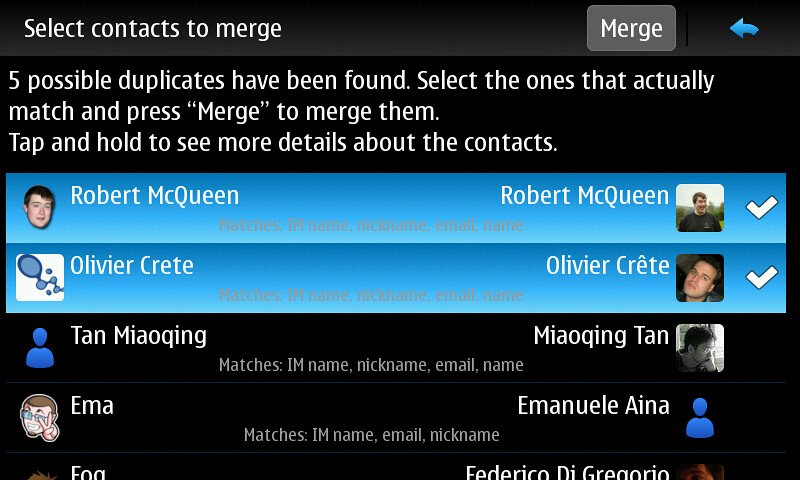
Contacts-merger finds probable duplicate contacts and allow the user to easily merge them.


After installing Contacts Merger you have to reboot your phone and then you will get a “Find duplicate contacts” button in the menu of the main address book window.

Available at Extras-devel repository.

Calendar Home Widget : replacement for the built-in calendar home widget !

Calendar Home Widget opens the calendar application with different views (agenda, week, month). Can change dynamically the widget size. Selectable fixed sizes. And you can select which calendar entries (color) should be visible and a time period.


It looks like the built-in widget but with some small ui changes and some setting options.

Features:

- Set visible rows:
Small - 2 Rows
Medium - 5 Rows
Larte - 9 Rows
- Auto - Adjusts the size automatically for upto 9 rows.
- Set the date range to use to show events on the widget (1 week, 2 weeks, 1 month, ..., 1 year)
- Select visible calendars .
- Select which calendar view to open, when tapping on the event list (agenda, week, month)
- You can always tap on the day icon to open the agenda view, the week day name always opens the week view and tapping on the month label, well opens the month view.

More to read.