Showing posts with label System tools. Show all posts

Sunday, January 1, 2012

[MeeGo Harmattan] Shutdown : shutdown or reboot with one click !

Shutdown is a simple Utility to shutdown or reboot your N9 :


but its particularity is that there is an option to create two one-click icons for reboot and shutdown which will appear on the homescreen.


FAQ :

How do I delete the 1-Click icons (shutdown, reboot)?

You will have to manually delete crochik-shutdown.desktop and crochik-reboot.desktop from /home/user/.local/share/applications. You can do this using the x-terminal or a file manager (please note the /home/user/.local is a hidden folder).

I have installed version 0.0.1

In order to see the new icons you first need to remove manually the 1-click shortcuts (see above)

Download it !

Thursday, December 22, 2011

[MeeGo Harmattan] BackLighter : disables the screensaver from dimming !

Don't want the device screensaver to go on when using applications like speedometers, timers, etc.? BackLighter does just that.


BackLighter disables the screensaver from dimming the device while the application is left running and set to ON. The screensaver can be once again enabled by setting the switch to OFF position or by closing the application.

BackLighter also makes it possible to adjust brightness with several convenien settings.

Saturday, November 26, 2011

[MeeGo Harmattan] QAD Cleaner : cache cleaner for N9 !

QAD Cleaner is an application cache cleaner for N9/N950.

Features

- Check how much space ~/.cache and ~/.grob/cache are consuming
- Clear cache folders


Bug Tracker

- coming soon, meanwhile you can send the maintainer an email using juhapekka@jpii.fi.

Saturday, June 18, 2011

Catorise PLUS : create your menu the way you want !

Catorise PLUS combines "catorise" and (a better version from) "Catorise GUI".

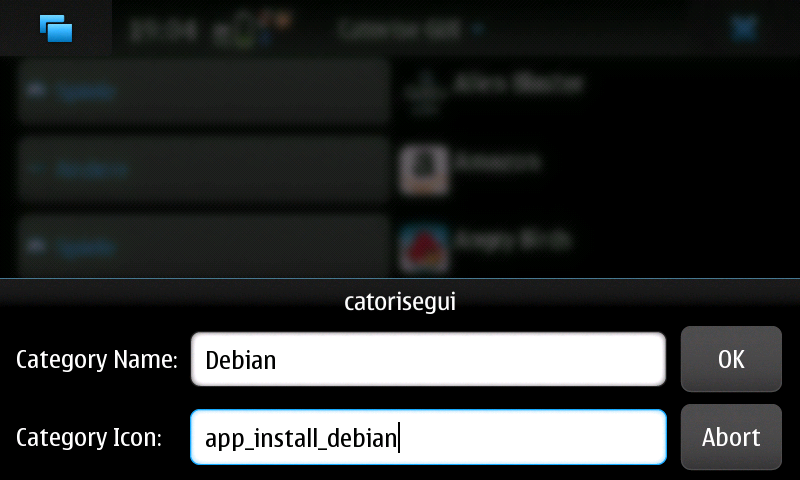
You don't need anymore two package, that's enough alone. With this Application you can create your menu like you want. You can add, delete and edit categories and icons.


As packages are installed and removed, the menu is kept up-to-date, When you create or delete categories, it takes a little bit. no panic! It depends not and the system does not crash.


To revert to the Nokia-supplied default, simply uninstall.

Wlan Driver Selector Applet : Switch easily between stock and bleeding edge drivers !

Wlan Driver Selector Applet is a little status area applet which lets you switch between stock and bleeding edge drivers It also has a possibility to shut down WLAN complitely.


How?
  • Install kernel-power (>=v46-wl1)
  • Download the bleeding edge drivers with the applets wizard, if you don't have them allready
  • First time when you bleeding edge drivers, it will ask for the folder where you saved the drivers, if you didn't use the applet's wizard

Applet is not showing up? You could try to run this as root:

Code:
apt-get install python python-hildondesktop
reboot
apt-get install --reinstall status-area-wlan-driver-selector-applet
My drivers are not located in MyDocs or memory card. How to select?

Code:
gconftool-2 --type string --set /apps/wlan_driver_selector/driver_folder /path/to/drivers/

Thursday, March 24, 2011

saveCPU : overheating control for overclocked n900 !

saveCPU is a script that controls the temperature through the bq27200 module and, if the n900 was overclocked, it reset the standard clock and turn on the LED.

The overclock will be automatically restored when the temperature drops 5 degrees Celsius below the alarm temperature.

Through the graphical interface you can set:

- LED color
- activation temperature
- waiting time for each control
- enable / disable control


If enabled, the script will be launched each time the n900 starts.


Saturday, March 19, 2011

OptimizeN900 : Virtually reboots your N900 !

OptimizeN900 is a script written originally by JorgeFX that refresh several processes like if you are rebooting your N900. It does not reboot or causes sudden battery drain like what happens when you reboot the N900.

Please be aware that the screen will show weird stuff but it is normal because the ALL UIs and Hildon are restarting.

Sunday, February 13, 2011

Low Battery LED : Signals low battery via the notification LED

Low Battery LED Installs a new LED notification pattern to signal low battery and you can configure it with LED Pattern Editor

Monday, March 22, 2010

CuteExplorer : Filemanager for maemo5 using Qt !

CuteExplorer is a Filemanager for maemo5 using Qt can explore the real filesystem and send files via bluetooth.

Available on Extras-devel.

Phone Speakers Switcher : Switching on/off speakers in a handy way !

Phone Speakers Switcher Eases switching on/off speakers while on the phone.

It turns the speakers on or off by sliding the keyboard out or closing it respectively while the call is active - making and answering the call (not while receiving/ringing)

Available shortcuts are:
  • Sliding out/in keyboard turns on/off speakers respectively
  • Half pressing and releasing the camera button (it turns speakers on if they are off and vice versa)
  • Uses proximity sensor to turn on/off speakers while on the phone
  • Long half pressing camera button ends the ongoing call
  • Open dashboard when the speakers are turned on.

Friday, March 19, 2010

Fcron : schedule anything at anytime !

Fcron is standard Linux scheduler used to schedule any command at any time. So this means that it doesn't have any limits and you can schedule just about anything. It is run as daemon in the background so you don't need to worry about it. You set it up with a config file which contains schedule.

Alternatives:

cron: Why not? - Cron is older than fcron and doesn't sleep between events.

anacron: Why not? - Anacron is used to schedule daily jobs, fcron can schedule to seconds.

ses: Why not? - Ses is buggy, buggy and buggy. It doesn't even uninstall properly.

Alarmed: It is the best alternative with a big plus (GUI), but also a big minus (no CLI). You can use custom command, so you can schedule anything, but you can't schedule it anytime (alarmed daemon doesn't provide an option for every possible time). It also needs python (because of the GUI, daemon itself doesn't need it), which consumes space.

You can use this simple yet powerful tool to schedule just about anything at anytime. You can schedule:

- profiles
- backup scripts
- resetting the GPRS counter every month
- disconnection and connection of mobile network or internet
- 3G/2G/Dual radio modes
- NTP update
- email notify/refresh
- brightness level
- locking
- rebooting
- your own scripts
- ...

The wiki entry covers why is using fcron the best way for scheduling events, installation and configuration guide and some scripts.

Wednesday, March 17, 2010

ConnectNow : internet connection switch widget !

ConnectNow is a desktop widget to switch internet connections and can be used to connect to a specific internet connection.

Available at : Extras-devel

Tuesday, March 16, 2010

Activity Manager : have multiple activities a'la KDE's plasma !

Activity manager (actman) is a status menu applet that allows the user to have multiple activities (a'la KDE's plasma). An activity is the set of all desktop widgets, bookmarks and icons along with the background.

For example, it is possible to have an activity named "car" where the desktop is customized to be easily accessible while driving without having many icons. Then another activity named "games" to include shortcuts to games. Then another activity named "clean" without any widgets on the desktop in order to conserve battery.

Activity manager comes along with a command-line tool (/usr/bin/activity) that can be used by other applications, scripts or automations in order to handle desktop activities.

Available :  Extras-devel

Saturday, March 13, 2010

Media Player Status Area Applet

Media Player Status Area Applet allows you to see the name of the song, album art (if available) and artist in the Status Area and allows for the quick launching of "Now Playing".


Available at Extras-devel repository

Monday, March 8, 2010

Alarmed : Scheduling App (supports automatic GPRS data counter resetting)

Alarmed is a small (???) App that acts as a GUI front-end to maemos alarmd scheduler back-end. It's written in python and uses the PySide bindings to Qt. (PySide is under heavy development at the moment and is both unstable and unreliable. A major new release is expected within weeks or months which will fix some of the knows issues with Alarmed.)

Alarmed enables you to do things like:

- Set a command to be executed at specific intervals (every minute, hourly, on specific weekdays, on last day of month etc...)
- Set recurring alarms
- Reset the GPRS data counter at a specific day every month or at the end of the month
- More stuff like this


WARNING: This is very much alpha: It crashes, has bugs, and it might do weird things (including - however unlikely - completely bricking your device). Do NOT use it if you expect it to work properly. Also read everything in this post before installing it! All of the known issues I can't do anything about except possibly workaround, as they're caused by bugs in PySide and pymaemo.

Planned future features:

- Support for intervals in seconds/minutes/hours etc.
- Better list of current items (waiting for new PySide release because of missing functions)
- Built-in functions for switching to the "General" or "Silent" profiles respectively
- Check if command is valid, possibly support for command line arguments
- Built-in function for sending SMS/Email

Known issues/bugs:

- Long startup time: Due to the current PySide implementation (boost). Will get much better once the new release is out (called Shiboken).
- Segfault (crash) after opening "New Event" or "Edit" three times or more: Bug in PySide, sorry
- Slightly weird banners: Bug in PR1.1 Qt, will be fixed in PR1.2 Qt.
- Adding a D-Bus call does not work: Bug in pymaemo, can't do anything about that.
- Command exec does not support command line arguments. Restriction in alarmd. You'll need to write a script and put it somewhere to execute a command with arguments.

More details over here !

Monday, February 22, 2010

powerlock : Lock/unlock device on single press of power key !

Self explanatory, powerlock enables to lock/unlock device on single press of power key !

Available on Extras-devel repository !