Showing posts with label WLAN Tools. Show all posts

Sunday, October 2, 2011

WiFi SMS : Answer and Send SMS From your Computer !

WiFi SMS forwards your sms to your computer over wifi or usb-networking so you can answer them with your usual keyboard at home.

It consists of two parts :

- The client application on the N900 which connects to WiFi SMS on the computer


- The server application which will actually run on Windows with .NET 4 installed. (Usually this should be no problem)


The application features are:

- Sending and receiving SMS to and from the computer
- Transfering your phonebook from the phone to the application on the computer where you can choose the people you would like to write to.
 - Sending one sms to multiple recipients (Just hold down ctrl and choose contacts)
 - See who has written you an sms (it shows the full name from your phonebook)
 - Supports every TCP/IP-based connection ways.
 - You can start an accesspoint and connect your device to it or use MAD Developer to get a network over usb.
- Client works in portrait and landscape mode! (Although portrait might be useless because of debugtext wrapping)

Ps : i think this is more reliable than ovi suite (with bluetooth) which often don't recognize the N900...

Original topic for feedback ;)

Saturday, June 18, 2011

Wlan Driver Selector Applet : Switch easily between stock and bleeding edge drivers !

Wlan Driver Selector Applet is a little status area applet which lets you switch between stock and bleeding edge drivers It also has a possibility to shut down WLAN complitely.


How?
  • Install kernel-power (>=v46-wl1)
  • Download the bleeding edge drivers with the applets wizard, if you don't have them allready
  • First time when you bleeding edge drivers, it will ask for the folder where you saved the drivers, if you didn't use the applet's wizard

Applet is not showing up? You could try to run this as root:

Code:
apt-get install python python-hildondesktop
reboot
apt-get install --reinstall status-area-wlan-driver-selector-applet
My drivers are not located in MyDocs or memory card. How to select?

Code:
gconftool-2 --type string --set /apps/wlan_driver_selector/driver_folder /path/to/drivers/

Sunday, April 10, 2011

ConnLock : enable "secure device" lock based on wifi network

Inspired by the original idea : ConnLock opens your device without having to enter your password when you are connected to WLAN Access Point you trust.


Usage:

- Select WLAN Access Points you trust.
- Click Secure Device from power button menu.
- Your phone will unlock automaticly when you unlock the screen, if you are connected to one of the WLAN Access Points you trust.

Tuesday, July 20, 2010

Autofreewifi : Connexion automatique à un réseau FreeWifi !

Bonne nouvelle pour les Freenautes, Autofreewifi s'agit d'une application (script) permettant l'authentification automatique sur un réseau FreeWifi (Un réseau que l'on trouve partout où il y a une freebox) quand la connexion s'établit. Le défaut de ce réseau, c'était qu'il faut passer par une page web d'authentification. Mais comme nous sommes sur Linux, c'est facile de ne plus avoir à passé par là !


Basé sur http://tomamplius.legay-homes.fr/index.php?post/2010/04/14/Nokia-N900-et-freewifi il rajoute une interface graphique pour la configuration et une installation automatique des fichiers et des dépendances.

Friday, July 16, 2010

WPA key editor : With 32-byte hex key support !

WPA Key Editor is a simple WPA-PSK key editor for 802.11 networks; supports both passphrases and 32-byte hexadecimal keys (support for the latter is notably missing in Maemo 5).

If you've tried to connect to a WPA-secured network using a 32-byte (64 char.) raw hexadecimal key on Maemo 5, you will have encountered bugs 1002, 6802, 6678.

This is a solution in the form of a control panel applet that allows you to edit an existing connection and enter a hex key (or a passphrase, as accepted by the standard UI tools).

Test and vote !

Thursday, April 8, 2010

Mobilehotspot : Joikuspot alternative !

Mobilehotspot enables to share your mobile internet connection via WiFi like joikuspot but FREE !

WARNING: This software requires custom kernel with NAT support (See http://talk.maemo.org/showthread.php?t=48075)

One can (and possibly will) be installed automatically but be aware that the custom kernel has much greater chance of messing up your device than the run-of-the-mill not-officially-supported software.

Provided as-is, no warranty etc. Use at your own risk.

Wednesday, April 7, 2010

Firefox Mobile 1.1 – What’s Coming

Mark Finkle from Mozilla Corporation on the Mozilla Mobile team developing Fennec stated the following :

The Mobile Team has been hard at work on the 1.1 release of Firefox Mobile. This release will mainly be a Nokia Maemo release, but the current Android builds are based on the same front-end.

For the 1.1 release, we are focusing on some UI features we didn’t have time to put in the initial release. We are also using your feedback to help improve the browsing experience. You can see the list of planned features on the planning page. As you can see, we have completed much of the work and the beta release is quickly approaching.

Some of the bigger features that have already landed include :

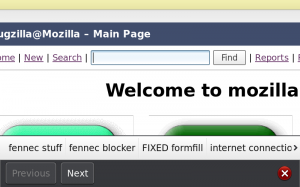
- Form assistant improvements, including autocomplete
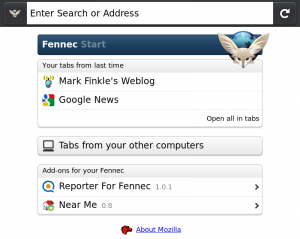
- Start page redesign
- Auto update add-ons
- Portrait support on N900
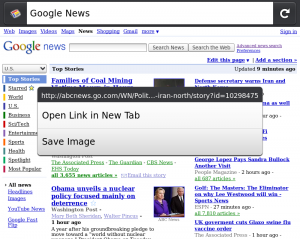
- Context Menu with Open in New Tab and Save Image
- Web content theme update
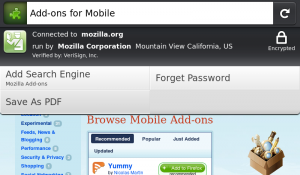
- Manage site preferences (clearing passwords and others)
- Clean up site menu
- Use volume keys to zoom on N900
- Save page to PDF

Screen shots of the some new features:

Form Assistant with Autocomplete:


Start Page:


Context Menu:


Page Menu:

Sunday, March 21, 2010

[How To] Set up Remote Desktop on Nokia N900 !

rdesktop is an open source client for Windows Terminal Services, capable of natively speaking Remote Desktop Protocol (RDP) in order to present the user's Windows desktop, if you can control your N900 from your computer and Vice Versa with VNC !, now you can access even windows desktops in traditional ways with rdesktop, use your n900 memory drives to transfer files between pc and phone etc.

So, how the Remote Desktop Mobile client on the N900 works with Windows 7 (or XP) in 3 easy steps?

1- Set up your computer to enable remote desktop access (you can look here for Win XP or if you use Win 7 just type "remote" in search field (click on windows start icon) and choose : "allow remote desktop...")

2- Download, install rdesktop and rdesktop-cli on your Nokia N900, (both are available in the Extras Devel repository) 


3- In "RDP server" you enter the IP address of your desktop PC, for username you use your Windows login and the password field and leave others as default configuration...

4- Connect --> Done !


Pretty nice eh?

Wednesday, March 17, 2010

ConnectNow : internet connection switch widget !

ConnectNow is a desktop widget to switch internet connections and can be used to connect to a specific internet connection.

Available at : Extras-devel

Wednesday, February 24, 2010

Knots 2 : Stream media from your desktop computer !

Knots 2 enables you to access your media collection automatically from anywhere. Stream high quality video through wlan or lower quality video through 3G. Requires additional software for your desktop computer. Please see http://wiki.maemo.org/Knots2 for instructions. Supported operating systems: - Windows XP/Vista/7 - OS X 10.5 Leopard or newer - Linux - FreeBSD

Available on Extras and Extras-devel repository !

Friday, February 19, 2010

AutoDisconnect : automatically disconnect idle connections

AutoDisconnect automatically disconnect idle connections. User can set a check interval value and the maximum traffic allowed to transit without disconnection.

You can download the compressed package and install it manually (uncompress/unpack .tar.gz) and install files yourself. I wouldn't recommend this either if you're not experienced with both the N900 and Debian.

Wait some days to download the deb file or directly through the Application Manager.

Friday, February 12, 2010

JoikuSpot Linux Beta 0.1 for Maemo Goes live !


The public beta of JoikuSpot is ready to be installed !

Installation: Surf with your N900 to this page and download & install the file from download link. Reboot the device after installation. JoikuSpot can be found under Applications.

Connect your laptop to internet using your mobile phone via WiFi (WLAN).

JoikuSpot turns your phone to a secure mobile WLAN (WiFi) HotSpot.

Replace USB dongles, cables or Bluetooth. JoikuSpot software installs direct to your phone, and you will carry 3G internet in your pocket, and can share it over Wifi with your friends.

***********
Known issues:

JoikuSpot Linux Beta 0.1 has some issues with current Maemo WLAN driver side. This will cause the N900 to reboot with some laptop models. If this happens, re-start JoikuSpot and try again. Typically second session will work. A fix shall be made as soon as possible.

********

This product contains GPL source code. It can be obtained from here

This is a beta-level software release and may contain bugs or incompatibilities. this edition is not fully tested against all device combinations, and may not function properly at all times or with all devices. please report such findings of mal-functioning to joikusoft at info(at)joikusoft.com. joikusoft appreciates all the beta-user feedback!

Via : My-maemo

Tuesday, February 9, 2010

Wifi Eye : Display available wireless networks with a graph !

Here the first version of a small app that displays available wireless networks.

You can get it from here for now.

It requires python-wifi and python-qt4


Via : internettablettalk

[UPD] VNC Viewer 0.6.5 now with fullscreen

Virtual Network Computing (VNC) is a system which allows the user to view a 'desktop' environment from anywhere on the Internet. The VNC viewer provides a client that can connect to a VNC server.

In this release :

+ loudness button allows to toggle between fullscreen and normal screen.

So, now it is possible to turn off the toolbar in fullscreen and have real fullscreen !

Download it !

Thursday, February 4, 2010

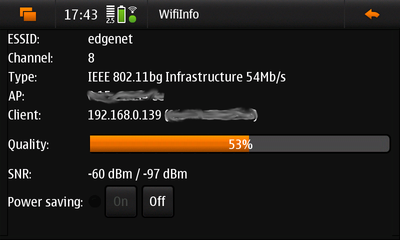
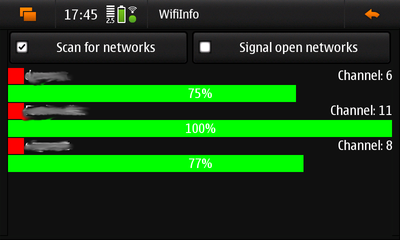
WifiInfo : Shows current detailed WLAN status !

WifiInfo is a simple application to show detailed information about the current WLAN connection.


Be careful not to leave it working on the background, or it will drain all your battery away.

Available in Extras repository ! Or click here to install this application