Showing posts with label UI Customizing. Show all posts

Sunday, March 18, 2012

[MeeGo Harmattan] Black Box : Add empty spaces to menu !

As simple as that, Black Box enables you to add empty spaces to menu !


Sunday, February 5, 2012

[MeeGo Harmattan] Toggle PSM (Power Saving Mode) for N9 !

Activating and deactivating PSM in MeeGo is a pain for me, having to start the Settings application, select Device and then Battery and finally click on the PSM button and select On. It’s a 4 steps procedure that at least consume me 1-2 seconds. Smartphone is meant for simplicity as well as quickness in operation.

Hence, a Toggle PSM button on the laucher home page which triggers the PSM on a single click on the home page. It’s just as easy as it looks.


Sunday, January 29, 2012

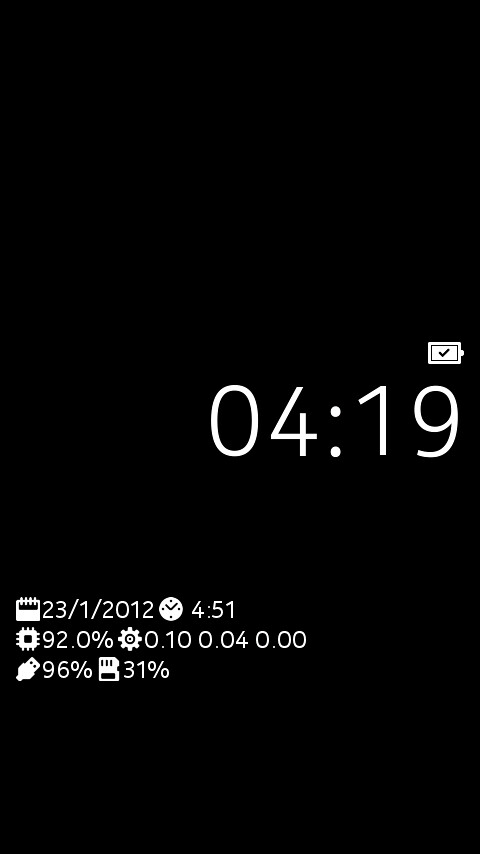
[MeeGo Harmattan] lpsmagic : Add useful info to low power screen !

lpsmagic basically shows info on lp mode instead of the operator logo

On your standby screen, which was kind of empty until now, the following things will be shown below the clock:


- current date
- uptime of the device
- amount of used RAM
- system load (1, 5, 15 minutes)
- battery state
- amount of used space on user data partition

of course everything comes with a corresponding icon. The battery icon will change depending on charging state (not connected, usb connection, wall charger connection) and loading percentage.

You can download it from here:
http://dl.dropbox.com/u/5225087/ls-magic_1.1_armel.deb

To have it running:
Install deb
Reboot

Monday, January 2, 2012

[MeeGo Harmattan] Toggle BT : touch the icon to Switch on\off Bluetooth !

Toggle BT : Switch on\off Bluetooth on your Nokia N9? Now it's very simple and quick! Just touch the icon!

Friday, December 30, 2011

[MeeGo Harmattan] Incoming Call UI MOD !

Incoming Call UI MOD (mainly) make the Incoming Call Avatar much larger !


Installation:

1. Download and using PC, extract zip into root directory of device via USB Mass Storage

2. Open Terminal app and type:

Code:

devel-su
rootme  [root password, default is shown]
sh /home/user/MyDocs/phoneuiMOD-install.sh
3. Device will automatically reboot.


Removal:

1. Open Terminal app and type:


Code:
devel-su
rootme  [root password, default is shown]
sh /home/user/MyDocs/phoneuiMOD-remove.sh
2. Device will automatically reboot.


Changelog:

Version 1.1 (30/12/11)

- Enlarged Answer & Reject buttons

- Adjusted position of avatar, buttons and labels


Version 1.0 (30/12/11)

- Avatar is now 470 x 470 pixels, up from default size of 64 x 64 pixels

- Rearranged buttons to accommodate larger avatar


Download Current Version

V 1.1 (30/12/11)


Please, Support Development

Tuesday, December 27, 2011

[MeeGo Harmattan] Zones : bubbles lockscreen for your N9 !

Zones let you use your N9 in a new and playful user interface.


It lets you keep the most essential parts handy to use based on your context. Whether you are at home, office, with friends you can group your applications, your needs and desires into Zones and interact with your device based on the Zone you are in. All it takes is a swipe to move from one Zone to another.


You can configure new Zones directly in your device or download new Zones for specific purpose.


Monday, December 19, 2011

[MeeGo Harmattan] Home screen settings : Configure the orientation locking of the home screen !

Home screen settings is a settings plugin for configuring the home screen. It allows the orientation locking of the home screen to be configured. Harmattan PR1.1 or later is required.


Note that this unlocks Harmattan functionality not supported in any way by Nokia. Do not file bugs to Nokia or to the author if you change the default home screen behavior.

Tuesday, December 6, 2011

[MeeGo Harmattan] Calenderr : Daily updated Calendar app icon !

Calenderr is a simple hack to make the Calendar app icon always show today's date (day-of-month). The existence of calendar icons for each day (1-31) in the theme on the device lets suspect that this feature was either planned and then abandoned or that it will come built-in in some future firmware.


put calendarhack.conf in /etc/init/apps directory (see the comment inside)

put calenderr.sh in /home/user folder  (see the comment inside)

Or simply try this (verified) *deb  file !

More to read (support) over here !

Friday, December 2, 2011

[MeeGo Harmattan] Air UI : interact with your Nokia N9 without touching it !

WARNING : Apparently, on many units (this may depend on country variants or language versions) there is a serious problem with this application, damaging the operating system to a point where reflashing the firmware is required. Please be aware of it and only install the application AT YOUR OWN RISK.

Air UI allows you to interact with your Nokia N9 with simple gestures over the front camera without actually touching the device and integrates smoothly with Gallery and Music Player application.

Remember to reboot your N9 after installation.

Ps : It was pulled from Nokia Store, keep an eye till the fix is released ;)


Really sorry about the troubles with Air UI.
We are working on a fix for it... but in the mean time my advice is to uninstall Air UI even if it works fine.

Tuesday, November 29, 2011

[MeeGo Harmattan] Folders : organize your applications into categories !

Folders helps you organize your applications into categories so that they are easier to find.

Features:

* Front page shows first 4 applications in that category and you can find rest of the applications by selecting arrow button.
* Long tap to select category for application.


- You can see first four items from the category.
- Clicking '>'-button will take you inside the category
- You can also swipe left on top of the applications to get inside the category
- Last category 'Misc' contains all the applications that doesn't have category selected.
- Clicking on application will start the application
- Long tap on application will open category selection view


- This view opens when you long tap on application icon
- From here you can select existing category or create new category for application
- You can also set the application as favorite

Monday, November 28, 2011

[MeeGo Harmattan] ThemeChanger !

Theme changer allows you to change between installed themes on the Harmattan platform !


In first phase, this tool is meant for creative people who want to innovate new themes for MeeGo Harmattan devices, N9 and N950.

Tool can be used to test your new theme.

Later when custom themes are available, users can change themes using this tool.

Note that using this application is in your own responsibility, and you have to note that you need to reboot your device after changing theme, for the new theme to apply correctly.

Without a reboot, theme doesn't change, or it might change partly and you may see drawing errors.

Important note: ThemeChanger does not come with any custom themes, to be able to use the application, you have to have either custom themes installed from others, or you have to create your own theme first.

The application shows two themes by default: "Developer" and "Blanco". Blanco is your current theme, but don't select "Developer", cause it includes only red squares (missing icons).

If you don't have skills to create your own theme, you have to wait for other themes to became available from other developers first.


Download it !

Thursday, November 24, 2011

[MeeGo Harmattan] ContactLaunch : add your contacts to the launcher !

ContactLaunch is an application that allows you to add your contacts to the N9 application grid, for quick access.

It is priced at 1€

 Original post ;)


Sunday, November 20, 2011

[MeeGo Harmattan] MesInput : fully personalized keyboards !

Show your personal smilies, custom text and buttons in your keyboard and boost your writing. MesInput provides fully personalized keyboards and more.


Design your keyboard or select from the existing designs - use the MesInput client in your Nokia N9 to install the keyboards. After installation, flick sidewise the keyboard to change to the newly downloaded design.


 More to read about instructions here !

Saturday, November 19, 2011

[MeeGo Harmattan] The default N9 font will change to bigger and better !

This is a pre-warning of one change that will take place in an future software update of the Nokia N9: the default font, "Nokia Pure Text", will be updated as well. This might have an impact on some of your application UIs.

The typeface of Nokia Pure Text itself will not change, but the font metrics will. The most significant change is that by default, the text will take approximately 20% more space vertically, i.e. the height of the "bounding box" of text items will increase.

The current height of the font is actually a bit too small. E.g., some of the diacritic/accent marks or descenders do not fit to the bounding box. Fixing this is important especially for non-european languages using non-latin script. The picture below shows how the same text labels render on two different software releases, PR1.0/PR1.1 on the left and the new version of the font on the right:

N9 old and new font side by side

Whether this has any impact on your application, depends on how the UI layout has been built. In many cases, there is no impact or the change does not really matter. These cases are e.g.:
  • Short text labels centered on top of other graphical items (like buttons)
  • Lists and other pannable areas where the size anyway varies.
  • By using margins and other buffer, you have anyway prepared for changes in the size of the text items e.g. for localization purposes.
But you might see some small surprises if your layout directly depends on the height of the bounding box of the text items. In Qt Quick terms, that would be the Label.height or Text.height properties.

In many cases, the best approach is to design the UI so that you expect the size of the text to vary both horizontally and vertically, that is needed anyway if you provide localizations for different languages.

Typically, that requires leaving enough margins or other space or placing text in pannable areas.

Via : developer.nokia.com

Wednesday, July 13, 2011

HARMATTAN icon pack for your N900 !

harmattan icons pack gives you a new refreshing look for your N900 ! (after installing, you should activate with the help of theme customizer)


Original thread to submit bugs or suggestions ;) !

Tuesday, March 29, 2011

Nokia Pure : Now in your N900 !

Nokia Pure is Nokia's new font. Successor of Nokia Sans, install it and then select it with Theme Customizer


You may need to restart your Maemo device before the fonts will show up in your available fonts list

Saturday, March 19, 2011

Conversation Modder : Modify the look of the conversations application !

Conversation Modder is an utility to mod the Nokia conversations app as required It helps to install new themes downloaded from Conversation Mods wiki. Also, backup and restore, and help in installing portrait support (not guaranteed for custom themes)



Download it ! and follow the development progress from the original thread !

Thursday, March 17, 2011

Short-Cut Maker (SCM) : GUI for making Shortcuts for your Desktop

scm is a GUI for making Shortcuts for your Desktop so it's an interesting way to create a desktop shortcut to a specific SMS conversation if there's one person you interact a lot with by SMS, so you have a shortcut to that "conversation" directly, but that's not all, you can use this also for phonecalls, emails etc !

Wednesday, February 16, 2011

Community SSU features to look forward to !

Here we go with some patches that try to improve the user experience and look and feel of the Maemo 5 UI that will be merged into the Community SSU :

Blurless desaturation: With this feature enabled, the background of dialogs, menus, the launcher and the switcher won't get all blurry - instead, they keep their sharpness, but are darkened and desaturated.


Bigger task switcher: You can choose between the Maemo 5 default layout, the single-column "big" task switcher and the two-column task switcher.


Rotation around the Z axis: This one makes the screen rotation look much more natural, just like on the MeeGo Handset UX. Instead of rotating around the X and Y axis, this makes the transitions from/to portrait mode rotate around the Z axis.


Forced auto-rotation for all apps: By default, hildon-desktop obeys the preferences of application windows and whether or not they support portrait mode. With this option enabled, hildon-desktop ignores those preferences and instead assumes every application can be auto-rotated. There's no support for the home screen, launcher or switcher, as these things are more complicated to support in portrait mode.


Ps : all those features are disabled by default, and need to be enabled explicitly in transitions.ini. For some of these options, a restart (of the device or hildon-desktop) is required

You can follow the changelog of CSSU over here ;)

Via : thpmaemo 

Sunday, October 10, 2010

Homescreen selector widget !

And another homescreen selector widget The difference between this one and this, is that this one shows all active desktops backgrounds and it supports Matan's modified hildon-desktop (up to 9 desktops) !