Showing posts with label Data Manager. Show all posts

Friday, March 19, 2010

Fcron : schedule anything at anytime !

Fcron is standard Linux scheduler used to schedule any command at any time. So this means that it doesn't have any limits and you can schedule just about anything. It is run as daemon in the background so you don't need to worry about it. You set it up with a config file which contains schedule.

Alternatives:

cron: Why not? - Cron is older than fcron and doesn't sleep between events.

anacron: Why not? - Anacron is used to schedule daily jobs, fcron can schedule to seconds.

ses: Why not? - Ses is buggy, buggy and buggy. It doesn't even uninstall properly.

Alarmed: It is the best alternative with a big plus (GUI), but also a big minus (no CLI). You can use custom command, so you can schedule anything, but you can't schedule it anytime (alarmed daemon doesn't provide an option for every possible time). It also needs python (because of the GUI, daemon itself doesn't need it), which consumes space.

You can use this simple yet powerful tool to schedule just about anything at anytime. You can schedule:

- profiles
- backup scripts
- resetting the GPRS counter every month
- disconnection and connection of mobile network or internet
- 3G/2G/Dual radio modes
- NTP update
- email notify/refresh
- brightness level
- locking
- rebooting
- your own scripts
- ...

The wiki entry covers why is using fcron the best way for scheduling events, installation and configuration guide and some scripts.

Monday, March 8, 2010

Alarmed : Scheduling App (supports automatic GPRS data counter resetting)

Alarmed is a small (???) App that acts as a GUI front-end to maemos alarmd scheduler back-end. It's written in python and uses the PySide bindings to Qt. (PySide is under heavy development at the moment and is both unstable and unreliable. A major new release is expected within weeks or months which will fix some of the knows issues with Alarmed.)

Alarmed enables you to do things like:

- Set a command to be executed at specific intervals (every minute, hourly, on specific weekdays, on last day of month etc...)
- Set recurring alarms
- Reset the GPRS data counter at a specific day every month or at the end of the month
- More stuff like this


WARNING: This is very much alpha: It crashes, has bugs, and it might do weird things (including - however unlikely - completely bricking your device). Do NOT use it if you expect it to work properly. Also read everything in this post before installing it! All of the known issues I can't do anything about except possibly workaround, as they're caused by bugs in PySide and pymaemo.

Planned future features:

- Support for intervals in seconds/minutes/hours etc.
- Better list of current items (waiting for new PySide release because of missing functions)
- Built-in functions for switching to the "General" or "Silent" profiles respectively
- Check if command is valid, possibly support for command line arguments
- Built-in function for sending SMS/Email

Known issues/bugs:

- Long startup time: Due to the current PySide implementation (boost). Will get much better once the new release is out (called Shiboken).
- Segfault (crash) after opening "New Event" or "Edit" three times or more: Bug in PySide, sorry
- Slightly weird banners: Bug in PR1.1 Qt, will be fixed in PR1.2 Qt.
- Adding a D-Bus call does not work: Bug in pymaemo, can't do anything about that.
- Command exec does not support command line arguments. Restriction in alarmd. You'll need to write a script and put it somewhere to execute a command with arguments.

More details over here !

Friday, February 19, 2010

SMSCounterWidget : track numbers of SMS messages !

SMS Counter Widget tracks numbers of SMS messages, it displays message counts of sent and received messages on desktop for current month and keeps track of total message counts as well.

Available in Extras-devel repository !

Thursday, February 18, 2010

Fuelpad for Fremantle in Extras

Finally after a few rounds of development revisions, Fuelpad (a tool to record your car fuel and other expenses. It calculates the fuel consumption for each entry, the overall distance, average fuel consumption and total cost. The data can be visualized graphically and exported to other programs.) has made it to Fremantle Extras. The Fremantle release includes all the features found in the Diablo version 0.82.


Some bugs have also been corrected during the porting.

There's also a new release in extras-testing. The new release fixes bug #5175

Tuesday, February 9, 2010

Search Tool : Simple search tool !

Simple search tool. Lets you search in the following categories:
  • All files
  • Applications
  • Documents
  • Folders
  • Images
  • Music
  • Playlists
  • Text
  • Videos


Via : My-Maemo

Thursday, February 4, 2010

Evernote Sharing Plugin :

Evernote makes it easy to remember things big and small from your life using your Nokia N900.

Chances are, if you can see it or think of it, Evernote can help you remember it. Type a text note. Clip a web page. Snap a photo. Grab a screenshot. Evernote will keep it all safe. Evernote is fully integrated into the N900 allowing you to take notes and snapshots and then easily send them into Evernote. Do this by using the ‘Share via Service’ option found in most applications.


Everything you capture is automatically processed, indexed, and made searchable. If you like, you can add tags or organise notes into different notebooks. Search for notes by keywords, titles, and tags. Evernote magically makes printed and handwritten text inside your images searchable, too.


Evernote for Nokia N900 works best when used together with downloadable versions of Evernote for Windows and Mac.

Download it from OVI Store !

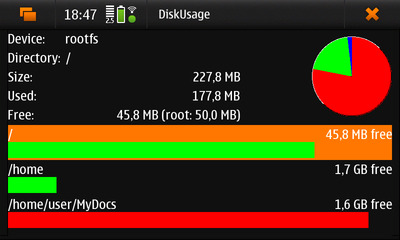
DiskUsage : Shows current disk usage !

DiskUsage is a simple application to show detailed information about the current disk usage


Click here to install this application !

Tuesday, February 2, 2010

Tethering Monitor : Monitor tethering connections from the status area

Tethering Monitor provides a visual feedback when a tethered data connection is in use.

It's able to detect that a data connection has been started, stopped or suspended (eg: if you answer a call while using gprs/edge)

If you’re interested, you can grab it from extras-devel.

Via : maintenance.maemo.org