Showing posts with label System Customizing. Show all posts

Sunday, March 18, 2012

[MeeGo Harmattan] Black Box : Add empty spaces to menu !

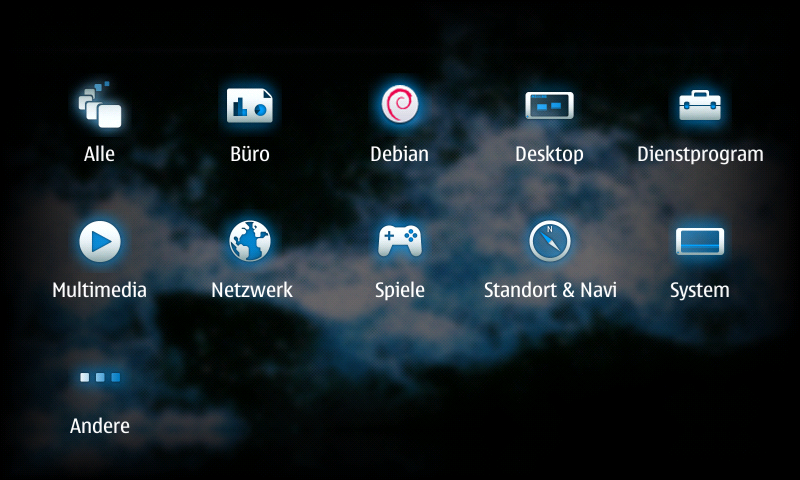
As simple as that, Black Box enables you to add empty spaces to menu !


Sunday, January 29, 2012

[MeeGo Harmattan] lpsmagic : Add useful info to low power screen !

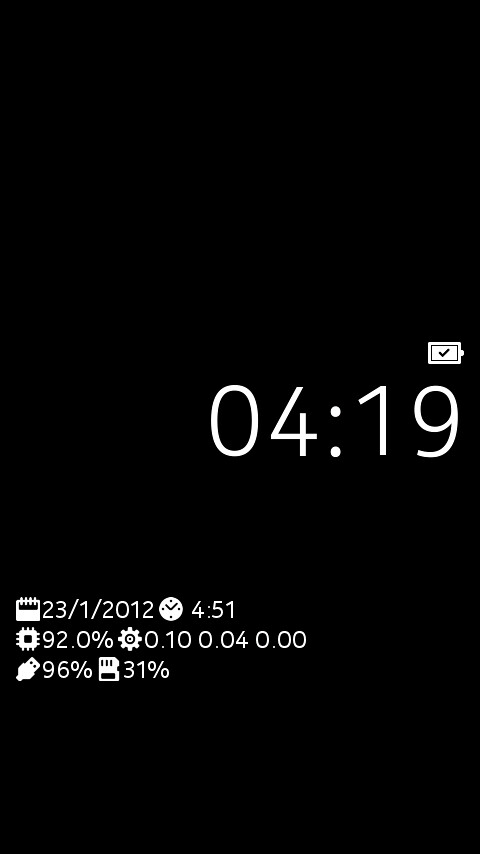
lpsmagic basically shows info on lp mode instead of the operator logo

On your standby screen, which was kind of empty until now, the following things will be shown below the clock:


- current date
- uptime of the device
- amount of used RAM
- system load (1, 5, 15 minutes)
- battery state
- amount of used space on user data partition

of course everything comes with a corresponding icon. The battery icon will change depending on charging state (not connected, usb connection, wall charger connection) and loading percentage.

You can download it from here:
http://dl.dropbox.com/u/5225087/ls-magic_1.1_armel.deb

To have it running:
Install deb
Reboot

Sunday, January 1, 2012

[MeeGo Harmattan] Shutdown : shutdown or reboot with one click !

Shutdown is a simple Utility to shutdown or reboot your N9 :


but its particularity is that there is an option to create two one-click icons for reboot and shutdown which will appear on the homescreen.


FAQ :

How do I delete the 1-Click icons (shutdown, reboot)?

You will have to manually delete crochik-shutdown.desktop and crochik-reboot.desktop from /home/user/.local/share/applications. You can do this using the x-terminal or a file manager (please note the /home/user/.local is a hidden folder).

I have installed version 0.0.1

In order to see the new icons you first need to remove manually the 1-click shortcuts (see above)

Download it !

Thursday, December 22, 2011

[MeeGo Harmattan] BackLighter : disables the screensaver from dimming !

Don't want the device screensaver to go on when using applications like speedometers, timers, etc.? BackLighter does just that.


BackLighter disables the screensaver from dimming the device while the application is left running and set to ON. The screensaver can be once again enabled by setting the switch to OFF position or by closing the application.

BackLighter also makes it possible to adjust brightness with several convenien settings.

Monday, December 19, 2011

[MeeGo Harmattan] Home screen settings : Configure the orientation locking of the home screen !

Home screen settings is a settings plugin for configuring the home screen. It allows the orientation locking of the home screen to be configured. Harmattan PR1.1 or later is required.


Note that this unlocks Harmattan functionality not supported in any way by Nokia. Do not file bugs to Nokia or to the author if you change the default home screen behavior.

Saturday, December 10, 2011

[MeeGo Harmattan] MyTopSites : Top Site Editor for N9 Web Browser !

MyTopSites is a Top Sites editor for the built-in web browser of the Nokia N9.

Using it, you can freely modify the top sites list that's shown when you launch the browser.


You can change the title, URL, font and color background, counter, and also add new sites.

The access count is responsible for the position on the top site list in the browser. A higher value gives a more relevant position.

Note: It's recommended to close all browser windows when using this application (and vice versa) to prevent possible mess due to concurrent access of the same database by two apps.

Tuesday, September 13, 2011

[MeeGo-Harmattan] QuickBarControl : Quicklaunch customization !

Quickbar control by the creator of cutetunes enables you to customize quicklaunch bar and  select the position you wish for it to be.


Sunday, September 11, 2011

Battery Patch For Non KP Users

This Patch as stated here will Improve The Battery Life Of Your N900 Using Dbus-scripts (Non-kp) Means non-kernel-power, For People Who Have Troubles With OverClocking

It Will Not Increase The Continues Usage Time, But It Will Increase The Standby Time About 3x.

Speed Patch !

As stated here, The CFS (completely fair scheduler) in our phone's kernel manages the allocation of resources (cpu/mem) between tasks.

It was designed to cope with server-class machines such as web servers and databases, giving all tasks equal access to resources. This means if a server is really busy, then all tasks on the machine slow down equally.

Desktop/mobile class machines shouldn't work the same way as servers though. They have a human user who expects the machine to respond and give feedback within a certain time. If a machine is slow to respond, the user loses some sense of control over the machine.

This patch addresses the problem by taking note of what the user is doing right now, and using that information to accelerate the current task, and decelerate other tasks on the system. The user won't notice the background stuff going slower, they will just see their app working fast.

The patch does this by creating multiple classes of task
-------------------------------------------
/dev/cgroup/cpu/tasks
/dev/cgroup/cpu/desktop/tasks
/dev/cgroup/cpu/applications/tasks
/dev/cgroup/cpu/applications/standby/tasks
/dev/cgroup/cpu/applications/launcher/tasks
-------------------------------------------

If you look at the contents of these files, you'll see the process IDs of all the tasks in each class. CPU and memory are shared out to these classes using the files "cpu.shares", and "memory_limit_in_bytes". When lots of tasks are demanding CPU/memory at once, the resources are handed out to tasks depending on their share.

This is why your phone feels nicer when you have this patch - the kernel automatically classifies tasks and devotes more of cpu/mem to the "application" and "desktop" class tasks, and much less to other classes like "standby".

Friday, August 26, 2011

[HOW TO] Have an Interactive Yahoo Weather on your N900 lock screen !

 Don't you want you're weather informations on the lock screen as i do? Hell yes (thanks to Alfred )!


Here's how to do it quickly in 6 steps ;)

1) Install imagemagick from extras or in X-terminal :

Code:
apt-get install imagemagick
2) Install wget (if not already done)

Code:
apt-get install wget

3) After installing imagemagick, the folder "/home/user/imagemagick" should appear, if not create it.

4) Place everything that contains this archived folder in /home/user/imagemagick/ folder.

Edit the script weather.sh (via txt editor for example) and change the URL of yahoo forecast city by yours :

Code:

http://weather.yahoo.com/morocco/greater-casablanca/casablanca-1532755/?unit=c
Ps : in yahoo forecast page you can also choose between Fahrenheit and Celsius.

5) Run following commands in Terminal :

Code:
root
chmod 777 /home/user/imagemagick/*
6) Run this script by executing:

Code:
sh /home/user/imagemagick/weather.sh
You're done !

7) If you want to make this script run automatically, install Alarmed. Make a "New event">"Command execution">Select frequency of how often do you want to update it>Enter Name> in the command field put this:

Code:
sh /home/user/imagemagick/weather.sh
Note : You need an internet connection for "weather.sh". The first run of this script must be followed by a reboot, in order to load the new slider.

And of course, you can play with colors and fonts. If you look into the script, you will find what and how to change. It's very easy. There is also a folder with some free fonts, so feel free to use them.

It's interactive as the background changes, depending on the current temperature. If it is below zero, it chooses "winter.png" as background. If it is above zero it chooses "summer.png" and if it IS ZERO, it chooses "background.png" as a background image.

If you want to reset everything back to normal, just choose another theme from desktop, and then again the theme you want. Everything will be back after a restart. 

Wednesday, August 24, 2011

[How To] Boost Your N900 with Speed & Battery Patch !?

Hello folks,

It's been a long time i wished to post about it, and here i am with some free time to do it :

- The first tweak (speed) improves the hildon-desktop : faster multitasking , faster contacts scrolling , faster images scroling and basically every thing will be improved

- The second tweak (battery) will change The VFS Cache Pressure value :
To 10 when locked the screen or the system is inactive and 100 when the screen is unlocked or the brightness is on, this will make us have a long standby usage because of vfs=10 and a long continues usage because of vfs=100


- Download speedpatch.tar.gz and speedpatch-install.sh.txt 

- Paste Both Files in /home/user/MyDocs

NOTE : MyDocs is Not Documents it is the default root folder of N900 like : Nokia N900/

- Open xterminal and write:

sudo gainroot

apt-get install bash

cd /home/user/MyDocs

bash speedpatch-install.sh.txt


- Then REBOOT when finished everything

PS : Ignore Any Errors appear about device resource busy or any others

********

* To check if Speedpatch was installed :

cd /dev/cgroup/cpu/user/

if no problem appeared about (no such file or directory) then you are fine


********

* Uninstalling speed patch

- Download speedpatch-uninstall.sh.txt

- Save it in /home/user/MyDocs

- Open xterminal and write:

sudo gainroot

cd /home/user/MyDocs

bash speedpatch-uninstall.sh.txt

- Then Reboot


********


- Download betterypatch.tar.gz  and batterypatch-install.sh.txt

- Paste Both Files in /home/user/MyDocs

NOTE : MyDocs is Not Documents it is the default root folder of N900 like : Nokia N900/

- Open xterminal and write:
sudo gainroot

apt-get install dbus-scripts kernel-power-settings

cp /home/user/MyDocs/batterypatch-install.sh.txt /home/user/batterypatch-install.sh.txt

chmod +rwx /home/user/batterypatch-install.sh.txt /home/user/batterypatch-install.sh.txt


********


* To check if Battery Patch was applied :

sudo gainroot

echo 1000 >> /proc/sys/vm/vfs_cache_pressure

Then lock the phone and unlock it

Then

cat /proc/sys/vm/vfs_cache_pressure

you should see 100

If so then the patch is applied !


********


* Uninstalling battery patch

rm /opt/scripts/cpu_sleep.sh
rm /opt/scripts/cpu_normal.sh
rmdir /opt/scripts
kernel-config load default
kernel-config default default
rm /home/user/.kernel/custom-karam
rm /etc/event.d/dbus-scripts-session
rm /etc/dbus-scripts.d/dbus-scripts-settings-by-karam


For all other related tweaks and benchmarking, technical informations or questions, bugs or suggestions, follow the original topic ;)

Monday, August 22, 2011

[MeeGo Harmattan] MyMoves : Configurable gestures to your N9/N950 !

MyMoves is an attempt to bring configurable gestures to Harmattan, written in QML/C++. The idea of MyMoves is to be able to create a gesture, and attach an arbitrary shell command into it.

The current prototype of MyMoves consists of two parts:

- mymoveserver, handles the touch events via XRecord, saves the gestures and performs the recognition
- Configuration UI for adding new gestures and starting/stopping the gesture observation
The server is controlled by the configuration UI via D-Bus commands

So. What on earth can we do with this? Let’s take a closer look. Here’s the configuration UI:


And as a result !


Harmattan debs: http://koti.kapsi.fi/~sh8dfwk/mymoves

Details about configuration can be found here ;)

Sunday, June 26, 2011

Enhanced lockscreen !

Enhanced lockscreen !


Have i to say more? If you have suggestions, post them in the original thread !

Saturday, June 18, 2011

Catorise PLUS : create your menu the way you want !

Catorise PLUS combines "catorise" and (a better version from) "Catorise GUI".

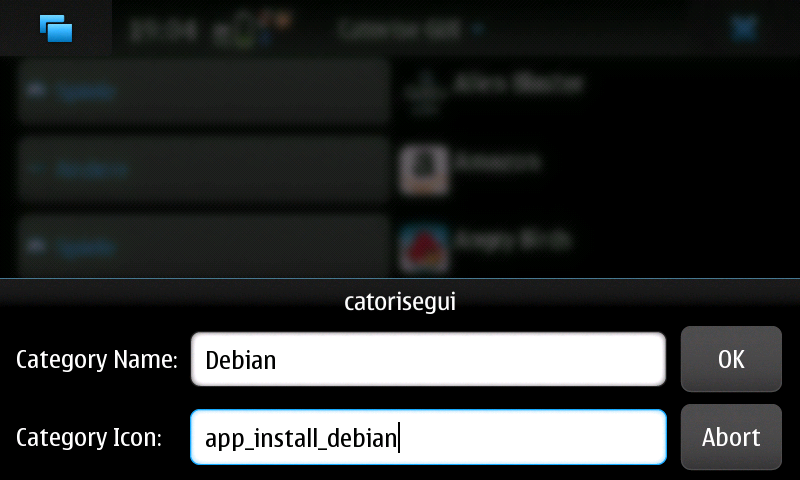
You don't need anymore two package, that's enough alone. With this Application you can create your menu like you want. You can add, delete and edit categories and icons.


As packages are installed and removed, the menu is kept up-to-date, When you create or delete categories, it takes a little bit. no panic! It depends not and the system does not crash.


To revert to the Nokia-supplied default, simply uninstall.

Wednesday, February 16, 2011

Community SSU features to look forward to !

Here we go with some patches that try to improve the user experience and look and feel of the Maemo 5 UI that will be merged into the Community SSU :

Blurless desaturation: With this feature enabled, the background of dialogs, menus, the launcher and the switcher won't get all blurry - instead, they keep their sharpness, but are darkened and desaturated.


Bigger task switcher: You can choose between the Maemo 5 default layout, the single-column "big" task switcher and the two-column task switcher.


Rotation around the Z axis: This one makes the screen rotation look much more natural, just like on the MeeGo Handset UX. Instead of rotating around the X and Y axis, this makes the transitions from/to portrait mode rotate around the Z axis.


Forced auto-rotation for all apps: By default, hildon-desktop obeys the preferences of application windows and whether or not they support portrait mode. With this option enabled, hildon-desktop ignores those preferences and instead assumes every application can be auto-rotated. There's no support for the home screen, launcher or switcher, as these things are more complicated to support in portrait mode.


Ps : all those features are disabled by default, and need to be enabled explicitly in transitions.ini. For some of these options, a restart (of the device or hildon-desktop) is required

You can follow the changelog of CSSU over here ;)

Via : thpmaemo 

Sunday, February 13, 2011

Low Battery LED : Signals low battery via the notification LED

Low Battery LED Installs a new LED notification pattern to signal low battery and you can configure it with LED Pattern Editor

Tuesday, May 18, 2010

Charging LED Clock : Modifies the charging LED pattern to indicate time !

Charging LED Clock modifies the charging LED pattern to indicate time : The charging and battery full LED batterns blink to indicate the current hour and minute with 5 minute precision.

concept:
time display with LED. When the phone is on charge.

Why do you want?
when I go to sleep.I usually put my phone (N900) away from me.
because I can turn the alarm off in my sleep.
is convenient when you can see the time at a distance.

implementation
use Morse code (only idea morse code)
12 hour 57 minute
looks like this: -** -----****(*)** //- long signal LED * short signal LED (*)signal brighter //

does not look very comfortable.
offer a minute rounded up a dozen
that is
12 hour 57 minute = 1 hour (code: *)
4 hour 16 minute = 4 hour 20 minute (code: **** **)
9 hour 33 minute = 9 hour 30 minute (code: ****(*)**** ***)
12 hour 22 minute = 12 hour 20 minute (code: -* **)
3 hour 42 minute = 3 hour 40 minute (code: *** ****)

More info at talk.maemo.org

Sunday, March 14, 2010

[How To] Have up to 9 home screens !

In 3 easy steps you'll be able to have more than 4 standard home screens for your N900 !

1- Download and install modified hildon desktop from here. It may take several minutes to download and install packages (5min or so...)

2- Reboot your N900

3- Open a terminal and type the following commands :

Sudo gainroot (then, Enter key)
gconftool -s /apps/osso/hildon-desktop/views/5/bg-image -t string "/path/to/background.jpg"
gconftool -s /apps/osso/hildon-desktop/views/active -t list --list-type int [1,2,3,4,5] (then, Enter key)

4- Done!

With this example you have 5 home screens! Works perfectly. Have fun with up to 9 Home Screens!


Via : www.maemo.ch

More info at :

http://wiki.maemo.org/Modified_Hildon_Desktop

http://maemo.org/packages/view/modified-hildon-desktop/

http://www.google.com/m?client=ms-nokia-maemo&channel=bookmark&q=Modified+Hildon+Desktop

Wednesday, March 3, 2010

Quick Launch : Status-bar applet for quickly launch apps !

Quick Launch is a status-bar applet for quickly launch apps, it can be configured through a control-panel applet.


Available at Extras-devel repository !

Thursday, February 25, 2010

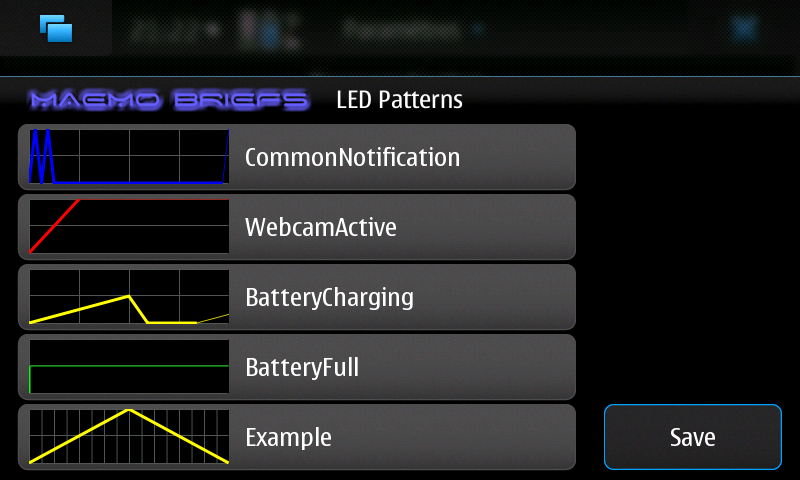
LED Pattern Editor : A control panel applet to edit notification LED blinking patterns !

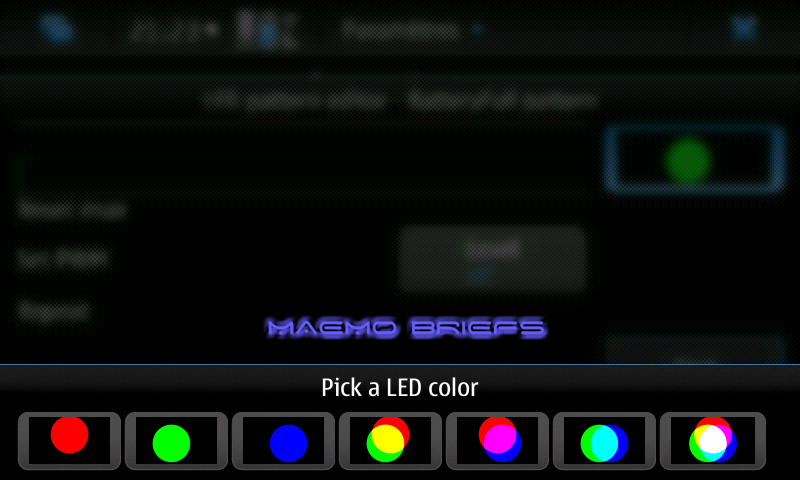
LED Pattern Editor is a control panel applet to edit notification LED blinking patterns that can graphically edit the blinking patterns and LED colors, preview the LED patterns and save the configuration and restart MCE to apply changes.


Available in Extras-devel repository !