Showing posts with label News. Show all posts

Thursday, June 21, 2012

[MeeGo - Harmattan] Nokia Suite 3.5 Beta now supports the Nokia N9 !

Oh yeah, that's right ! Nokia Beta Labs has released Nokia Suite 3.5 Beta for Windows (v3.5.14), which now supports the Nokia N9. It allows Nokia N9 (and N950) owners to copy content between the phone and computer (including contacts and SMS backup / sync) and Internet tethering. It can be downloaded from here.

Sunday, November 13, 2011

[MeeGo Harmattan] Shazam and LinkedIn are coming to your N9 !?

Oh yeah it seems, that at least, there's still some interest to port Shazam and LinkedIn to the MeeGo Harmattan powered N9 if we look closely at the elisa PDF file (or the 3rd page of the front page) as this is their best selling device (for October at least)


Thanks to @talakem for the tip :)

Sadly there's no whatsapp mention yet :-(

Thursday, August 25, 2011

[Briefs] Nokia N9 has the best antenna ever !

3 have now had the opportunity to test Nokia's new smartphone N9 on 3's network and the results have been nothing less than impressive, 3 said !

Nokia N9's transmit and receive characteristics should result in 3 being quite superior compared to all other phones 3 has been tested, and that means among other things, a significantly better network experience on the edge of network areas and in areas with poor signal conditions !

  The expert Christian Nielsen is probably so very impressed by the efficiency of the transmission and reception power of the Nokia N9, that it will be used henceforth as a reference unit in terms of reception quality at the 3 mobile service provider !

"When I run into what we call the network area's outskirts, there is still full 3G coverage on Nokia N9. Some other phones switches already here to a 2G network (EDGE). When I run on into a small forest on route, with the Nokia N9 still stand with full 3G coverage. All other phones I've tested, jump here on the 2G network, but even in the midst of the forest, Nokia N9 full 3G. I get so about 6 Mbit / s speed Nokia N9 in this area and it's crazy! ", says Christian Nielsen.

 He continues: "If I'm in the middle of the forest put the phone down on the floor of the car lost one of the 3G signal bars, and only by holding his hand over the phone for several minutes while it is at the bottom of the car, can I get it off the 3G network and onto the 2G network, " he explains.

 Thus, there are marginal areas in the mobile network, in which decreases the quality of the network. If other mobile phones already on 2G (EDGE) change, so only transmitted at a reduced speed, the Nokia N9 still had full 3G reception. Even in a forest as a speed of 6 Mbit /s was possible.

 This power is not found, according to "3" in any other phone or smartphone. This means that the Nokia N9  has significantly better reception, which in turn has a better voice quality and faster Internet connection to follow.

However, this comes at Nokia does not surprise or astonishment. Markku Suomi, Product Manager responsible for the Nokia N9 says that both the housing of polycarbonate, as well as the absence of a metal frame, preventing interference and thus contributes to good reception.

Via : elektronikbranchen.dk

Friday, August 19, 2011

[MeeGo Harmattan] Butaca : Bring all your movie-related informations !

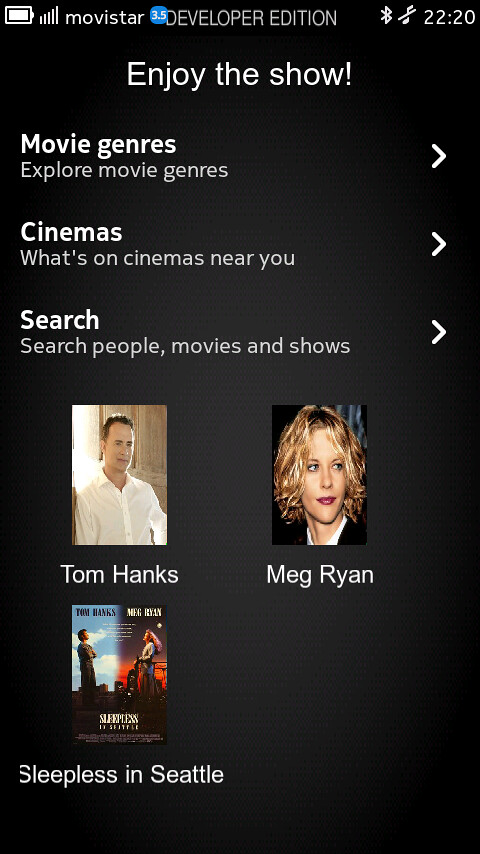
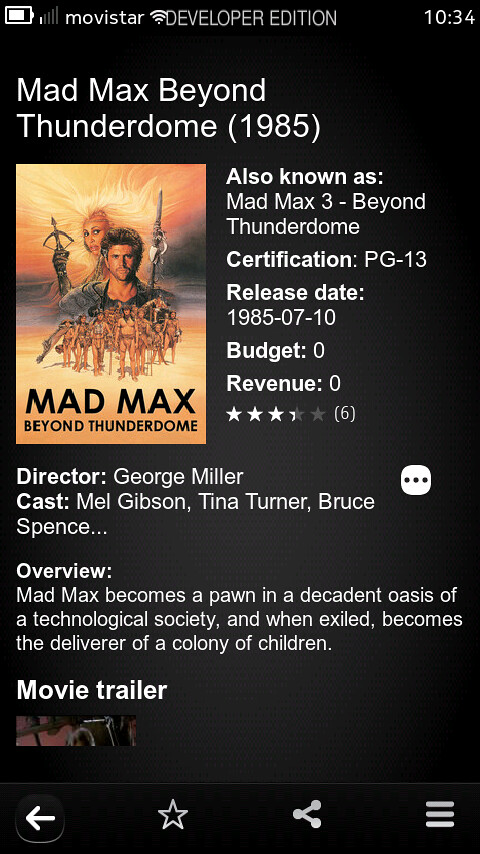
Butaca is an application which allows accessing a lot of movie-related information. Using  The Movie Database as a backend, Butaca lets you search for a movie and get the title, rating, release date, overview, cast... and a lot of interesting data. It can be used as well to access information about the people in the movie industry: from actors to writers, you'll get all their interesting details.


Besides, you can explore all the movie genres to find new movies and save them as favorites to check them in any moment, you can find what's going on on the theaters around you, and also search the showtimes for a given movie.


So it lets you:

- Browse movie genres
- Search for movies and people
- Shows title, rating, release date, overview and cast for movies
- Shows name, birthplace, date of birth, biography and filmography for people
- Allows keeping content as favorite (both movies and people)
- Allows sharing content using the system share interface
- Search movie showtimes (launching the web browser agains Google Movies)
- Check what's on cinemas near you (also using the web browser)


 Future improvements will add support for checking whether a movie has extras after or during the credits and also sharing the info on the Internet (using the email, Twitter or Facebook to communicate your intention to watch some movie, or how interesting you found another one you already watched)

Wednesday, June 22, 2011

Some N9 videos hands on !


Tuesday, June 21, 2011

The N950 is here too, but not for you !

Yes, as we know the Nokia N9 has been already announced this morning stirs envy. It is however not up to the expectations of some including me, who expected the first smartphone MeeGo it is a worthy heir to the N900, mainly due to the disappearance of the slider. They can rest assured that Nokia is also launching the "N950" variant "developer" of the N9 but not for public, not for sale !

by Brendan Arndt Product Manager for Three UK

The "Nokia N950" inherits the crucial points of the specifications of the N9, but ignores some of its refinements. It benefits in return for a slider, which is well worth the sacrifices to some mobile users.

"Exchange against keyboard screen, camera and connectivity"

The screen version of the developer just to start a LCD panel, not AMOLED. The tenth of an inch of additional diagonal (4.0 against 3.9 inches) is a small consolation, but of course they display the same definition FWVGA (848 x 480 pixels).

The dorsal sensor N950 is also "different" from that of the N9, without to much lower quality, but in any case deprived of light stamped Carl Zeiss lens of the latter.

Its connectivity is finally partially amputated, since swapped the one hand the latest Bluetooth 4.0 standard for tireless 2.1, and the other is deprived of NFC.


The same vital components

He inherited, however, the same TI OMAP 3630 SoC clocked at 1 GHz, carrying a PowerVR SGX GPU 530, all supported by 1 GB of RAM LPDDR. Storage is finally performed by the same amount of from 16 to 64 GB of flash memory.

Not content to communicate or not the price or the date of marketing, which is not good since it has not done either for the original, Nokia has not even published a photo of the N950. 

The N9 has arrived, finally !

As you probably saw this early morning i posted some first links regarding the N9 (here, here and here), and Engadget was up also with some great photo gallery here and here and with some live demos and initial thoughts !
The N9 UI, as you'll have learned from the product announcement, is Nokia's Harmattan skin atop MeeGo 1.2, which is built around three core home views. The central one is your app organizer / launcher, to one side of which you have a notifications and activities section -- which will be populated by phone calls, calendar alerts, and social network updates -- and to the other you get a live app switcher. That trio is navigable in a carousel fashion, meaning that you can keep cycling through all three by flicking your finger in one direction. Double-tapping the screen wakes the phone up and then you can unlock it with a swipe in any direction. Similar swipes, starting from one edge of the screen and going to the other, allow you to exit apps into the home screen. What we can say about all these aspects of the interface is that they're done exceedingly well and make the somewhat aged OMAP3630 processor look terrific. Fluid animations are evident throughout, navigation is natural, and this marks a major advance over anything else Nokia has given us on the software front in terms of touch-based UI.

Physically, the N9 feels about as good as a device built out of plastic can do. Nokia's devoutly calling it polycarbonate in order to highlight that this isn't just any old plastic, it's a high-grade variety that inspires confidence in its durability while also having the sharp looks to keep aesthetes happy as well. The whole phone is essentially built into the external shell, which does mean the battery isn't user-replaceable and there's no microSD expandability, but at least you can hot-swap the MicroSIM (yes, Micro) card without needing to reboot the handset.

The Clear Black AMOLED display is truly a sight to behold, with stunning viewing angles, a curved Gorilla Glass front, and some pretty excellent (for AMOLED) performance out in the sunlight. We compared it side by side with a Super LCD-equipped Incredible S and the N9 more than held its own. The screen is easily one of this new phone's great strengths, though we'd argue the intuitive UI, responsiveness, and eye-catching industrial design are pretty high up on that list too. All in all, we're highly impressed by what Nokia has put together here, though the N9 does beg the question as to why the company has opted against making MeeGo its long-term smartphone OS of choice. What we've seen today is a damn fine smartphone with some very neat ideas, one which certainly merits the title of being Nokia's flagship. Or it will do, when it launches later in the year.


For your information :

Nokia N9 Quick Specification
Size: 116.45 x 61.2 x 7.6-12.1 mm
Weight (with battery): 135 g
Volume: 76 cc
Internal memory: 16 GB or 64 GB
Use as USB mass memory device for storing photos, documents and more
Talk-time (maximum):
GSM 11 hours
WCDMA (3G) 7 hours
Standby time (maximum):
GSM 380 hours
WCDMA (3G) 450 hours
Video playback time (720P) 4.5 hours
Music playback time 50 hours

Display and User Interface
Screen size: 3.9″
Resolution: 16:9 FWVGA (854 x 480 pixels)
AMOLED display
16.7 million colours
Capacitive touch screen
2.5D curved glass
Anti-glare polariser
Scratch-resistant Corning® Gorilla® glass
Orientation sensor (Accelerometer)
Compass (Magnetometer)
Proximity sensor
Ambient light detector
Personalisation
Customisable wallpapers and lock screen
Customisable profiles
Ringtones: mp3, AAC, eAAC, eAAC+, WMA, AMR-NB, AMR-WB

Keys and Inputs Methods
Pure touch screen UI, all-screen front
On-screen alphanumeric keypad and keyboard
Dedicated power, camera and volume keys

Power Management
Talk-time (maximum):
GSM 11 hours
WCDMA (3G) 7 hours
Standby time (maximum):
GSM 380 hours
WCDMA (3G) 450 hours
Video playback time (720P) 4.5 hours
Music playback time 50 hours

Memory
Internal memory: 16 GB or 64 GB
RAM: 1 GB
Operating Frequency
Quad-band GSM/EDGE 850/900/1800/1900
Penta-band WCDMA 850/900/1700/1900/2100
Automatic switching between WCDMA and GSM bands
Flight mode

Data Network
GPRS/EDGE class B, multislot class 33
HSDPA cat 10 maximum speed up to 14.4 Mbit/s, HSUPA cat 6 up to 5.7 Mbit/s
WLAN IEEE802.11 a/b/g/n

Connectivity
NFC (Near Field Communication) for easy pairing and sharing
Bluetooth 2.1 +EDR (Enhanced Data Rate)
FTP (File Transfer Profile): server (v1.1)
OPP (Object Push Profile): client, server (v1.1)
HSP (Headset Profile): audio gateway (v1.2)
HFP (Hands Free Profile): audio gateway (v1.5)
A2DP (Advanced Audio Distribution Profile): audio source (v1.2)
AVRCP (Audio/Video Remote Control Profile): v1.0
High-Speed USB 2.0 with micro USB connector for transferring data and charging
3.5 mm AV connector
Capability to serve as data modem
Micro SIM card

Software
Software platform and user interface
MeeGo for Nokia N9 (MeeGo 1.2 Harmattan)
User interface simplified to three home views: events, applications and open apps
Swipe gesture instantly takes you back to the home view you started from
Multitasking and app switching through open apps view: a live snapshot of all running apps
Apps compliant with Qt 4.7
HTML5
Software updates over the internet
Personal Information Management (PIM)
Detailed contact information
Calendar
To-do list
Notes
Support for MS Outlook synchronisation of contacts, calendar and to-do with Mail for Exchange
Support for viewing documents in Word, Excel, Powerpoint, PDF and Open Document Formats
Online calendar synchronisation with CalDAV

Applications
Key applications: Facebook, Twitter, Skype, Joikuspot Wi-Fi tethering, Accuweather, AP News, Swype, Track and Protect, Galaxy on Fire 2, Real Golf, Angry Birds Magic, Mail, video player, Drive, Feeds, search, calculator, Calendar, Contacts, music player, web browser, messaging, photos, photo editor, Ovi Store, Maps
More apps available at Ovi Store
Nokia Link: PC and Mac application for easily syncing photos, music and videos

Sunday, April 10, 2011

mir-translator : Translate text from pictures to various languages !

mir-translator is an application for translating text in photos taken from the N900 camera (like PhotoTranslator). Supports novel interactive recognition techniques.


Leverages the FCam API, as well as custom-modified recognition web service based on Google Tesseract. Uses Google Translate for translation.

Ps : It takes a lot of time to tranlate a simple text, hope this will be adressed in future updates 

Tuesday, October 5, 2010

Nokia Meego chief exits !

Nokia Meego chief Ari Jaaksi has left the company before the manufacturer has even announced a phone on the platform.

Jaaksi is the third Nokia executive to leave the company recently. Meego is hosting a conference in Ireland next month.

Via : mobiletoday

Sunday, October 3, 2010

Here and Now: what's on near you now !

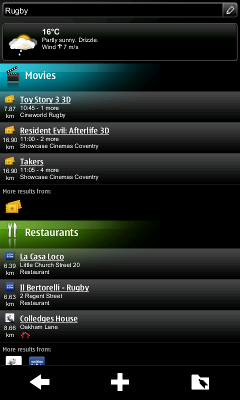
Nokia's N8, a Symbian^3 device, comes with a service called Here and Now. This reads the cell tower information you're currently connected to and opens a web page detailing the current events (cinema listings and weather, for example) near you. Jaffa has done a quick port to Maemo 5 and the N900.

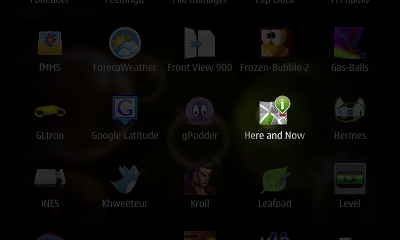
Once installed, you can launch it like any other application:


Without using a GPS, it sends your approximate position to Nokia's servers and shows you what's currently going on:


Tuesday, September 14, 2010

Peter Skillman (of Palm fame) appointed VP, Head of MeeGo & Services UX Design at Nokia !

Well it seems that Apple isn't the only one to had the opportunity to hire one of the most talented WebOs User Interface Designer ! Nokia has managed to get one of the many senior VPs to leave Palm as VP user experience design of MeeGo and services ! Peter Skillman !


via ; quimgil

Tuesday, June 22, 2010

Handset version of MeeGo set for June 30 release !?

According to fiercedeveloper Nokia plans to release a preliminary version of its MeeGo platform for handsets including images of the user interface and an SDK for developers on June 30, according to Valtteri Halla, director of MeeGo software at Nokia.

"It's what we call Day One for the MeeGo handset release," Halla explained. "The productized release of the software is still (set for release in) October of this year, but this is a kind of pre-Alpha release."

Hmm wait and  see, in the meanwhile, watch this demo of Meego 1.1 running on a tablet ^^

Saturday, June 19, 2010

What to expect from Meego OS User Interface !

Some days ago i came across an interesting article from MeeGo Wiki page which describe the User Interface of the upcoming Meego Handset ! And guess what, the page has been deleted ! But hey, thanks to the magical google's webcache ;)

Anyway, some highlighted contents which i found interesting :

Lock Screen

- The lock screen is presented when the user presses the power key to wake the device from idle state.
- The screen presents the wallpaper (customizable by the user), date and time, and the lock action button. The device is unlocked by dragging the lock button into the wallpaper area.
- Notifications are also supported in the lock screen. They stack up in a similar way to the Notification Drawer.

Launcher

The launcher is a view that contains links to all applications installed in the device. In the launcher, the user can browse through the applications and add up to 4 links to the quick launch bar at the bottom of the screen. In editing mode, the user can also change the order of application links.

Applications are presented in a 4 x 4 grid. In the case where there are more than 16 applications, more pages of the same grid are added to the right. Paging through the different grids is done by swiping the current grid off screen, hence bringing the new one into view. When the user installs a new application, it goes to the end of the application grid.

The user opens the launcher by selecting an icon at the bottom of the Homescreen (placed together with Favorite Application links). To close, the same icon is used.

Order of Applications, Browsing, and Changing Modes

Tasks are shown in the order they were opened, from left to right. Every time a new task is opened, it pushes the previous task panels to the left and adds its thumbnail view to the far right.

The default view of the switcher presents the latest accessed task in focus, with the other, different tasks running to the right. Thumbnails are presented in chronological order, as they are opened.

It is possible to browse through the thumbnails, one by one, by slowly dragging them, or to use a quick swipe to rapidly pan from one side of the list to the other. During this quick swipe, a tap stops the transition at tapped point, but does not open the application. To open the application, the user needs to tap the desired thumbnail.

Users can use a pinch multi-touch motion to change the switcher into an overview mode. By pinching in, thumbnails move into a grid display. The grid can scale up to a 3x3 version, thereafter the switcher then starts to create new pages. Pinching out, while in the grid mode, changes the view back to larger stacked mode.

 Text Input

Extra keyboard line The framework offers the possibility of customizing the keyboard by adding an extra virtual line to the pad. This line may receive custom-made buttons, for example, a ‘.com’ button for the browser keyboard. When the hardware keyboard is opened, the extra virtual line still appears (it is possible to dismiss it by dragging it down).

In addition, the system uses this extra line for advance functions, such as Copy/Paste. If the user selects a section of the text (drag and hold gesture), the extra line appears with the copy function available. Once the user actions copy, the same button reverts to paste. More on Copy & Paste section of this document.

Portrait vs. Landscape

Device orientation will suite multiple Applications in different ways. While watching a video is best done on landscape – with the media taking up all the screen, scrolling long lists is more comfortable on portrait.

MeeGo common components are always provided for both orientations. In other words, by using them, there is not need for extra work. It is advice able, however, that anyone building an Application acknowledges such change, as it might impact the desired experience.

Applications can overwrite default changes. However, it is highly recommended that all Application provide both portrait and landscape mode. The main reason is the form factor of some available MeeGo devices. In a devices with a slide hardware Qwerty, the landscape experience becomes key, and somehow extended. Therefore, the user shouldn’t be forced to change orientation to complete a task. Playing a game is one of the few exceptions to this rules, as its experience flow does not require (in most cases) the use of any other application.

Changing views should not introduce new or different content or functionality. Assets can be subtlety resided and/or reshuffled to make better use of the screen real estate.

1 vs. 2 Columns

Lists are probably the most common UI layout, and have a particular behavior depending on the orientation.

Whereas portrait allows for more items to be presented, landscape presents the possibility to extend the content area of a particular item. This is specially useful for text strings, which in landscape get more character area. The title of a message, for example, has less chance of being truncated.

Some Applications may consider splitting lists in two columns when on landscape to optimize space usage. This may be used when there is no hierarchical order, usually in first level drill down pages. However, this should never be done when the list follows a specific order criteria (such as chronological, alphabetical, etc).

Buttons should always be centralized (specially important due to two column split) and, full width in both orientations.

i'm going to keep reading the rest of the page too !

Thursday, June 17, 2010

Demola Innovation Experience: Nokia Augmented Reality Concept

Jaako Keranen speaks to Rafe Blandford, editor of All About Symbian about an augmented reality concept shown at theTampere Innovation Experience @ Demola and guess what !? Yep it was demonstrated on a N900 !

It’s a mix of augmented reality and photo browser and works by using a device’s sensors to detect where the device is (GPS) and where it is pointing (magnetometer and accelerometer).

The notable difference to other’s attempts at this though, is that MAA can see through the earth; this means as well as pointing at the horizon (as with traditional augmented reality photo viewers) and the area around you, you can also point at the ground and see photos on the other side (e.g. if your in the UK, point at your feet, and you’ll see photos from Australia). MAA also includes ‘a birds eye view’, which lets you look down on the earth from above. Geo-tagged images can be drawn from the handset or (as seen in the demo) photo services such as Flickr.

The idea behind the research is to explore the ways in which photos browsing on a device can be better connected to the physical world. It also investigates how augmented reality-based viewing could make it easier to view large numbers of photos.


Via : thereallymobileproject

Sunday, June 13, 2010

About Meego and the Nokia N9...Eldar about to strike again !

Maybe some of you have already read this post wich list some keyfeatures of the upcoming Nokia flagship, the Nokia N9 (Dali as codename) running on the Meego platform :

Hey, don't believe all what you see ;)


- Thickness 0.5 - 1 cm thinner than the N900 (with a hardware keyboard or...?)
- Meego-operating system
- ARM Cortex-A8 SoC (Same as iPhone 4 processor, hmm)
-64 GB internal memory
-4 Inch screen
-Capacitive touch screen with multi-touch (like the iPhone)
-12 MP camera - Dual LED  (Not a Xenon one?)
- 720p Recording

Well, another post transcript a Q&A with Nokia’s EVP, MeeGo Computers: Alberto Torres wich can be summarized as :

- MeeGo phone being announced this year
- MeeGo phone will push the boudaries of processing power
- MeeGo phone will be a very high end product
- MeeGo is an opportunity to create something well beyond what others are doing
- MeeGo phone is step 5 of 5 and intended for mass market
- MeeGo phone will be something everyone wants to own
- MeeGo phone will try to satisfy all needs into one plate
- MeeGo phone will be capacitive, more stylish and more beautiful with simpler UI that average users will find as equally compelling as tech leaders.
- MeeGo has potential to be something deeper than typical smartphone
- Maemo apps not directly backwards compatible with MeeGo
- Nokia N8 will be Nokia’s flagship in a few months
- All future flagships will be built on MeeGo
- MeeGo phone will be on Nseries (not rumoured Sseries)
- MeeGo will have higher experience level than Symbian
- Symbian^3 and MeeGo will have certain minimum base level specification to ensure apps created on one device works in another.
- N8 is first step in reclaiming momentum at high end.
- MeeGo is the next step.


Ok, this confirm this as we can read in the 7th page :

Nokia plans to launch a MeeGo-based device in 2010. For this device, Nokia is creating an iconic user experience with integrated Ovi services. It will have a multitasking-centric design with multi-touch interaction,
such as pinching. Furthermore, Nokia plans to scale MeeGo to higher volumes.


And the great news ! Eldar is preparing a preview about Meego and the N9-00 ! I know, not a very good idea as Meego is in very very early development stage, it's a MeeGo project release and when i read such comment :

meego is not mature os - you see N900, so you know what will w8 from meego, they imagine that this product is ready for market. They do not count other companies as competitors

I wonder why, how, and if it's a fair comment !? :) Reply after the break :

 Finally. I wouldnt be insist that MeeGo is bad. Is great for geeks. For people who like N900 today. But for regular users is nothing. No idea behind this story. No UI which will be outstanding. No design which will be overwhelming. At least on average level. Of course, someone could said that MeeGo have some unique features like Qt. Yes, yes and again yes. But how Qt connected with end customer experience? Someone in Nokia miss the point. Qt is great for developers. But for customers you need to produce cool UI, a lot of apps etc. Do you know a lot of apps for N900? Could you compare it with Bada from Samsung which just started on market. I will answer that Bada even today have 5 times more apps than N900. Android much more.

So mobile computer without software? LOL.

I could go on. But my point is really simple. MeeGo is not mature due to lack of normal, regular things

- ecosystem (it will be build in future, but now doesnt exists)
- a range of products (1 this yesr, 2-3 next)
- cool UI which will astonished us - average


In summary, prepare yourself to see some pics next week in the sphere !

Wednesday, June 9, 2010

Pelota : World Cup Widget !

Pelota is a real-time widget that shows status of world cup games's scores, every goal that happens, a beep and vibration indicates you about it !


Update : You can install it by grabbing the .deb file as following :

wget http://184.73.182.199/pelota-repo/dists/fremantle-1.2/pelota-widget_1.0.0-1_armel.deb

And installing it manually with

dpkg -i pelota-widget_1.0.0-1_armel.deb

Also doing this will work for others without having to download the file with wget.

dpkg -i http://184.73.182.199/pelota-repo/dists/fremantle-1.2/pelota-widget_1.0.0-1_armel.deb

Friday, May 28, 2010

WeatherBug for Nokia N900 released !

WeatherBug for Nokia N900 provides instant access to local current conditions, extended forecast, radar and satellite images, severe weather alerts and more for your U.S. city and thousands of locations around the world. To download, simply access the Ovi Store on your Nokia N900 smartphone device and search by entering the keyword "WeatherBug"


Standard Features:

- Access to the WeatherBug Network — the source for truly live, local weather with the largest network of professional weather stations in the U.S. and thousands of locations around the world
- Extended 7-Day, Detailed and Hourly* forecasts
- Ten (10) detailed interactive weather maps: Temperature, Radar*, Satellite, Humidity, Pressure, Wind Speed, Today's High, Today's Low, Tomorrow's High and Tomorrow's Low Temperature Forecast
- Interactive weather maps include zoom and road, aerial or hybrid view options
- Radar animation*
- Easily switch between unlimited saved locations
- Severe weather alerts (NWS alerts) for any saved location*
[Note: Alerts update in background at interval options of 15 minutes to 8 hours.]
- National Weather Outlook broadcast provided by WeatherBug meteorologists* (updated 2x daily)
- Weather camera images and time-lapse animation*
- Unique weather data presentation for your location – view maps, radar animation, camera images and videos in full-screen mode or side-by-side current conditions
- View weather in Metric or English Imperial (U.S.) units

* U.S. locations only

Tuesday, May 25, 2010

PR1.2 firmware UK release today, and global release tomorrow Wednesday, May 26 !

There’s a number of changes that you can expect:

Loads of new games and apps in the Ovi Store

Gaming fans can now get their hands on all sorts of new titles including Jurassic 3D Rollercoaster, Zen-bound, Angry Birds (level pack), Sygic, Kroll, Weatherbug and GoGadget. Bear in mind that these games won’t show up in the Ovi Store until you have upgraded to PR 1.2.

It’s one for the socialites among you

Facebook IM Chat is now bundled in, and the updated email service allows you to accept or decline event invitations right from your inbox. And what do you think of video calling, allowing users face-to-face chatting anywhere.

A freshened Ovi Maps interface

This updated UI should make it easier for you to find your way around, and there’s also a change to the menu system UI, with the first level now customisable…
On top of all that, your N900 can now browse the web in portrait mode and make video calls.

Via : http://blogs.nokia.com/nseries/

Friday, April 30, 2010

Firefox 1.1 beta for Nokia N900 goes live !

As already highlighted, Firefox 1.1 beta is built on the same browser engine as Firefox 3.6 for desktop computers with extensive under the hood work to optimize for mobile. For the 1.1 release, they have tried to improve the browsing experience. As a result, polishing the user interface and improving UI responsiveness and performance is at the heart of this beta release. Secure, powerful and customizable, Firefox 1.1 beta for the Nokia N900 is packed with your favorite features and great improvements. Highlights include:

- Use volume rocker to zoom in and out on the Nokia N900
- Download, First Run and Start page redesign to help you find and use your favorite Firefox features
- Add-ons now auto update and view full add-on gallery from the Add-ons Manager
- Portrait mode support on the Nokia N900
- Form assistant improvements, including autocomplete
- Context Menu with Open in New Tab and Save Image
- Manage site preferences (clearing passwords and others)
- Site Menu improvements and additions including Save to PDF, Forget Password and Add Search Engine
- Web content theme update

Download Firefox 1.1 beta for the Nokia N900 by visiting Firefox.com/m/beta.

Known Issues
Important: for Ovi Store customers

If you installed Firefox 1.0 from the Ovi Store, you will not be able to upgrade to Firefox 1.1 Beta 1 (either from the N900 Application Manager or by downloading the software from Mozilla). We are working to solve this for future releases so that anyone can participate in our Beta programs. Don't worry, though, if you got Firefox 1.0 from either the Ovi store or directly from Mozilla, you will be updated to Firefox 1.1 (final) when it is released.

Stretched images can show black lines and dots near to bottom and side of content bug 468496
Youtube Enabler is not compatible with Firefox 1.1 beta 1 bug 559908
Vertical white line on tab thumbnails when on About:home bug 556046
Text is hard to read due to light gray background color on buttons with new web content theme bug 556650
Scrolling to bottom of a long Web page cannot be reached using the keyboard bug 547307
Switching from portrait to landscape mode while page is zoomed always displays tab sidebar bug 559868

Via : www.mozilla.com

Wednesday, March 31, 2010

Day 1 is here - opening up the MeeGo development !

Today is the culmination of a huge effort by the worldwide Nokia and Intel teams to share the MeeGo operating system code with the open source community. This is the latest step in the full merger of Maemo and Moblin, and we are happy to open the repositories and move the ongoing development work into the open - as we set out to do from the beginning.

What are we opening? The MeeGo distribution infrastructure and the operating system base from the Linux kernel to the OS infrastructure up to the middleware layer. The MeeGo architecture is based on a common core across the different usage models, such as netbooks, handheld, in-vehicle, and connected TV. The MeeGo common core includes the various key subsystems including the core operating system libraries, the comms and telephony services, internet and social networking services, visual services, media services, data management, device services, and personal services. More on this will be described on meego.com over the next few days.

The downloaded images will boot from a USB stick or directly flashed on the device from your Linux PC, but since the MeeGo User Experiences for the usage models mentioned previously are not yet included in today's MeeGo core, these images will boot into terminal.

After Day 1, the rest will follow soon – in the next few days, we will post the next steps leading to the first release of MeeGo in May.

The images available today are: Intel Atom-based netbooks, ARM-based Nokia N900, and Intel Atom-based handset (Moorestown). These images can be downloaded from http://meego.com/downloads

The corresponding package (RPM) repositories are at repo.meego.com/MeeGo and the git source repositories are available at http://meego.gitorious.org/. Bugzilla is at http://bugzilla.meego.com/

Please download, test, and provide feedback. The wiki on meego.com and the MeeGo mailing lists are excellent ways to share information and ask questions.

We'll post a proposed timeline soon which should answer your questions about opening the user experience, applications, and application framework repositories. For now, please take a look and let us know what you think.

Imad Sousou

Director of Intel’s Open Source Technology Center
Co-chair of the MeeGo TSG

Via : meego.com

You can read instructions about downloading and installing it on your N900 over here !