Showing posts with label Fennec. Show all posts

Friday, April 30, 2010

Firefox 1.1 beta for Nokia N900 goes live !

As already highlighted, Firefox 1.1 beta is built on the same browser engine as Firefox 3.6 for desktop computers with extensive under the hood work to optimize for mobile. For the 1.1 release, they have tried to improve the browsing experience. As a result, polishing the user interface and improving UI responsiveness and performance is at the heart of this beta release. Secure, powerful and customizable, Firefox 1.1 beta for the Nokia N900 is packed with your favorite features and great improvements. Highlights include:

- Use volume rocker to zoom in and out on the Nokia N900
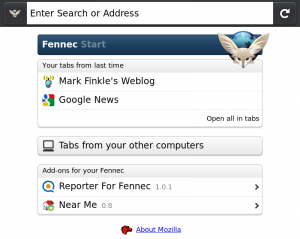
- Download, First Run and Start page redesign to help you find and use your favorite Firefox features
- Add-ons now auto update and view full add-on gallery from the Add-ons Manager
- Portrait mode support on the Nokia N900
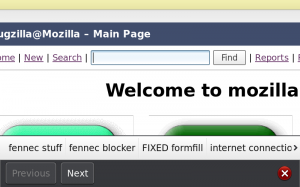
- Form assistant improvements, including autocomplete
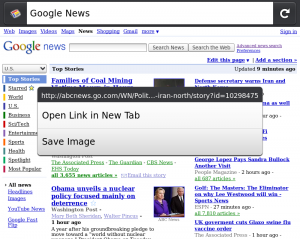
- Context Menu with Open in New Tab and Save Image
- Manage site preferences (clearing passwords and others)
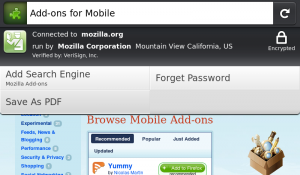
- Site Menu improvements and additions including Save to PDF, Forget Password and Add Search Engine
- Web content theme update

Download Firefox 1.1 beta for the Nokia N900 by visiting Firefox.com/m/beta.

Known Issues
Important: for Ovi Store customers

If you installed Firefox 1.0 from the Ovi Store, you will not be able to upgrade to Firefox 1.1 Beta 1 (either from the N900 Application Manager or by downloading the software from Mozilla). We are working to solve this for future releases so that anyone can participate in our Beta programs. Don't worry, though, if you got Firefox 1.0 from either the Ovi store or directly from Mozilla, you will be updated to Firefox 1.1 (final) when it is released.

Stretched images can show black lines and dots near to bottom and side of content bug 468496
Youtube Enabler is not compatible with Firefox 1.1 beta 1 bug 559908
Vertical white line on tab thumbnails when on About:home bug 556046
Text is hard to read due to light gray background color on buttons with new web content theme bug 556650
Scrolling to bottom of a long Web page cannot be reached using the keyboard bug 547307
Switching from portrait to landscape mode while page is zoomed always displays tab sidebar bug 559868

Via : www.mozilla.com
Wednesday, April 7, 2010

Firefox Mobile 1.1 – What’s Coming

Mark Finkle from Mozilla Corporation on the Mozilla Mobile team developing Fennec stated the following :

The Mobile Team has been hard at work on the 1.1 release of Firefox Mobile. This release will mainly be a Nokia Maemo release, but the current Android builds are based on the same front-end.

For the 1.1 release, we are focusing on some UI features we didn’t have time to put in the initial release. We are also using your feedback to help improve the browsing experience. You can see the list of planned features on the planning page. As you can see, we have completed much of the work and the beta release is quickly approaching.

Some of the bigger features that have already landed include :

- Form assistant improvements, including autocomplete
- Start page redesign
- Auto update add-ons
- Portrait support on N900
- Context Menu with Open in New Tab and Save Image
- Web content theme update
- Manage site preferences (clearing passwords and others)
- Clean up site menu
- Use volume keys to zoom on N900
- Save page to PDF

Screen shots of the some new features:

Form Assistant with Autocomplete:


Start Page:


Context Menu:


Page Menu:

Sunday, January 31, 2010

Firefox 1.0 goes live !

The first final official release of Firefox for Maemo is live now, go to firefox.com/mobile to download it !

Note : that the flash is disabled in this release too !!

"The Adobe Flash plugin used on many sites degraded the performance of the browser to the point where it didn’t meet Mozilla’s standards."

Anyway, here's the PR :

Firefox for mobile is packed with your favorite features, including:
  • Awesome Bar – Go to your favorite sites in just a couple of keystrokes with intelligent and personalized searching
  • Weave Sync – Sync your Firefox tabs, history, bookmarks and passwords between your desktop and mobile device for a seamless browsing experience
  • Add-ons – Customize your Firefox by adding small pieces of functionality, like games and news readers, that help make the mobile Web browser your own
  • Location-Aware Browsing – Get maps and information relevant to your location
  • Tabbed browsing – View open tabs as thumbnails to easily identify and select the Web page you’d like to go to next
  • Safe Browsing – Get an Instant Web Site ID and easily access and edit security settings
  • Available in more than 30 languages and counting
Firefox is the first mobile Web browser to support add-ons. With add-ons, you can customize your Firefox by adding features that help make your browser your own. Add-ons like AdBlock Plus, URL Fixer, TwitterBar, language translators, and geo guides become especially handy when you’re out and about on your mobile device. You can both discover and install add-ons directly from your Nokia N900. There are currently more than 40 Firefox add-ons available for mobile and the number is growing every day.
We strongly recommend that you install the YouTube Enabler add-on from within the Add-ons Manager.  Tap on the install button, restart Firefox, and you’re all set to watch YouTube videos.
Just as Firefox does for the desktop, Firefox for mobile provides a platform for developers to create rich applications. Developers can use the latest Web technologies like HTML5, CSS and JavaScript to improve, modify and customize the browser. Visit the Develop for mobile page to learn more.
Firefox is currently supported on Nokia’s Maemo5 platform and is available for download on the Nokia N900. Users can download and learn more by visiting Firefox.com/mobile. Visit the FAQ for more information.

Firefox for Maemo v.1.0 RC3 released !

Firefox for Maemo has got another update, check out what’s new :

Improvements to Performance and Productivity
For our third release candidate of Firefox for Maemo, we put a lot of emphasis on improving overall performance: Web pages load significantly faster than RC2. Panning is more responsive and zooming in on Web pages is much faster. The Awesome Bar will now pop up much faster when you tap on it.
Plugins Disabled to Improve User Experience
Support for plugins has been disabled. On most Web pages that use the Adobe Flash plugin, the performance of the plugin didn't meet our standards, and the interactivity and performance of the entire Web page was negatively impacted, especially on pages with multiple instances of the plugin. Advanced users can enable plugins for experimentation and testing purposes only. We are working on ways for the user to have control of which sites to enable plugins for, as some sites, like YouTube, do work quite well. That capability will most likely be packaged as a browser add-on.
Firefox is currently supported on Nokia’s Maemo platform, available for download on the Nokia N900. Initially available in more than 30 languages, download and learn more by visiting Firefox.com/mobile.
You'll see many of your favorite features for the desktop Firefox, now optimized for an exceptional mobile experience:
Easy Navigation to Web Content
  • Awesome Bar: The Smart Location Bar, or "Awesome Bar" is even more awesome on a mobile device. The Awesome Bar gets you to your Web destination with minimal typing, by intelligently searching the names, URLs and tags of the sites you visit, and takes into account how often and recently you visit them. With Weave Sync, the Awesome Bar will also search the Web history from Firefox on your PC
  • Easy access to many search engines: Type your search term right in the Awesome Bar to search Google. Or send your search to another search engine (Wikipedia, Amazon.com, Twitter) with one touch. Customize with the search engines of your choice.
Touch Interface Optimization
  • Touch-enabled UI: Greatly improved panning and scrolling performance bug 539062
  • View without obstructions: The browser controls and Awesome Bar get stowed away when you reach                  your website so you can use the whole screen to view the site. Start to pan up or to the sides and your controls and Awesome Bar reappear
  • Quick zoom: Double tap on the screen to zoom in, double tap to zoom back out
  • One-touch bookmarking: Bookmark a Web site in one touch, along with the ability to tag it with a memorable term
  • Tabbed browsing: Thumbnails of your open tabs easily identify your open pages.
Performance
  • Modified Content Sink preference has significantly decreased page load time bug 538655
  • Use of a new, less animated page load throbber decreased page load time by another 10-15% bug 539495
  • Double-tap to zoom is much faster bug 537660
  • Greatly improved panning and scrolling performance bug 539062
Seamless Synchronization
  • Weave Sync: Create a Weave Sync account on your desktop and install the Weave Sync add-on on your mobile to synchronize your Firefox tabs, passwords, history and bookmarks between your desktop and mobile
  • Less typing: Access Firefox for mobile’s Awesome Bar and visit any site you’ve ever been to, regardless of which computer you visited it on, with just a couple keystrokes
  • Don't start from scratch: Weave Sync brings along your saved passwords from your desktop, removing barriers to your favorite sites
  • Get up and go: Take your Firefox with you wherever you go. Surf the Web on your PC, get up and go,                  and have everything waiting for you on your phone -- even your open tabs.
A Personalized Experience
  • Add-ons: Firefox is the first mobile Web browser to support add-ons. You can view recommended add-ons in the Add-ons Manager and install them directly from your mobile device
  • Location-Aware Browsing: Be a local wherever you are. Get maps and info relevant to your location. Its all optional– Firefox doesn’t share your location without your permission– and is done with the utmost respect for your privacy.
Private and Secure
  • Instant Web site ID ("Larry"): Tap on a site favicon for an instant identity overview
  • Password manager: Typing passwords on your phone is hard, so why do it more than you have to? Choose to remember site passwords and forget ever having to endure long and difficult typing
  • Popup blocker: Banish pop-ups from your surfing experience once and for all
  • Clear private data: As an extra security measure, you can clear all your private data via your Preferences
  • Customized security settings: Customize settings for passwords, cookies, loading images and installing add-ons for a fully empowered mobile browsing experience
  • Automated Update: Install upgrades directly to your device when you receive an automatic notification, or wait until you’re ready.
Productivity
  • The Awesome Bar will now pop up much faster when you tap on it bug 536368
  • Preferences pane: Go to your Preferences in one touch. From here, manage your plugins and security settings, as well as access your Downloads Manager and Add-ons Manager
  • Download manager: Download files seamlessly and securely. The manager shows your download progress and lets you search your files by name or the Web address where the download came from
  • Spell checker: Catch typos and misspellings in form fields.